Ask ten small business owners what they think a CRM implementation looks like, and most will describe something like a six-month project: consultants, workshops, data migrations that go sideways, a go-live date that slips twice, and a line item on the budget that somehow doubles. That reputation is real — but it belongs to a different category of software.
The CRMs that take six months to set up were built for companies with 500 or more employees. Salesforce, SAP, Microsoft Dynamics — these platforms serve organisations with dedicated sales operations teams, regional compliance requirements, and ten interlocking business processes that all have to migrate at once. For a business that size, six months is fast.
For a 5-to-20-person company running sales out of a spreadsheet, none of that applies. The work fits in an afternoon. By the end of the day, your team is logging their first real deals and you’ve already automated the first piece of busywork. Here’s exactly how.
What you need before you start
Before you open a browser, spend 15 minutes gathering four things. If you don’t, the afternoon will stall halfway through and you’ll blame the software.
A list of existing contacts. Around 50 is enough to start — pulled from your current spreadsheet, WhatsApp contacts, LinkedIn connections, or your phone. Any format works: .csv, Excel, even a copy-paste from a Notion table. Don’t clean it yet; we’ll do that in hour two.
A napkin sketch of your sales pipeline. Literally four boxes with arrows. Something like: Lead → Contacted → Quoted → Won. If you can’t describe your current sales process in four or five steps, that’s a sign to simplify before the CRM locks it in.
Access decisions made in advance. Who is admin? Who gets read-only? In a 10-person team this is usually two admins (you and your head of sales) and everyone else as standard users. Decide now so you’re not poking at permissions at 5pm.
A laptop and a stable WiFi connection. Seriously.
The 3-hour plan — hour by hour
Hour 1: Signup and schema (60 minutes)
Start by picking a CRM that doesn’t force you into a long sales cycle before you can even see the product. The quick test: if the vendor’s website hides pricing and the only button is “book a demo,” they’re built for slow enterprise buyers. For a small business, pick something where you can sign up and log in without a phone call.
Create your account, confirm your email, and log in. If you see a setup wizard labelled “enterprise” or “advanced,” skip it — those are built for people who hired a consultant. The defaults are fine for today.
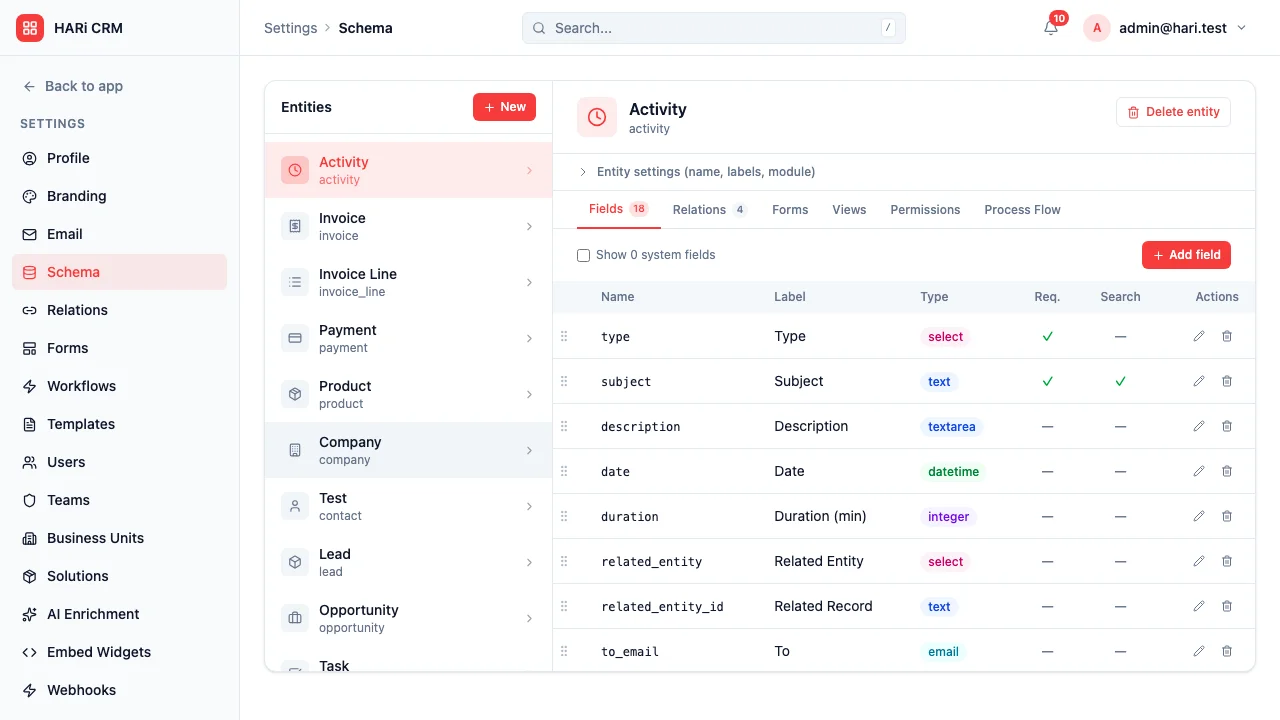
The first real task is defining your entities — the core objects your business tracks. Almost every small B2B business needs the same three:
- Contact — the humans you talk to
- Company — the organisations they work for
- Deal — the sales opportunities (sometimes called “Opportunity” or “Transaction”)
Create those three. If your business is B2C rather than B2B, you may only need Contact and Deal. Resist the urge to add Partner, Supplier, Project, Campaign, and Event today. You can add those next week once you know what you actually need.
For each entity, add 5 to 8 fields maximum. Not 30. This is the single most common mistake. A bloated form with 25 fields is a form your team will refuse to fill in. Start lean:
- Contact: First name, Last name, Phone, Email, Company, Tags, Notes
- Company: Name, Industry, Size, Phone, Website
- Deal: Name, Company, Primary contact, Value, Pipeline stage, Expected close date, Owner
Then set your pipeline stages. Four to six stages is the sweet spot. A typical B2B sales pipeline is: Lead → Qualified → Proposal → Negotiation → Won (with a parallel “Lost” status). Don’t spend 40 minutes debating whether “Qualified” and “Discovery” are the same thing — pick names, move on. You can rename them next week when you see which ones your team actually says out loud.
By the end of hour one you should have three entities, a handful of fields each, and a pipeline. The screen will feel empty. Good.
Hour 2: Import existing data (45 minutes)
Export your current contact spreadsheet to CSV. If you keep contacts in multiple places (a master spreadsheet, your phone, an old Mailchimp list), pick the freshest one — you can merge the others next week.
Before you upload, clean the column headers. Most CRM importers match by column name. If your spreadsheet has a column called “Mobile #” and the CRM expects “Phone,” the data gets dropped or shoved into a “Notes” field. Rename your columns to match: First name, Last name, Email, Phone, Company, Title, Notes. Takes five minutes. Saves an hour of confusion later.
Now the import order matters:
- Import Contacts first. Upload the CSV, map the columns, run the import.
- Verify 10 random rows. Pick five from the top of the list, five from the bottom. Open each record and check that phone, email, and company look right. If the phone column is empty, stop and re-check the mapping — don’t import 5,000 rows and discover the whole column came in blank.
- Import Companies next. In most CRMs, companies are auto-created from the Contact import if your contacts had a “Company” column. You usually don’t need to re-import companies separately unless you want extra fields like Industry or Website.
- Import Deals last. If you already track active opportunities in your spreadsheet, import them now. If not, skip this step — your team will add deals manually as they come up this week. That’s fine.
Pro tip: import the first 10 rows, verify, then do the rest. Two-minute check, hours saved. The same principle applies when moving contacts from a spreadsheet to a CRM: small batches, verify as you go.
Hour 3: Invite your team and set up one workflow (45 minutes)
Invite your three-to-five colleagues. In a modern CRM this is one screen: type email addresses, pick a role, hit send. They’ll get a magic link, set a password, and be in within a minute.
Record a 15-minute Loom walkthrough instead of scheduling a group training session. Start from the login screen, show how to create a Contact, log a call, add a Deal, move it through the pipeline. Send the Loom link in your team chat. People watch it on their own time and rewatch the parts they forgot. Scheduling an hour-long “CRM training” meeting is what makes CRM projects feel heavy — skip it.
Now the bit that makes the CRM feel alive: set up exactly one automation. Not ten. One. A good first choice: “When a deal moves to the Won stage, send me a Telegram or email notification.” This single workflow is what transforms the CRM from “another spreadsheet” into “a tool that works with me.” When your first deal closes next Tuesday and your phone buzzes automatically, the team sees the point immediately.
That’s it. You’re live.
The afternoon after: the first real week
Week one is testing, not finalising. A few things will come up, and they’re all normal.
Expect friction in the first 48 hours. Someone on your team will say, “I need a field for X and it doesn’t exist.” Add it. Don’t make them open a ticket — in a small business the owner is the admin, and a field takes 30 seconds to create. The whole point of picking a CRM that a non-technical person can configure is so that this kind of feedback loop stays short.
Let everyone put in current live deals, not historical ones. Resist the urge to “import 18 months of back history for reporting purposes.” Nobody needs that data this week. Everyone needs to see their active pipeline. Back-filling history is a week-3 task, if at all.
Don’t optimise yet. After five business days of real use, you’ll know more about what to change than you could possibly guess today. The two most common tweaks in week two are:
- Splitting one entity into two. For example, you might have created one “Contact” entity and realised you actually want separate “Client” and “Partner” entities with different fields.
- Renaming pipeline stages. Your team will say “Proposal” when you called it “Quote,” or “Closed” when you called it “Won.” Rename to match how they talk. The CRM should fit the team, not the other way around.
These tweaks take minutes. Doing them in week two, with real feedback, produces a much better result than debating them in hour one with no data.
What NOT to do in the first afternoon
The afternoon gets blown up by the same five mistakes every time. Avoid them all.
- Don’t try to import every field from your old spreadsheet. The column “Favourite type of dumpling — asked at 2019 Christmas party” is not business-critical. Cut it.
- Don’t set up 30 workflows. “We’ll automate everything on day one!” is the fastest way to have 30 half-working automations firing at the wrong time and confusing your team.
- Don’t invite every peripheral person. Your accountant, your lawyer, your part-time intern, your outsourced marketing agency — none of them need access today. Invite the people who will actually log deals. Others can be added later, with appropriate permissions.
- Don’t customise the UI. Fonts, colours, dashboard widget layouts — none of that matters until the data is in. Set the defaults, use them for a week, then customise.
- Don’t integrate with 10 tools. Slack, Telegram, Zapier, Gmail, Outlook, accounting software, WhatsApp Business API — each integration adds a failure mode. Pick zero or one today. The rest can wait.
Each of these delays “real use starts today” by days or weeks. And the paradox is that the teams who try to do everything upfront usually never finish — because they’re still customising when the early enthusiasm fades, and then the project dies.
Why HARi makes this afternoon possible
Most traditional CRMs were not designed for the 3-hour setup. They were designed around a sales cycle that expects an implementation partner, a statement of work, and a go-live plan. HARi was built the opposite way:
- Signup is two clicks. No demo call required. No sales qualification question about company size before you can see the product.
- The schema editor is drag-drop, not YAML files or custom metadata XML.
- CSV import auto-maps columns. If your column is called “Email” or “email” or “E-mail,” it figures it out.
- Team invites go out as magic links. Your colleagues click once and they’re in — no password reset emails to help with.
- Workflows are built with a WHEN / IF / THEN builder, no code, no Zapier account needed for the basics.
- Pricing is a flat HK$1,990/month, not per-seat. You’re not penalised for adding your intern or your part-time bookkeeper. See the problem with per-seat pricing for why that matters.
- PDPO-aware hosting for Hong Kong businesses that need to keep customer data local. The CRM and PDPO compliance guide covers the details.
When you can sign up without a sales call and see the pricing without filling in a form, the afternoon actually fits in an afternoon.
Closing: implementation vs. setup
There’s a real difference between “CRM implementation” and “CRM setup,” and it’s the difference between committee-driven enterprise software and a small business getting to work.
If you’re a 500-person company with three regional sales teams, four regulators, and a custom lead-routing algorithm, you probably do need six months and a consultant. That’s a real project.
If you’re 20 people or fewer, you don’t. The tools exist now where you can skip the consultant, skip the multi-month rollout, and start using the CRM this afternoon. If it doesn’t feel right after a week of real use, cancel — a CRM without lock-in is a CRM you can actually evaluate honestly.
The biggest blocker is usually not the tool. It’s the belief that “a CRM project” has to feel heavy. Drop the belief, block off three hours, and get started. Sign up here and see how far you get before dinner.