Changelog
What's new in HARi
Every feature, improvement, and fix we ship — in plain language. No marketing spin, just what changed.
Week of July 27, 2026
- Fix

Form sections no longer disappear when a visibility rule was left unfinished
A section on a record form can be set to show only when a condition is met. If you opened that rule on a section, never picked a field, and saved the form, the section quietly vanished from the record page for everyone — the layout still looked right in the form editor, but the fields were simply gone when anyone opened a record, with nothing to explain why. An unfinished rule is now treated as no rule at all, so the section stays visible. Any form already affected repairs itself the next time someone opens a record: nothing to re-save, no setting to change, no need to rebuild the layout. Sections carrying a rule you did finish are untouched — they still hide exactly when their condition isn't met.

Week of July 20, 2026
- Fix
Preview emails now match what your recipients actually receive
When you email yourself a preview of a campaign, HARi used to send a stripped-down version — it left out the preview-text snippet that shows next to the subject line in an inbox, and it didn't add the tracking tags to your links. A preview could look fine while the real send behaved differently, so problems only surfaced after the campaign had already gone out. Previews now run through the exact same steps as the real send: the preview text is included, your links carry their tracking tags, and any show-if / hide-if sections are worked out for the contact you preview against. The two things that must never happen in a preview still don't — it never counts as an open for the first person on your list, and it is never recorded in your send history.
- Fix
Invalid filters now show a clear error instead of quietly returning the wrong records
If a filter was malformed — a value left blank, or a saved view or campaign audience that had become corrupted — HARi used to silently ignore it and hand back everything: a list that looked complete but wasn't, or a campaign audience that had quietly widened to your whole database. Now a malformed filter is refused with a plain-language message that points at the part it couldn't read, and the query never runs with your filter quietly dropped. The same protection covers filters saved inside views, campaigns and automations: saving a view with a broken filter is rejected on the spot, and a campaign whose stored audience can't be read stops with an error and sends to no one — never to everyone by accident.
- Feature
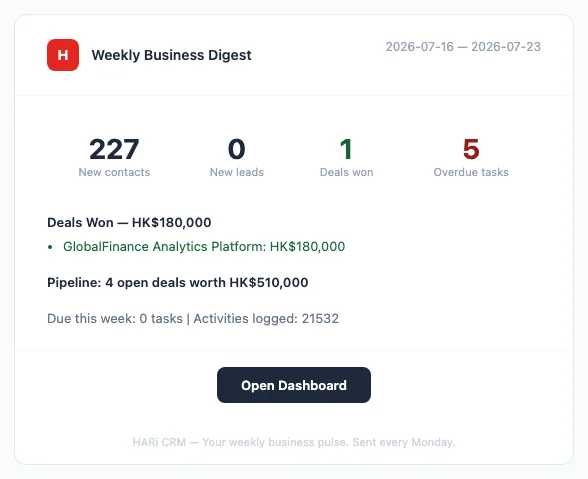
Weekly Business Digest now arrives every Monday
Every Monday morning, HARi emails a one-page summary of your last seven days to each administrator of your workspace — new contacts and opportunities, the deals you won with their combined value, the ones you lost, what is still open in your pipeline and what it is worth, tasks already overdue, tasks due this week, and the activity your team logged. An Open Dashboard button takes you straight in to act on any of it. There is nothing to schedule and nothing to switch on: it simply starts arriving. Recipients are the active members of your Administrators team, so people who leave stop receiving it automatically, and removing someone from that team is how you stop their copy. If you administer more than one workspace you get one digest for each, summarising only that workspace's data — and never more than one per workspace per week.
Week of July 13, 2026
- Feature
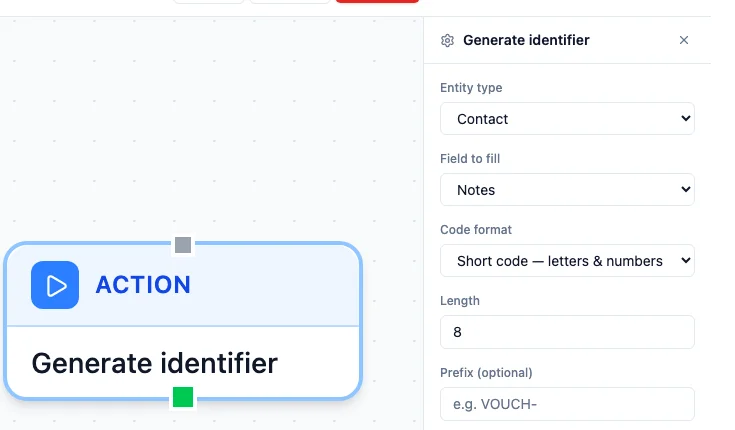
Mint a unique code on any record automatically — vouchers, tickets, referral numbers
A new "Generate identifier" action fills a text field on a record with a ready-to-use code the moment a workflow or automation runs — no developer, and no spreadsheet counter to maintain. Choose a Random UUID for a fully unique internal identifier, a Short code (letters and numbers) for something a customer can read aloud or type into a redemption box, or a Numeric code for systems that expect plain digits — add your own Prefix (for example "VOUCH-") and set the Length for the short and numeric formats. It's available as an action in both the Automation Builder and the Workflow editor, so an On Create rule can hand every new record its own code the instant it's added. Generation happens on HARi's server, and if a freshly-minted code ever matches one you already issued, HARi quietly tries again — you never see or hand out a duplicate.
- Feature

Your sending speed grows automatically as your list quality proves itself
When you connect your own mailbox, HARi now paces your campaign sends for you — and the sending speed climbs on its own the more you send cleanly. Pick "Automatic (recommended)" on a connected sender and HARi starts you at a safe 30 emails an hour, then raises the pace by itself — to 60, then higher — as your emails keep landing and your list quality proves itself. Nothing to schedule, no number to babysit: a healthy sender speeds up, and if bounces spike the pace eases back on its own and recovers. Prefer to set it yourself? Switch to Manual and type a fixed rate. Either way, only bulk campaign sends are paced — your everyday and test emails are never throttled. This protects your domain reputation the way Google recommends: start low, then increase volume gradually as engaged recipients receive your mail.
- Feature
Formulas can now fill in a fallback when a field is blank
Formula fields gained four null-handling functions — COALESCE, IFNULL, NVL and NULLIF — for building a value out of a first choice and a fallback. COALESCE(last_name, "Unknown") returns the last name if there is one, and "Unknown" when there isn't. The load-bearing detail: HARi treats a blank field the same as a missing one, so the fallback fires on an empty text field too — not only on a never-set value. That is a deliberate, business-friendly difference from how a raw database behaves (a database would skip only a truly missing value). Zero always stays a real value, never a blank. There is now a reference page documenting all four, with the exact display-name example — TRIM(CONCAT(first_name, " ", COALESCE(last_name, ""))) — that produces "John Doe" or a clean "John" with no stray trailing space.
- Feature
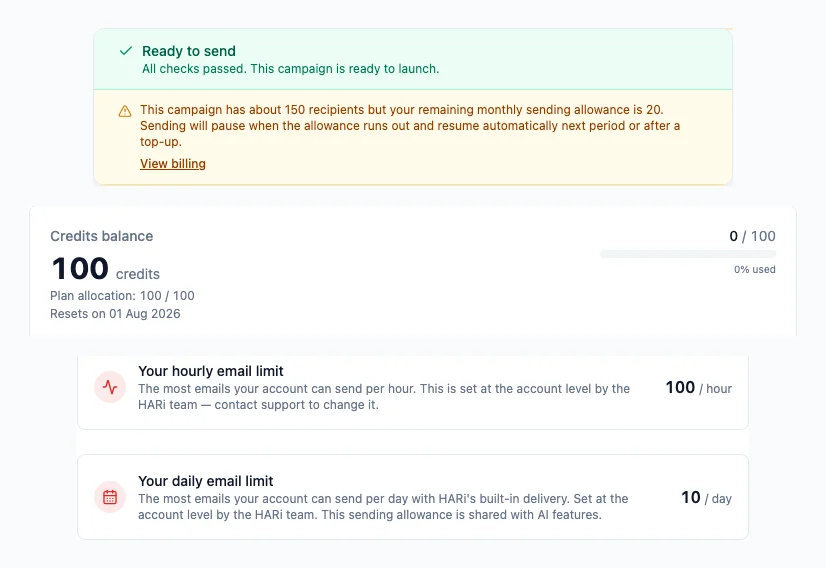
A clear monthly sending allowance — no surprise pauses, no surprise bills
Every plan now shows exactly how much email you can send through HARi's built-in delivery, so a large campaign never fails unexpectedly. The Free plan includes about 100 emails a month plus a 10-per-day safety cap; paid plans about 2,000 a month — and that allowance is shared with your AI usage, shown as one simple balance in Settings → Billing. You're never billed per email. When a send would go past your allowance or daily cap, HARi doesn't reject it: it pauses and resumes automatically — next period, the next day, or the moment you top up — and a campaign tells you in advance if it won't all fit in one go, without ever blocking you from launching. Need real volume? Connect your own mailbox (Microsoft 365, SMTP, or your provider) and your sending is unlimited and never counts against the allowance — HARi just paces it at your account's own safe sending rate to protect your domain reputation.
- Feature
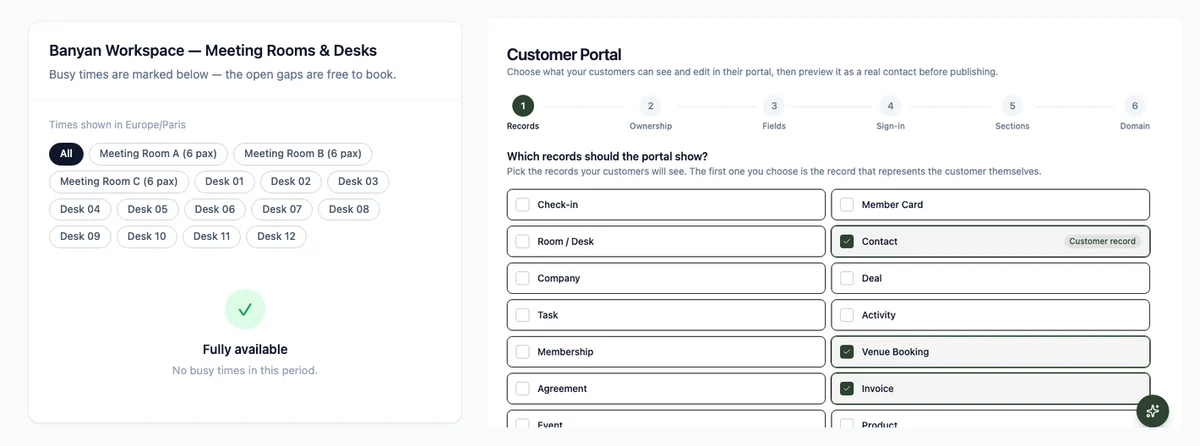
Let customers book rooms and desks themselves in the portal
Customers who sign in to your Customer Portal can now book a room, desk, or appointment themselves — no email back-and-forth and no staff data entry. They tap "Book a room", pick a resource, choose a free slot from a live calendar shown in their own timezone, and confirm in as few as three taps. HARi checks the slot is still open at the moment of booking and prevents double-bookings: if someone grabbed it a second earlier, the customer sees "That time was just taken" and the calendar refreshes. Each confirmed booking becomes a normal record in your workspace, owned by that customer and ready for your workflows — so you can, for example, notify the front desk automatically. The booking's time, room, and status are set by the server, so a customer can only ever reserve a genuinely free slot.

Week of July 6, 2026
- Feature

Let customers pay invoices online with Stripe
You can now connect your own Stripe account and let customers pay any invoice online by card. An admin connects Stripe once under Settings → Integrations, then anyone on your team can open an invoice and hit "Copy pay link" — no Stripe keys needed to share it. Your customer opens a secure, branded Stripe checkout (card, Apple Pay, Link, and local methods), pays without any login, and HARi marks the invoice paid automatically the moment Stripe confirms it. Card details never touch HARi — Stripe handles all of it.
- Feature

Import upgrades: match linked records by name, and skip duplicates
Two upgrades make importing a CSV safer and simpler. When a column maps to a linked record — a contact's Company, a deal's Contact — you no longer paste database IDs: HARi shows a "Match by" picker that links each row by name, or by any other field you choose, like a code or reference number. And a new "Skip rows that already exist" option lets you pick a column to check, so re-importing a refreshed export only adds genuinely new rows instead of creating duplicates. You can also decide whether your automations fire for the imported records — leave it on for a normal import, or turn it off for a big historical backfill.
- Feature
Publish a live availability calendar your customers can book from

You can now turn the bookings you already track — sales meetings, room reservations, service appointments — into a public free/busy calendar and embed it on any website, with no API key and no developer. Set it up in Settings → Availability Widgets: pick the entity your bookings live in, choose the field that marks each start time, then copy the ready-made snippet onto your site (or just share the hosted link). Visitors see a clean, branded calendar of your open and busy times in their own timezone — and only your busy time blocks are ever exposed, never the records, names, or details behind them. If your bookings belong to a room or desk, the calendar can break availability down per resource, so a coworking space shows exactly which rooms are free.
- Feature
See and reassign who owns every record
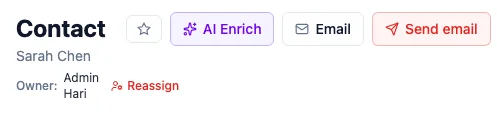
Every record now shows who owns it — by name, right under the title, in an optional Owner column in your lists, and on kanban and gallery cards. No more cryptic IDs: you see at a glance that Sarah Chen owns this deal. And you can hand a record to a teammate without leaving the page — click Reassign, search for a colleague by name, and it's theirs, saved instantly and written to the record's history. A record nobody owns shows a one-click Claim so you can make it yours. Whether you can reassign follows your permissions: if you can edit the record you can reassign it; if you can only view it, the owner is shown read-only.
- Feature
A smarter, clearer workflow builder
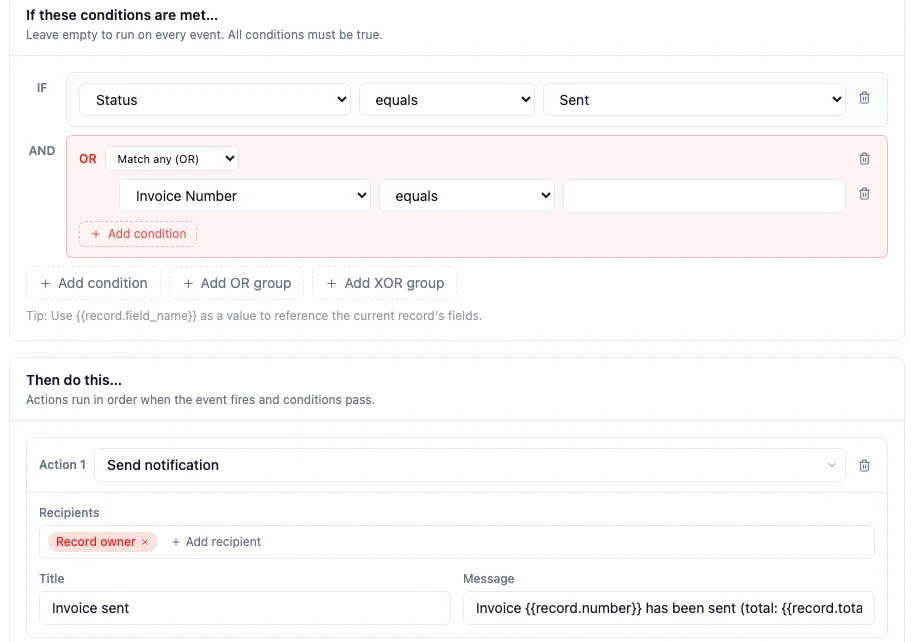
The workflow builder now shows you exactly what a workflow will do — and never blanks out a value you saved. Each condition matches its field: a status condition offers its choices as a dropdown, a date condition gives you date operators and a calendar, a linked-record condition searches by name — and you can group conditions with "Match any (OR)" or "Exactly one (XOR)", not just "all must match". A new "On Create" event runs a workflow once, only when a record is first added. The "Send notification" action now takes several recipients at once — pick people by name, or Record owner / Created by / Current user — with no IDs to type. And every email template you (or the HARi assistant) write now appears in the workflow's email step, in campaigns, and in quick-send. Reopening a saved workflow shows every stored value intact — the event, each condition, every recipient, and the linked template by name — so editing one is safe.
- Feature
Process templates: choose which task list your follow-up tasks land in
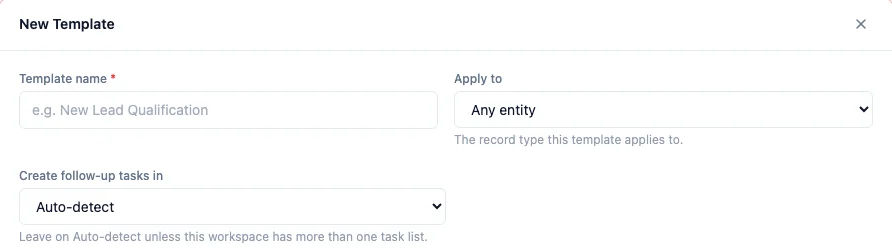
Process templates — reusable checklists you apply to a record in one click — now have a "Create follow-up tasks in" control, so you can pin exactly which list the generated tasks are created in. It defaults to Auto-detect, which finds your task list for you, so you only ever need to change it if your workspace keeps more than one list of tasks (say a "Tasks" list and a separate "Activities" list). The choice is saved per template, so one checklist can file its tasks under Activities while another uses Tasks.
- Fix
Process templates now work in any workspace, even when your task list is renamed
Applying a process template used to fail in any workspace that had renamed its task list — for example to "Activities", or to a term in another language — with an error saying the "task" list didn't exist. Applying a template now finds your task list automatically, whatever it's called, so the checklist's tasks are created correctly in every workspace. There's nothing to reconfigure — existing templates simply start working.


Week of June 29, 2026
- Feature
Customer Portal — give your customers their own branded login

Give your own customers a branded, password-protected portal where they sign in and look after their own record — check invoices and download PDFs, open the files you've shared, edit their profile and their own records, manage email preferences, and export their data — all without emailing your team. Each customer only ever sees their own data, you choose field by field what they can view versus edit, and a six-step setup wizard gets it live instantly on your-workspace.haricrm.com/portal (no DNS) or on your own domain. Sign in works four ways — passwordless magic link, email and password, self-signup, or a staff invite. Turn it on for a mortgage borrower, a coworking member, or any client who'd rather help themselves.
- Fix
Public & embed forms: the per-IP submission rate limit is now actually enforced
Embed and public forms have a per-IP hourly submission limit — meant to stop a single source from flooding your form with spam. It turned out the limit was not being applied at all: the check was looking in the wrong place and always came back empty, so a form could be submitted any number of times from the same address. It now correctly counts recent submissions per IP and blocks further ones once the limit is reached, and it fails safe (if the check itself errors, the submission is held rather than waved through). Genuine submissions are unaffected, and a submission that fails to save never counts against the limit.
- Fix
Public & embed forms: linked-record fields now show a searchable name picker
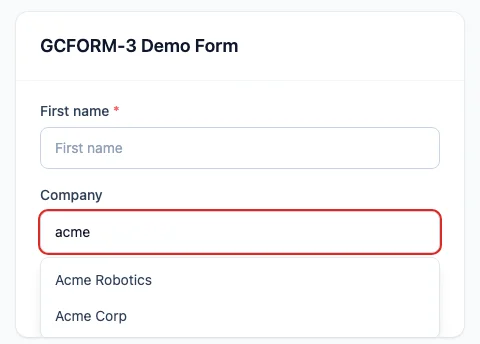
When one of your public or embed forms has a field that links to another record — for example a "Company" field that points to your companies — it used to render as a plain text box that asked the visitor to type an internal ID. Unusable on a form a stranger fills in. It now renders as a search-as-you-type picker: the visitor types a few letters, sees matching names ("Acme Robotics", "Acme Corp"), and picks one — the link is stored correctly behind the scenes, no ID required. The picker only ever searches the single record type that field is linked to, so a public form can never be used to browse the rest of your data.
- Fix
Dashboard charts now respect their filters, and grouped lists show friendly labels
Two dashboard fixes. First, a chart widget you set up with a filter — for example a "Distributor response" doughnut set to exclude "Not applicable" — was ignoring that filter and plotting every value; it now applies the filter, so the chart matches what you configured. Second, a breakdown list grouped by a choice field was showing the raw stored value (like "tier_1" or "cold_call") plus an empty group for records with no value; it now shows the friendly label you chose ("Tier 1 — Strategic", "Cold Call") and hides the empty group entirely. Both bring these widgets in line with how the other charts already behaved.
- Fix
Default values you set on a field now fill in automatically when creating a record
When you give a field a default value in the field designer — a status that should start as "New", a date that should default to today — that default now applies automatically as you create a record. Previously it was quietly ignored unless the default had been baked in when the field was first created, so newer fields silently saved blank. A required field that has a default no longer blocks you with a "this field is required" message either, because the default fills in first. Fields without a default, and any value you type yourself, are left exactly as before.
- Fix
Document & PDF templates now show full contact names — and can pull in any linked field
When you generate a document or PDF from a template (an invoice, a quote, a letter), a linked contact's name sometimes came out blank — this happened whenever a contact's display name is built from separate first- and last-name fields. That name now renders correctly. We also expanded what a template can include: alongside a linked record's name, you can now insert any of its other fields too — for example a contact's address or a company's address — so your documents can be richer without copy-pasting by hand. Line items on a document also now appear in the order you arranged them. Existing templates keep working unchanged.

Week of June 22, 2026
- Fix
Internal email-verification columns no longer clutter your record lists
A few technical columns tied to an upcoming email-verification feature ("Email Address Verification Status", "… Verified At", "… Verifier Meta") had started appearing automatically in record lists and detail pages, even though the feature itself is not switched on yet. They have been removed from your lists automatically — including on lists you had already customised, with no action needed on your part. Nothing was lost: you can add any of them back any time from the column picker (the "Columns" control above a table) or from the form designer under Settings → Forms.
- Feature
Bulk email campaigns now pace themselves to protect your sender reputation
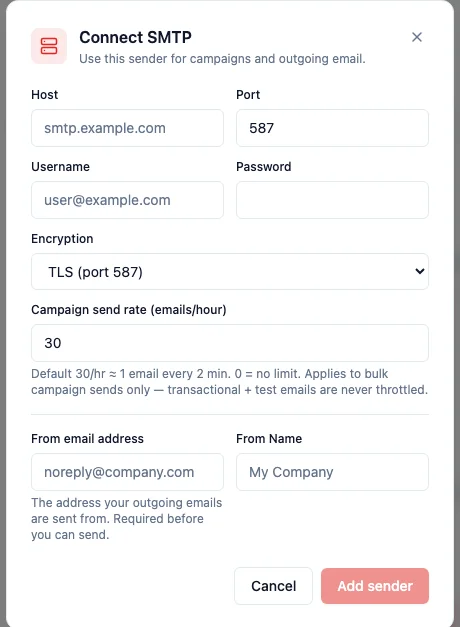
When you send a bulk campaign through your own SMTP server, HARi now releases the emails at a steady rate instead of firing them all at once — by default 30 per hour (about one every two minutes). Sending in a controlled drip keeps your mail server and your domain's sending reputation healthy, which means more of your emails reach the inbox instead of the spam folder. You can set the rate on each SMTP sender (Settings → Outbound Email → your SMTP connector → "Campaign send rate"); set it to 0 to turn pacing off entirely. Transactional emails and test sends are never throttled. A large campaign now takes longer to fully go out — that is intentional, and the recipient list is unaffected.
- Fix
The "Lists & subscriptions" panel on a record now shows only that record's own memberships
On a contact's (or any record's) detail page, the "Lists & subscriptions" panel was mistakenly showing list memberships that belonged to other records — a long grid of "Newsletter" chips that were not actually this record's. It now shows only the memberships of the record you are viewing, and a clear "no lists yet" state when there are none. This also closes a safety issue: the ✕ "remove" button on each chip now only ever removes the open record's own membership, never another record's.
Week of June 8, 2026
- Feature
Campaign links are now shareable — the address bar follows the campaign you open
Opening a campaign now updates the page address to point directly at that campaign (for example /campaigns/<id>). Copy the link and send it to a colleague — or just bookmark it — and it reopens that exact campaign, instead of dropping them on the generic campaign list. The browser tab title and the breadcrumb at the top of the page also follow along, so it's always clear which campaign you're looking at. Creating a new campaign, saving a draft, and deleting all keep the address in sync, and your filters (like a status filter) are preserved in the link.
- Fix
Campaign Click Report now shows who clicked — by name — instead of unreadable tracking links
The Click Report on a sent campaign's Performance tab used to list one row per raw tracking URL — including the long per-recipient "manage preferences" links, which were unreadable and duplicated for every contact. It now shows a clean Contact · Link · When table: each click is attributed to the contact by name (linking straight to their record), the link appears as a friendly label like "Manage preferences", and the time of the click. As a bonus, preference and unsubscribe links no longer expose their one-time access tokens anywhere in the report.
Week of June 1, 2026
- Polish
Kanban cards now show the record photo
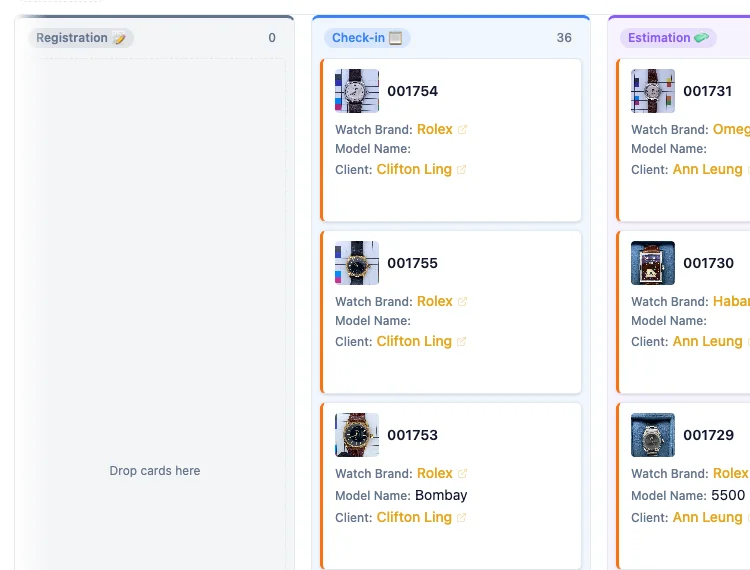
On any entity configured with a header image field (for example a watch-service job's intake photo), Kanban cards now show a small thumbnail of that photo to the left of the title — so you can recognise a record at a glance without opening it. It is the same image you see on the record's edit page, served at a small size for fast loading. Records without a photo simply show no thumbnail, and the card layout is unchanged.
Week of May 25, 2026
- Feature
Shopify panel now shows real-time webhook activity instead of a misleading "last sync" date
The Shopify integration page used to lead with "Last sync: 9 days ago" — which made it look like the connection had gone stale even when webhooks were flowing in continuously, several times an hour. The panel has been rebuilt around two distinct signals. The primary signal — Real-time activity — shows how many webhook events you have actually received in the last hour, day, week, and month, broken down by topic (orders, customers, products, and so on). The secondary signal — Periodic reconciliation — shows the last full reconciliation sync (every 5 minutes by default) with status, duration, and a link to the full history. Webhooks are the real-time pulse; reconciliation is the safety net. Both empty states are now explanatory ("Webhooks not yet receiving — check your setup" / "Auto-reconciliation every 5 minutes — no run recorded yet") instead of just blank.
- Feature
Upgrade installed solutions from inside the app — preview before applying
When a solution has a newer version available, you can now upgrade it without leaving the Settings → Solutions page. Click the new "Upgrade" button on a solution card and a three-step dialog walks you through it: (1) a preview of every change — new entities, new fields, new views, new permission profiles, plus any destructive changes flagged in amber so you spot them before they apply; (2) a confirmation step asking you to review and click Apply; (3) a result step showing the install summary. The Tasks solution ships its first upgrade today (version 1.1.0) — adds a "Assigned to" field on tasks and two default views: All Tasks and "My Tasks" (filtered to whoever is logged in). The "My Tasks" view automatically follows the current user — no per-user setup needed.
- Fix
Money fields no longer mis-label values as HKD on non-Hong-Kong workspaces
Money fields with no explicit currency were rendering with a "HKD" suffix on every workspace, regardless of where the tenant actually operates. A workspace based in the US would see "1,234.56 HKD" on an Amount column that had no currency set. The display now falls through cleanly: an explicit per-field currency wins; otherwise the value renders as a plain formatted number ("1,234.56") with no suffix. The Shopify integration also now requires an explicit shop currency at connection time — no more silent HKD-tagging of imported orders for shops that operate in USD, EUR, or anything else.
- Polish
Form designer: insert spacer cells for cleaner section layouts
When you build a form in the Schema editor, you can now drop in empty "spacer" cells next to your fields to align things the way you want. Sidebar palette has a new "Empty space" entry; each section has a "+ Spacer" quick-add button under the field grid. Spacer cells render in record forms as a clean empty grid slot so two-column sections line up the way the designer intended. Existing layouts that already contained spacer entries (a few amplitude-hk forms) used to render the literal text "[object Object]" in the designer — those now show the proper "Empty space" indicator instead.
- Fix
Business process panels now show readable names instead of internal IDs
In the right-hand process tracker — the panel that shows the required fields for each stage of a sales pipeline or onboarding flow — fields linking to another record (a Client, an Owner, a Property type) used to leak a raw internal ID instead of the record's name. Multi-select values appeared as `["locatif"]`, currency values had no formatting, and the in-place editor was a bare text input even for fields that should have been a dropdown. All of these now use the same renderer as the rest of the app: relations show human names, multi-select shows chip badges, currency is formatted, and editing inline opens the correct field type. This was the fourth time we hit the same root cause across different surfaces — every panel-style view now goes through the canonical renderer.
- Fix
Merging contacts now keeps every linked record — even the unmapped ones
When you merged two contacts, related records (activities, tasks, custom child entities) were supposed to move from the deactivated copy to the survivor. In a handful of older workspaces some of those links were missed: a record could be merged and yet its survivor page still showed fewer children than expected. The merge engine now reads the database itself for every real link between records, not just the ones declared in the Schema editor, so every child row is repointed at merge time and the survivor record shows the complete history.
- Fix
Settings → Email now correctly shows a connected Microsoft 365 mailbox
When the workspace was set to send through Microsoft 365 and a teammate had connected their Outlook mailbox in Connected Channels, the Settings → Email page would still say "Email not configured" with an amber warning — even though the inbox was already pulling mail through that same connection. The check now looks at the whole workspace (any teammate with a connected Microsoft 365 mailbox counts) instead of asking only whether the person currently looking at the page has connected their own mailbox, so the status banner finally matches reality. The "Send test email" button also no longer claims the provider is unconfigured in that case.
- Feature
Choose a record thumbnail image
Records can now open with a picture, not just text. In the Schema Editor, next to where you set the Display name, there is a new Record thumbnail selector — point it at any image or file field on the entity (a contact photo, a company logo, a product shot) and that image shows at the top of every record of that type. The field stays fully editable in the form, so uploading or swapping the image from the record updates the thumbnail too. Records that have no image for that field simply show no thumbnail — nothing looks broken.
- Fix
Kanban cards now show names, not IDs
On the Kanban board, fields that link to another record (like Client, Owner, or a status drop-down) used to leak a raw internal ID on the card — you would see "Client: 6aac76d6…" instead of the actual name. Those fields now resolve to the human display name, exactly like they already did in the list view, so a card reads "Client: Acme Ltd" at a glance.
- Fix
Clearer errors when a record can't be saved
When a record could not be created because of a database rule — a required value was missing, or a value had to be unique and already existed — HARi used to surface a generic "Failed to create record" with no hint about what went wrong. You now get a plain-language message that names the problem and highlights the field at fault, for example "Email is required" or "That value already exists", so you can fix it and save without guessing.
- Feature
Your table columns now follow your login across devices
Set up a table the way you like it — which columns show, the order you drag them into, each column's width, and how many rows appear per page — and HARi now remembers that layout against your login instead of just the browser you happened to be using. Arrange the Contacts table on your laptop and the same columns, order, widths, and page size are waiting when you sign in on another computer. Each entity (Contacts, Companies, Deals, and so on) keeps its own layout, so tuning one never disturbs another. Want a clean slate? The table's column menu now has a "Reset to default columns" item that restores the standard layout for that entity in one click.
- Feature
Schedule a campaign to send at a future time
The campaign send dialog now asks "Send now" or "Schedule for later". Pick "Schedule for later", choose a date and time, and HARi holds the campaign and sends it automatically when that moment arrives — handy for hitting a recipient's local morning, lining a newsletter up with a launch, or queuing the send before you step away. The picker only accepts a time in the future, so you can't accidentally schedule into a moment that's already passed. A scheduled campaign stays editable while it waits, and you can still cancel it before it leaves.
- Feature
Mark fields as Recommended — a nudge, not a hard block
Required fields (red ★) stop a record from saving until they're filled — the right call for data you genuinely can't do business without. But forcing every nice-to-have field is heavy-handed and slows people down. Fields can now be marked Recommended (blue ★) instead: leaving one empty doesn't block the save — HARi shows a friendly "save anyway?" prompt so you can fill it in or proceed. Use it for job titles, phone numbers, lead sources — anything that improves your data without being a deal-breaker. Configure it with the new "Recommended (advisory)" checkbox when you add or edit a field in the Schema Editor.
- Feature
Merge duplicate records from any list
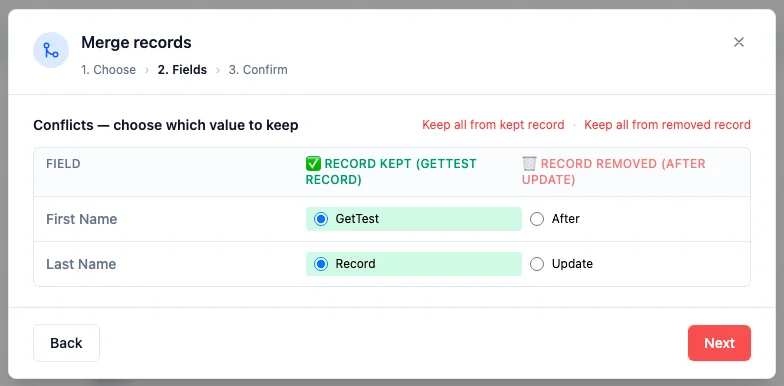
Cleaning up duplicates no longer means hunting them down one record page at a time. Select two or more rows in any entity list, open the Actions menu, and click "Merge N records" to launch a guided three-step dialog: choose which record to keep (with a Swap button if HARi picked the wrong one), resolve any conflicting field values — keep-all toggles set every field at once, or pick winners individually — then confirm against a plain-language summary of exactly which related records will move. Related activities, deals, emails, tasks, and list memberships move to the kept record, the other is deactivated rather than deleted, and no automations fire. The Data Health and record-page banner paths now open this same dialog.
Week of May 4, 2026
- Feature
Build campaign recipient lists directly on the campaign
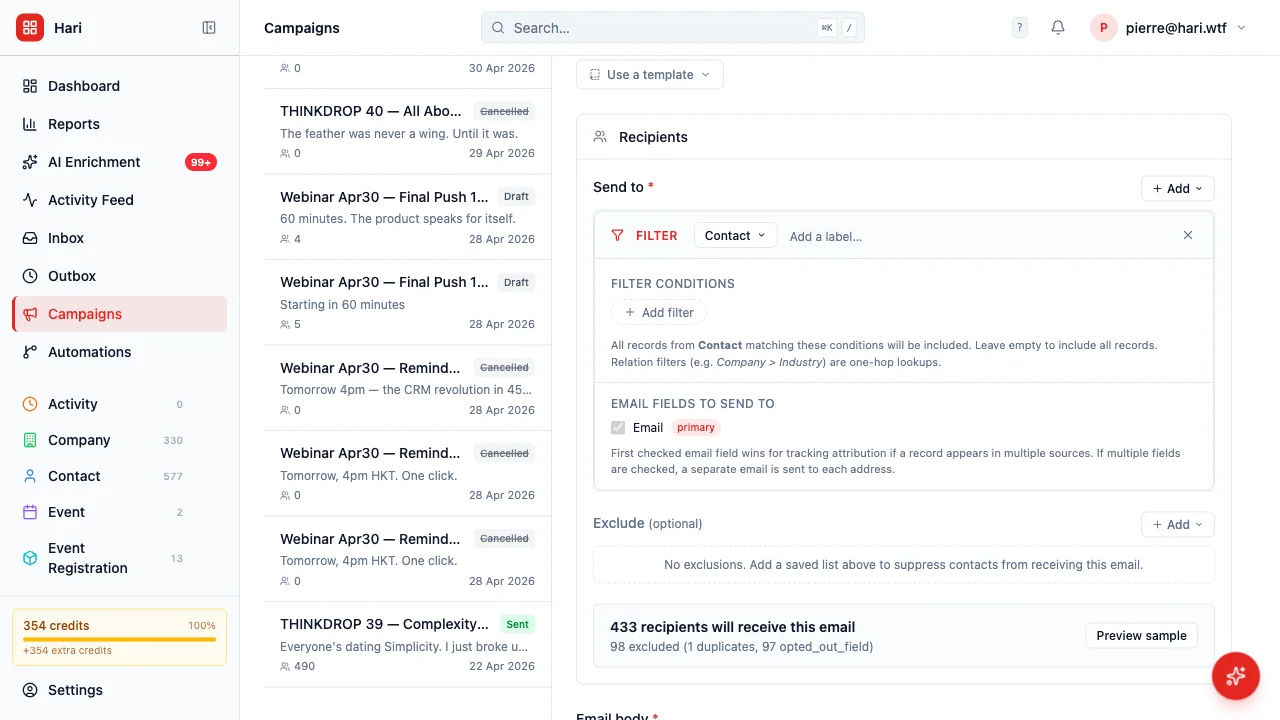
A new "Filter directly" source type lets you build the recipient query inline when creating a campaign — no need to first create and save a view. Pick any entity that has an email field (Contact, Company, Event Registration today; whatever your custom solutions add later), set filter conditions including one-hop relation traversal (e.g. "Company > Industry equals tech"), and pick which email field(s) to send to when an entity has more than one. Multiple sources stack and deduplicate by email automatically — if the same address appears under a contact and a company, it ships exactly once. The first source listed wins for tracking attribution. The recipient box also got a width revamp so the filter UI breathes instead of cramming into a narrow column.
Week of April 27, 2026
- Feature
Abort a campaign that's already sending
Until today, once a campaign moved into the sending status there was no way to stop it from the app — Delete only worked on drafts, Cancel only worked on scheduled. A real customer hit the gap when they noticed a duplicate "Sending..." campaign and had no kill switch. Now every campaign in sending shows a red "Abort campaign" button, both in the row actions and in the report header. Confirming opens a modal with a clear count: how many recipients have not yet received the email (these are cancelled), versus how many already received it (these are preserved as historical record). The campaign moves to the new "Cancelled" status and the cron stops processing it on the next tick.
- Feature
Test-fire any webhook directly from the settings page
Configuring a webhook used to mean saving it in HARi, then triggering a real workflow event to confirm the endpoint actually received the call — slow whenever you tweaked the URL or the payload. Each saved webhook now has a "Test fire" button that sends a sample payload immediately. A result panel appears below the row showing HTTP status, response time, the response body (truncated at 500 characters with a "Show more" link for long payloads), and any connection error in red. The panel persists until you dismiss it — no toast you have to catch before it fades.
- Feature
Leads merged into Contacts with a Lifecycle Stage field
Tracking the same person twice — once as a Lead, then again as a Contact when they sign — was awkward and easy to break. Now there's one record per person on the Contact entity, with a Lifecycle Stage field that moves them through Lead → Qualified → Customer (or Lost). The "Active Leads" view that used to live under /lead now points at Contacts filtered to Lead + Qualified, so the workflow stays familiar. Existing workspaces keep their old Lead records visible until your admin runs the one-shot migration (which copies them into Contact with lifecycle_stage="lead" and soft-archives the old rows). New workspaces ship without the Lead entity at all.
- Feature
Download dashboard charts as PNG
Every chart on your dashboard now has a "Download as PNG" button next to the CSV one. Click it and the chart drops to your downloads as a retina-quality image with the right background colour for whatever theme you're in — drop straight into a slide deck or report without screenshotting and cropping. The CSV button is still there when you need the raw numbers.
- Polish
Reactivated teammates: see what was transferred away last time
When you open a teammate's profile in Settings → Users, HARi now shows a "Records previously transferred away" card if any records were reassigned to other teammates during a prior deactivation — listing the entity, count, new owner, and date. Useful when a returning teammate asks where their old contacts went; you can see at a glance who picked them up and reach out for a manual handover. Pure information — no surprise auto-reassignments.
- Polish
Forms now show errors next to the right field instead of one big message
When a record save fails validation, HARi now highlights exactly which fields have a problem and what to fix — the email is malformed, the amount is below the minimum, the date is in the wrong format. Previously some forms only showed a single "Validation failed: 3 error(s)" toast that left you hunting for the offending field. The same standardized error shape now flows everywhere: contacts, companies, opportunities, tasks, invoices, custom entities — anywhere you create or edit a record.
- Polish
User reactivation no longer surprises record owners
Reactivating a deactivated teammate is one click and now does the conservative thing on purpose: it re-enables login and nothing else. Records previously reassigned to other teammates stay with their current owner — no silent yank-back when someone returns. The Reactivate button on the user detail page spells it out in a tooltip so admins aren't guessing what the click will do, and admins can still reassign records back manually on a case-by-case basis if the returning teammate genuinely needs them.
- Polish
Workspace renames no longer break embed widgets
Until now, renaming your workspace would also rotate the URL slug — which silently broke every embed widget, OAuth callback, and external link you'd already shared with customers. The URL is now locked at signup; the editable label lives separately in Settings → Branding → Workspace identity. Type a new label, hit Save, and the workspace switcher and login page update — your URL stays the same so nothing downstream breaks.
- Polish
Deactivation modal: notify the new owner with one summary message
Tick the new "Notify the new owner" box when you reassign someone's records during deactivation, and the chosen teammate gets a single summary in their notification bell — "Vincent reassigned 47 records from Amy to you." — instead of one ping per moved record. Off by default to keep the notification feed quiet on routine cleanups; flip it on when you want a heads-up to land.
- Feature
Deactivating a teammate: pick who inherits their records
When you deactivate someone in Settings → Users, HARi now opens a dialog showing exactly what they own — contacts, opportunities, tasks, and any team where they're the only active member — and asks where it should go. Pick a teammate to receive everything, or skip with a short note explaining why (for example: "Returning in 3 months — keep records as-is"). The transfer happens in one click and is recorded in the audit log so you can always see what moved. No more silent record orphaning when someone leaves.
- Polish
Embed widget pings you when its routing breaks
When an active embed widget routes new submissions to a user who's been deactivated or deleted (or to a team that no longer exists), the widget creator now gets a notification the moment the platform detects it — instead of having to spot the issue buried in Settings → Data Health. The detection runs on the existing nightly hygiene scan, and the notification only fires the first time each broken widget is found, so re-runs don't spam.
- Polish
Wait timers can stick to business hours
The "Only count business hours" toggle is back on automation Wait nodes — and now actually does what it says. Pick "Wait 5 days" with the toggle on, and the timer skips Saturday and Sunday so a Friday start resolves on the following Friday, not the next Wednesday. Pick "Wait 2 hours" with the toggle on at 5 PM, and the wait carries over to 10 AM the next business day instead of finishing at 7 PM after-hours. Times use the contact owner's timezone, falling back to UTC.
- Feature
New automation actions: subscription lists + AI enrichment
Three actions are now configurable in the automation builder: "Add to list" and "Remove from list" subscribe or unsubscribe a contact from one of your marketing lists, and "AI enrichment" queues a contact for background AI enrichment on the fields you pick (with an optional "apply suggestions automatically" toggle when you trust the result quality). The Add/Remove list actions write through the same opt-in / opt-out audit trail your campaign sends respect, so the consent gate stays honoured. Pair them with the new "Sent a campaign" trigger for end-to-end campaign-driven workflows — for example: someone receives the welcome newsletter → enrich their job title and company → add to the engaged-prospects list.
- Feature
Automation trigger: "Sent a campaign"
New trigger in the automation builder: "Sent a campaign" fires the moment a contact receives a campaign send. Pick a specific campaign or any campaign. Use it to chain follow-up workflows after a newsletter, drip the next message in a sequence, or notify the owner once a recipient has been reached. Replaces the old "Matches a saved filter" trigger for the "contact enters a campaign" pattern, with no polling delay — the automation enrols the contact at the same moment the send is marked successful.
- Polish
Automation triggers — "Matches a saved filter" retired
The "Matches a saved filter" trigger option has been removed from the automation builder. View membership turned out to be a poor signal for automating workflows — it's a derived filter result rather than a real data event, so the engine could never reliably catch indirect cases (records that became visible because something else changed). Use real data triggers instead: "Field changes", "New contact added", "Form received", or "Engagement score reached". Existing automations using the old trigger now show a "Deprecated trigger" pill on the automation list so you can spot and rewrite them.
- Feature
Compose Email suggests related contacts
Composing an email from a record without an email field of its own (like a Company or Account) used to open with an empty "To" — you had to remember which contact was associated and type their address. The dialog now suggests up to 10 related contacts as one-click chips below the recipient field. The suggestion list is built from your schema (any record type that "belongs to" the parent and carries an email field) and respects your read permissions, so you only see contacts you're already allowed to see.
- Fix
Webhook activity log now tells you when it fails to load
When the webhook log on Settings → Webhooks couldn't reach the server (5xx error or network blip), the page silently dropped to "No log entries match the current filters." — making a real failure look like an empty result. There's now a clear red banner explaining the load failed, the underlying error, and a Retry button. Empty results still show the empty-state.
- Fix
Activity feed marks soft-deleted records as "[deleted]"
When a record was archived (soft-deleted), the activity feed kept showing its live name as if nothing had changed — "John Smith updated" instead of indicating the record was gone. Soft-deleted records are now prefixed with "[deleted]" in the activity-feed entries so it's clear at a glance which timeline events relate to records still in your workspace versus ones that have been archived.
- Polish
Billing audit log now reads in plain English
The Wallet ledger and audit tables on Settings → Billing used to show raw enum strings in mono-font — "top_up", "credit_pack_external_billing", "subscription_read_only_triggered" — that nobody but a developer could decode. Every event and action is now shown in plain language ("Top-up", "Credit pack purchase", "Workspace switched to read-only", "AI chat", "Email send", etc.). Hovering over any label still shows the raw value as a tooltip for support and debugging.
- Polish
Settings breadcrumbs now show the leaf page on Currency, Data Privacy, and Data Health
The breadcrumb at the top of the Settings → Currency, Settings → Data Privacy, and Settings → Data Health pages used to stop at "Settings" — not telling you which sub-page you were on. Now the full chain shows ("Settings · Currency"), matching every other settings sub-page.
- Polish
Background Tasks page: plain-language header and live "Updated N seconds ago" indicator
The Settings → Background Tasks page (formerly "Job Queue") got a friendlier header — "Webhooks, bulk imports, AI jobs, and other long-running work — auto-refreshed every 30 seconds." — and a live "Updated 12s ago" / "Just updated" indicator next to the Refresh button. The page already auto-polled every 30 seconds, but you had no way to tell whether the numbers on screen were 1 second old or 29 seconds old. Now you do.
- Polish
Dashboard shows skeletons on first load instead of "No charts yet"
Opening the Dashboard used to flash "No charts yet" and "No records yet" for two to four seconds while data was loading — making the workspace look broken or empty on every navigation. The skeletons now render from the first paint and only resolve to real content (or the genuine empty-state messages) once the data has arrived.
- Feature
Download any chart as CSV from /reports and dashboards
Every chart on the Reports page (and on dashboards) now has a small download icon next to its fullscreen icon. One click saves the chart's underlying numbers as a CSV file with two columns — Label and Value — that opens straight into Excel, Numbers, or Google Sheets. Works for every chart type (pie, doughnut, bar, column, line, funnel) and uses today's date in the filename so you can keep snapshots.
- Fix
Contact pickers, card view, and timeline now show full names
Anywhere HARi rendered a record from an entity that uses a compound display name (like Contacts, where the display is "first name + last name"), the label was rendering empty or showing the raw ID. The relation picker dropdown, card view tiles, timeline list, business-process indicator, and right-click context menu all now resolve compound display fields correctly and fall back to a friendly "(unnamed)" label rather than leaking an internal UUID.
- Polish
Templates page opens to your most-recent template
The Settings → Templates page used to drop you into an empty "New Template" form even when you already had saved templates. Now it auto-opens the template you edited most recently, so returning users land on the row they were probably about to edit. The sidebar list also got proper list semantics for screen readers and a clearer selected-row indicator.
- Feature
Four starter templates on the Templates page
Open Settings → Templates in a fresh workspace and the editor now offers four ready-to-edit starting points: Newsletter, Welcome email, Receipt, and Announcement. Pick one to pre-fill the form with sample copy and merge fields, or click "Start blank" to keep the old behaviour. The cards disappear automatically once you have at least one saved template.
- Feature
Reassign historical embed-form submissions when you change routing
Edit any embed widget, change its owner or team, and tick the new "Also apply this routing to records already submitted via this form" checkbox before saving. The save will reassign every historical submission from that widget to match the new routing — no more leaving old leads stranded with the previous owner. Future submissions are always routed by the current settings, with or without the checkbox.
- Fix
Webhook Activity Log shows real entries instead of "no entries"
The Webhook Activity Log on the Integrations page was silently rendering "No log entries match the current filters" even when deliveries had happened. The underlying API call was failing because two columns the code expected were never created in the database. Both columns are now in place and the log shows your real webhook delivery history again.
- Feature
Trigger automations from public form submissions
You can now build an automation with a "Form submitted" trigger and have it fire every time a visitor submits one of your embed widget forms. Pick a specific form, or "any form" on a chosen entity. Useful for instant assignment, welcome emails, or notifying a team channel the moment a lead arrives.
Week of April 13, 2026
- Feature
Export your entire workspace as a ZIP

Download a full copy of your HARi workspace — all contacts, companies, deals, tasks, and related files — from Settings. Useful for GDPR/PDPO subject-access requests, backups, and moving between plans.
- Feature

Close your workspace yourself
You can now request workspace closure directly from Settings. No email ticket needed. Your data is exported, then deleted on schedule — you stay in control.
- Feature
Automatic cleanup of deleted records
When you permanently delete a record, attached files stored in HARi are now cleaned up at the same time. No more orphaned attachments taking up space.
- Polish
Dark-mode polish across the app
Record pages, settings screens, and the relation editor now look and feel native in dark mode. Colours, borders, and badges were all tuned for comfortable reading.
- Polish
Smoother loading on record pages and dashboards
Opening a contact or the main dashboard now shows a light skeleton of the page while data arrives, instead of a blank screen. Feels noticeably faster.
- Polish
Friendlier tables and forms
Row hover is more obvious, the first field in forms is auto-focused so you can start typing immediately, and list views feel cleaner on mobile (down to 375px).
- Feature
Phone fields get a country-code picker
Adding a phone number now offers a country-code dropdown so formatting is consistent and international numbers are stored correctly.
- Feature
AI Assistant page with real examples
A new Features → AI Assistant page shows exactly what the assistant can do for you: answer questions about your data, draft emails, manage records, and build workflows.
- Polish
Sidebar active-page indicator
A small accent border now highlights the page you're on in the sidebar, so you always know where you are. Notification tooltips were also tightened up.
- Polish
Friendlier tables and billing errors
Table rows alternate colours for easier scanning, form fields auto-focus where it makes sense, and billing error messages are now in plain language.


Want to try the latest updates?
Start free — no credit card
Every change on this page is live for every HARi workspace. No feature-gating, no upgrade nag.