
How to Configure Notifications
How to Configure Notifications
Section titled “How to Configure Notifications”Notifications keep you informed about important events in your CRM — new leads, overdue tasks, deal updates, and more — without needing to check the app constantly.
Accessing Notification Preferences
Section titled “Accessing Notification Preferences”Notification preferences live on your profile page:
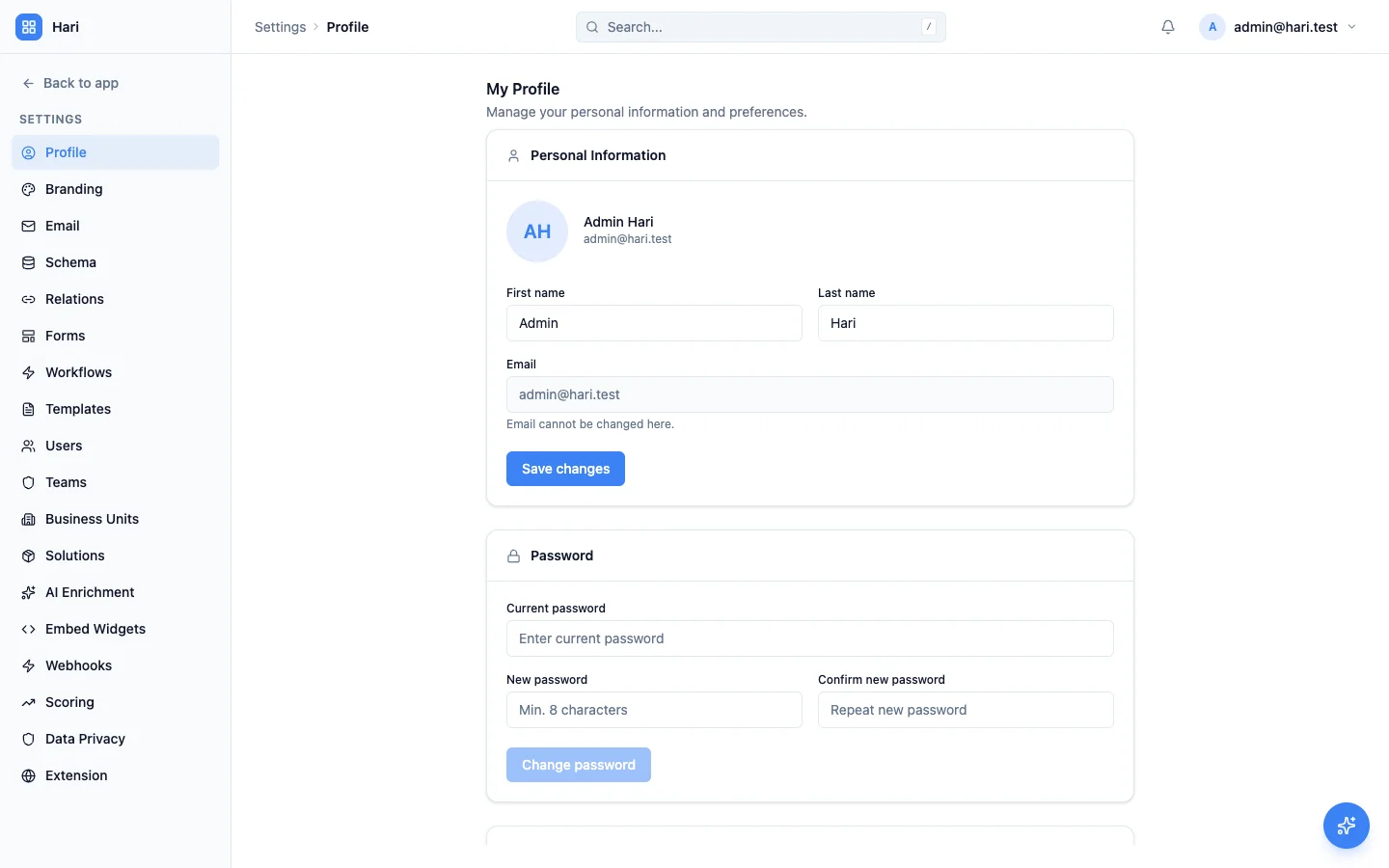
- Go to Settings > Profile
- Scroll to the Notifications section
Your preferences apply only to you — every user controls their own settings.
Available Notification Channels
Section titled “Available Notification Channels”HARi offers four notification channels you can toggle independently:
| Channel | What it does |
|---|---|
| In-app notifications | Shows the bell icon in the top bar with unread counts |
| Sound | Plays a sound when an in-app notification arrives. Pick a sound and a volume level. |
| Desktop notifications | Browser-native pop-up (requires the browser’s notification permission) |
| Email digest | A daily or weekly email summary. Set to None to disable. |
Each toggle persists automatically — there is no separate Save button.
Weekly Business Digest
Section titled “Weekly Business Digest”Every Monday morning, HARi emails a one-page summary of the previous seven days to each administrator of your workspace: new contacts and opportunities, deals won and lost, open pipeline value, overdue tasks, and activity logged. It arrives once a week, per workspace, with nothing to schedule and nothing to switch on.
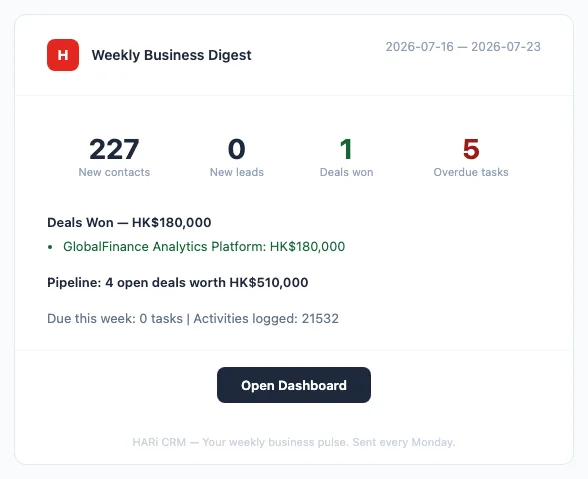
Deliberately, it is one email a week rather than a daily drip. More than 300 billion emails are sent and received worldwide every day (The Radicati Group, Email Statistics Report), so an extra daily message competes for attention it rarely earns. The digest’s own footer states the intent plainly: “HARi CRM — Your weekly business pulse. Sent every Monday.”
What the digest contains
Section titled “What the digest contains”The digest reports on the seven days before it is sent:
| Section | What it reports |
|---|---|
| New this week | Contacts, leads and opportunities created |
| Deals won | How many, their combined value, and the largest deals by amount |
| Deals lost | How many, and which ones most recently |
| Pipeline | How many deals are still open and what they are worth |
| Tasks | Tasks already overdue, and tasks due in the coming week |
| Activity | Interactions logged across the workspace |
An Open Dashboard button at the foot of the email takes you straight into HARi to act on any of it.
Who receives the digest
Section titled “Who receives the digest”Recipients are the active users on your workspace’s Administrators team. Everyone else is excluded, and so is anyone whose account has been deactivated — no one has to be removed by hand when they leave.
There is currently no per-person opt-out for this email. Receipt follows Administrators team membership and nothing else. In particular, the personal Email digest preference on your profile (described above) is a separate setting and has no effect on the Weekly Business Digest — changing it will not stop the Monday email.
To stop someone’s copy, remove them from the Administrators team under Settings > Teams, on the Members tab:
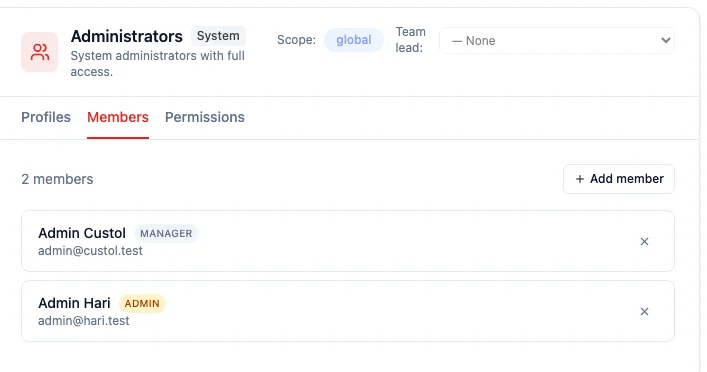
Bear in mind that team also governs administrative access, so removing someone changes more than their email. If they need to keep their access, they will keep receiving the digest for now.
Administering more than one workspace means one digest per workspace, not one in total — each summarises only its own data.
Digest delivery schedule
Section titled “Digest delivery schedule”The digest goes out on Monday between 08:00 and 08:04 UTC, and each administrator receives exactly one per workspace per week. Receiving it twice is not possible, even if the delivery runs late or a scheduled job repeats.
The trade-off worth knowing: if the send genuinely fails — during a mail provider outage, say — that week’s digest is skipped rather than retried later. That is a deliberate choice, made so an uncertain delivery can never turn into a duplicate landing in your inbox.
Setting Up Workflow-Triggered Notifications
Section titled “Setting Up Workflow-Triggered Notifications”For event-specific alerts (“notify the deal owner when a quote is sent”, “alert the team when a high-value deal is created”), use a workflow:
- Go to Settings > Workflows
- Create a workflow with:
- Entity — the record type to watch
- Event — typically After Save
- IF (optional) — conditions like “amount > 10000”
- THEN — add a Send notification action targeting the user (literal user ID or
{{record.owner_id}})
- Save and activate
The workflow fires notifications into the same in-app bell + email digest you configured on your profile.
Managing Notification Volume
Section titled “Managing Notification Volume”If you are receiving too many notifications:
- Disable Sound and Desktop — keep only the bell-icon counter visible
- Switch the email digest to weekly (or off) so you batch-process instead of reacting in real time
- Tighten workflow conditions so notifications fire only for the deals/leads that genuinely matter