
Email Safety Net — protection on every campaign
Your first campaign will not burn your sender reputation. Turn on address checking and HARi checks addresses as you save them, sends a new or returning sender’s first campaign in gradual batches, and automatically pauses the send if too many messages bounce. Remaining recipients are held, not cancelled. You do not need to know what a bounce rate is.
What is the Email Safety Net?
Section titled “What is the Email Safety Net?”The Email Safety Net is three automatic protections on campaign sending: address checking when you turn it on, a gradual first-send ramp for a new or dormant sender, and a mid-send pause if bounce rate crosses 5%. Mailbox providers treat a bad first send as a reason to file everything that follows as spam. HubSpot suspends marketing email at a 5% hard-bounce rate (HubSpot, Why is my email suspended?). Google’s sender guidelines go further on complaints: keep the spam rate in Postmaster Tools “below 0.30%”, and “maintaining a high spam rate leads to increased spam classification” (Google, Email sender guidelines). HARi’s safety net is built around those same numbers, so the pause happens inside your campaign instead of as a suspension of your domain.
How does address checking work?
Section titled “How does address checking work?”Turn on Check email addresses automatically in Settings → Email Sending. It is off by default. When you switch it on, HARi asks you to confirm, because every address saved anywhere in the workspace is then checked and each check uses credits from your wallet. You can turn it off again at any time.
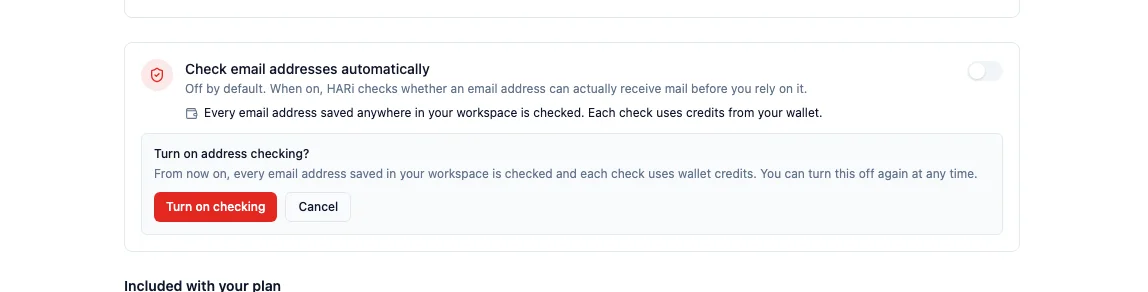
Once it is on, HARi checks whether an address can actually receive mail when the address is saved — a new contact, an import, a form submission — not as a separate errand you run on a spreadsheet. Invalid addresses stop being a surprise at send time.
This is the same job standalone tools sell as a pre-send filter. Allegrow’s Safety Net is an add-on for HubSpot and similar platforms that blocks risky contacts before they enter a cadence (Allegrow, Email Safety Net). In HARi it is a switch on the sending page, not a second product.
How does a first campaign warm up?
Section titled “How does a first campaign warm up?”If this is one of the first campaigns from a sender, the sender has been idle for 30 days or more, or the sending domain was verified in the last 14 days, HARi does not dump the whole list at once. It splits the recipients into gradual batches — 50, then 200, then 500, then 1,250 — each step capped at your hourly sending limit, and watches the bounce rate after every batch. Later batches wait about an hour. A large send is capped at 30 batches, so a worst-case warmup finishes in about a day rather than a week.
The campaign itself shows this as Protecting your sender reputation, with the reason in plain language (this is one of your first campaigns from this sender, this sender hasn’t sent email in a while, or you’re sending from a newly-verified domain) and a row per batch: sent, bounced, or scheduled. If a batch bounces above 5%, remaining batches are not released. Recipients already sent stay sent.
That shape is what mailbox providers ask for. Google tells every new sender to “start with a low sending volume to engaged users, and slowly increase the volume over time” (Google, Email sender guidelines). Most CRMs leave that ramp as a checklist. HARi runs it for you on the first send, then gets out of the way once the sender has earned a reputation (100 lifetime sends).
The schedule is visible while that warmed-up send is in flight. After the campaign finishes — or after a safety pause, below — the panel is no longer on the campaign, because the ramp is over.
What happens if too many messages bounce?
Section titled “What happens if too many messages bounce?”Independently of the warmup, HARi watches bounce rate on a live send. Once at least 50 messages have gone out, a bounce rate above 5% pauses the campaign for safety. Pending recipients are held, not cancelled. The campaign badge reads Paused (safety). Resume is a deliberate action: you tick the acknowledgement, then Resume sending. There is no automatic resume.
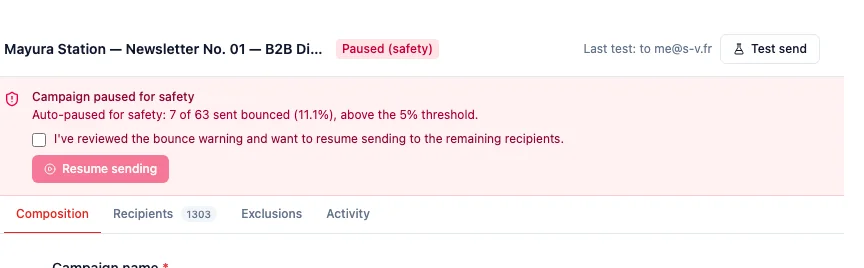
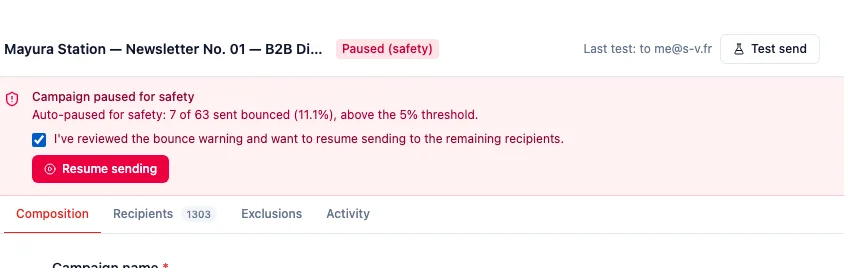
The 5% line matches the threshold HubSpot uses to suspend marketing email (HubSpot, Why is my email suspended?). The difference is when it fires: HARi stops this campaign after a meaningful sample, with the rest of the list still sitting in the campaign so you can clean it and continue. A platform suspension is what you get when nobody paused you first.
You can still send a test while the campaign is paused for safety, so you can check the content before you decide to resume. The screen does not offer an abort control in this state — remaining recipients stay held until you resume.
What the safety net does not do
Section titled “What the safety net does not do”- It does not replace connecting a sending method. Address checking, warmup and the safety pause all sit on top of the sender you already chose.
- Address checking is off until you turn it on. The confirm panel is there because checks use wallet credits.
- Warmup applies to a new, dormant, or newly-verified sender’s campaign, not to every newsletter once that sender has been sending cleanly.
- A safety pause is not the same as the sending allowance pause (monthly credits or the free-plan daily cap). Allowance pauses resume on their own; a safety pause does not.
Related
Section titled “Related”- Email sending — choose how mail leaves HARi
- Email sending allowance — volume and speed on built-in delivery
- Email setup — connect a sender and schedule a campaign
- Why are my emails not sending? — diagnose a failed send
- Campaign click tracking — who clicked which link after a send