
Availability Widget
The availability widget turns the bookings you already track in HARi into a public free/busy calendar you can embed on any website. Visitors see when you are open and when you are busy — never the underlying records — and you set it up in minutes, with no API key and no developer.
What is the availability widget?
Section titled “What is the availability widget?”The availability widget is a hosted, read-only calendar that shows your open and busy times, drawn straight from records you already keep — sales meetings, room bookings, service appointments, anything with a start time. You publish it as a shareable link or drop a small snippet onto your own site, and prospects can check when you are free without emailing to ask.
Most customers try to sort things out for themselves before they ever contact you. Harvard Business Review found that 81% of customers “attempt to take care of matters themselves before reaching out to a live representative” (Dixon, Ponomareff, Turner & DeLisi, HBR, 2017). A public availability calendar meets that instinct for scheduling: someone can see your open slots at 11pm on a Sunday without waiting for your office to open.
The widget reuses the entities and records already in your workspace, so there is nothing new to maintain — the calendar stays current as your bookings change. If you also want customers to sign in and manage their own record, see the Customer Portal; the availability widget is the lighter-weight, no-login way to share just your open times.
Setting up your widget
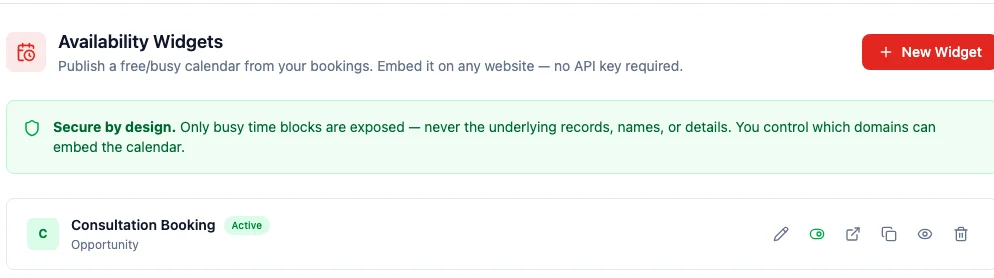
Section titled “Setting up your widget”Open Settings → Availability Widgets and choose New Widget. Every widget you create is listed here, and no API key is required to publish one.
Choose where bookings come from
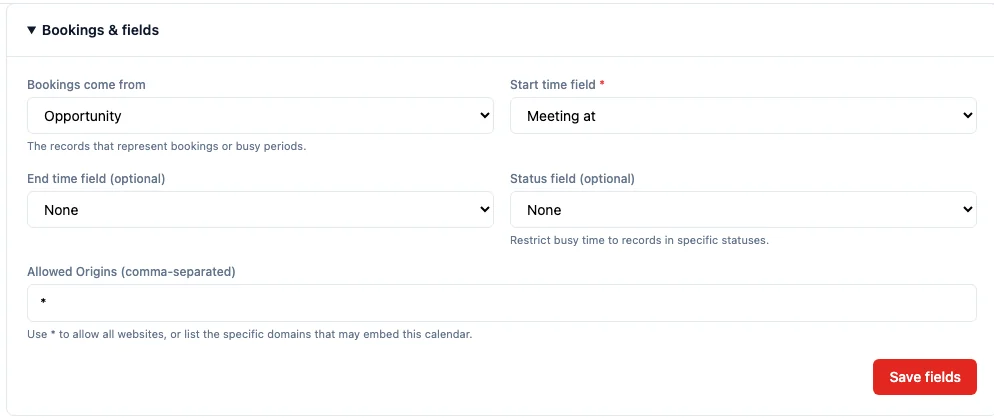
Section titled “Choose where bookings come from”In the Bookings & fields section you map the widget to your data. Pick the entity that holds your bookings, then the field that marks each booking’s start time — that is all that is required.
You can optionally add:
- End time field — if your records store an explicit end time. Without it, each booking is treated as one slot of the length you set (30 minutes by default).
- Status field — restrict busy time to records in specific statuses, so a cancelled booking never blocks a slot.
- Allowed origins — list the exact domains that may embed the calendar, or leave
*to allow any site.
Embed it on your website
Section titled “Embed it on your website”The Embed code & preview section gives you a ready-made snippet and a live preview. Copy the snippet into any web page — a landing page, a “Contact us” section, a Notion or Squarespace embed block — and the calendar renders inline. You can also share the hosted link directly if you would rather not embed anything.
What your visitors see
Section titled “What your visitors see”Your visitors get a clean, branded calendar grouped by day. Busy slots are clearly marked; the open gaps are free to book through whatever channel you already use.
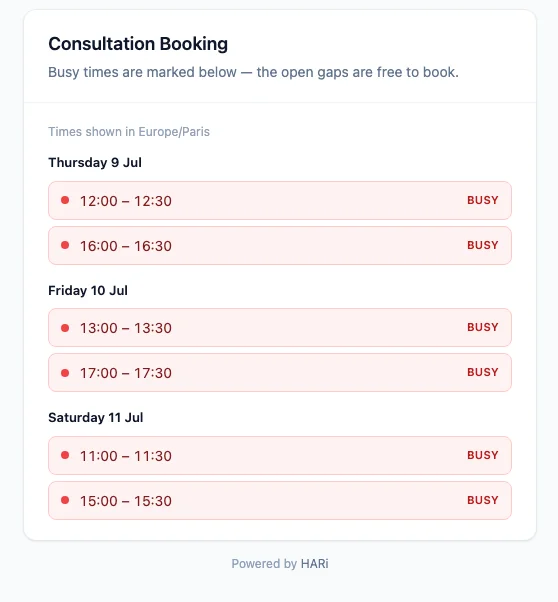
Times are shown in the viewer’s expected timezone, and the page carries your name and colours rather than raw database labels — no IDs, no field codes, nothing technical.
Rooms, desks, and other resources
Section titled “Rooms, desks, and other resources”If your bookings belong to a resource — a meeting room, a hot desk, a piece of equipment — you can point the widget at that relationship. When you do, the calendar breaks availability down per resource, so a coworking space can publish one calendar that shows which rooms are free at 2pm rather than a single all-or-nothing view.
The resource breakdown is all-or-nothing by design: the calendar only ever shows a resource’s name, never any record behind it, and only when the linked resource genuinely exists.
Keeping your data private
Section titled “Keeping your data private”The availability widget is deliberately built to expose the absolute minimum. It publishes only busy time blocks — the start and end of each busy period, and nothing else. Customer names, deal values, notes, contact details, and record IDs never leave your workspace and never appear on the wire.
You stay in control of who can embed the calendar through the Allowed origins list, and turning a widget inactive immediately stops both the public calendar and every embed of it from returning any data.
Good to know: timing and limitations
Section titled “Good to know: timing and limitations”- The calendar is display-only. It shows when you are free or busy; it does not create bookings or write anything back into your workspace. Visitors use it to see your availability, then reach out through your normal booking channel. This keeps the public endpoint completely read-only and safe to expose. If you want signed-in customers to actually reserve a slot themselves — conflict-checked and saved against their record — that is the write-enabled companion, portal booking.
- Updates can lag by up to 60 seconds. For speed and to shrug off traffic spikes, the calendar is cached briefly, so a booking you add or remove appears within about a minute rather than instantly. That trade-off keeps an embedded calendar fast even on a busy page.
- One start time per booking. If a record has no configured end-time field, the widget assumes a fixed slot length (30 minutes unless you change it).
For a fuller self-service experience where customers log in and manage their own record, invoices, and documents, see the Customer Portal. To understand where the availability widget fits alongside the rest of HARi, start with the introduction.