
B2C Sales Pipeline Template
 Business-to-consumer sales move fast. You’re dealing with hundreds or thousands of individual buyers, shorter decision cycles, and the constant need to prioritize which leads deserve attention right now. A CRM designed for enterprise deals won’t cut it.
Configuration recipe. This page describes how to configure HARi for a high-velocity B2C sales motion. It is not a one-click install — the pipeline stages, scoring rules and workflows below are ones you set up on top of the core CRM solution.
Common B2C sales challenges
Section titled “Common B2C sales challenges”- High volume — too many leads to manage manually, and the best ones get buried
- Short attention spans — if you don’t respond within hours, the buyer moves on
- Lead quality varies wildly — most inquiries won’t convert, so scoring is essential
- Repeat purchases — the real value is in lifetime customer relationships, not one-off sales
How HARi handles this
Section titled “How HARi handles this”The CRM solution gives you Lead, Contact, and Opportunity. Engagement scoring is built in — you tune it to surface the hottest prospects automatically. Configure the pipeline stages below as a Business Process Flow on Lead or Opportunity.
Pipeline stages
Section titled “Pipeline stages”| Stage | Purpose | Typical duration |
|---|---|---|
| New Lead | Inquiry received | Minutes to hours |
| Contacted | First response sent | Same day |
| Interested | Lead has shown buying intent | 1-3 days |
| Quote Sent | Pricing shared | 1-5 days |
| Won | Purchase completed | — |
| Lost | Did not purchase | — |
Engagement scoring setup
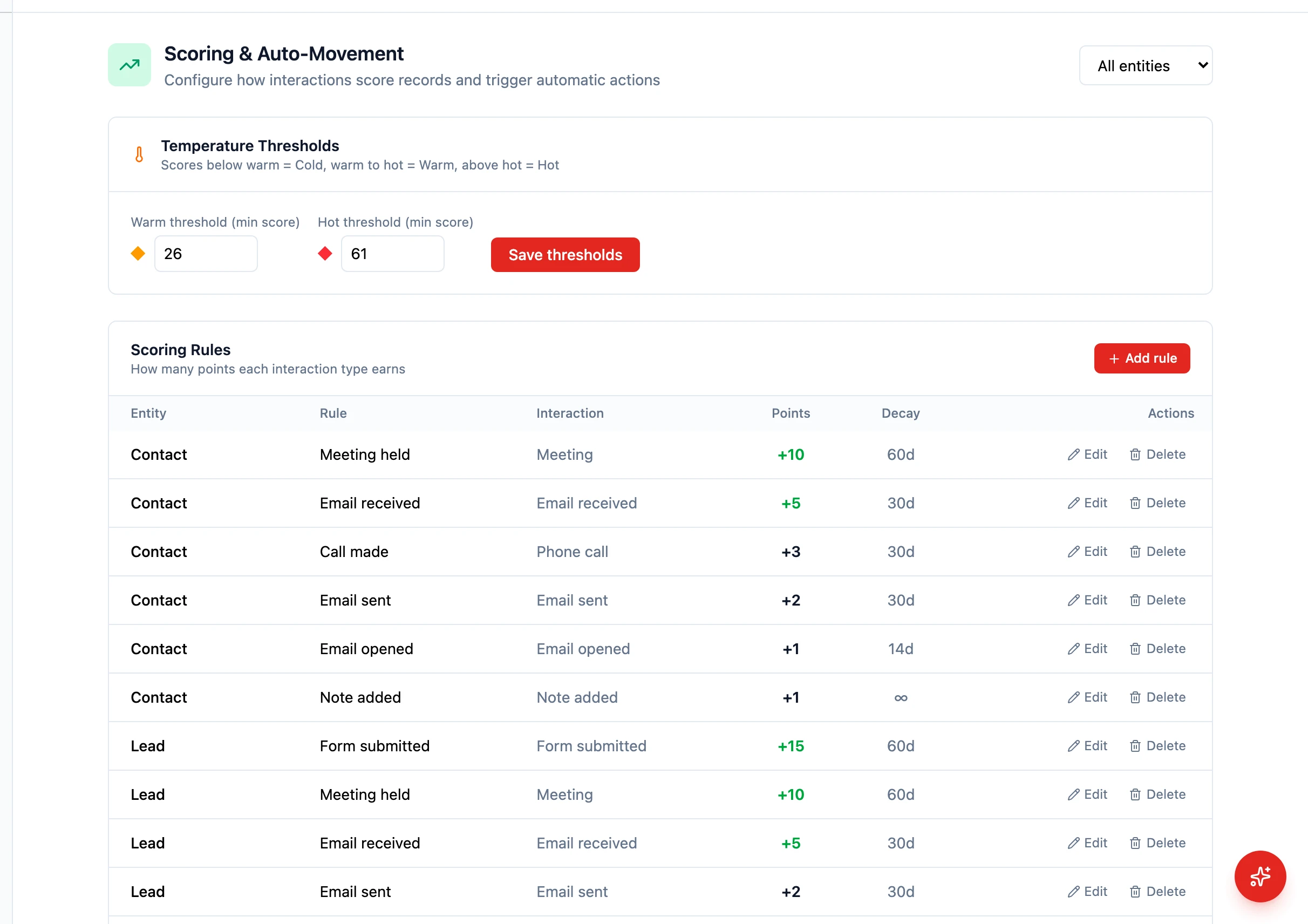
Section titled “Engagement scoring setup”HARi’s engagement scoring assigns a 0–100 score plus a temperature (cold / warm / hot) to every contact. Tune the point values for your B2C motion in Settings > Engagement Scoring — typical adjustments:
- Email open — +3 to +5 points
- Email click — +5 to +10 points
- Form submission — +10 to +20 points
- Hard bounce — -20 points
- Unsubscribe — -50 points
Decay is applied automatically: -5 points after 30 days of inactivity, an additional -10 after 60. Adjust the warm/hot thresholds (defaults 26 and 61) so the right contacts surface as “Hot” for your team.
Entities and fields to set up
Section titled “Entities and fields to set up”- Contacts — source channel, lead score, preferred contact method, purchase history
- Opportunities — product interest, deal value, urgency level
- Activities — automated email sequences, SMS follow-ups, call logs
Suggested workflows
Section titled “Suggested workflows”Configure these in Settings > Workflows:
- Speed-to-lead — when a new lead arrives, assign to the next available rep and send an instant welcome email
- Hot lead alert — when a lead score crosses your “hot” threshold, notify the assigned rep
- Abandoned follow-up — if a lead goes quiet for 3 days after receiving a quote, send a reminder email
- Win celebration — on purchase, trigger a thank-you email and create a satisfaction survey task
Key dashboard widgets
Section titled “Key dashboard widgets”- Leads by source (pie chart)
- Conversion rate by stage (funnel)
- Average time to close
- Lead score distribution
Get started
Section titled “Get started”- Sign up for a free HARi account and install the CRM solution from Settings > Solutions.
- Configure the pipeline as a BPF on Lead (or Opportunity) in Settings > Schema.
- Tune scoring rules and thresholds in Settings > Engagement Scoring.
- Configure the suggested workflows in Settings > Workflows.
- Build a B2C dashboard from Dashboards with the suggested widgets.