
Build a Sales Pipeline
Build a Sales Pipeline
Section titled “Build a Sales Pipeline”A well-structured pipeline shows you exactly where every deal stands and what needs to happen next. This guide walks you through building a B2B sales pipeline from scratch in HARi CRM.
What Ships by Default
Section titled “What Ships by Default”When you install the CRM solution, the Opportunity entity already has a stage field with these stages:
- Prospecting
- Qualification
- Proposal
- Negotiation
- Closed Won
- Closed Lost
You can use these as-is, edit them in Settings > Schema > Opportunity > Fields > stage, or add a Process Flow on top to enforce required fields per stage (next section).
Adding a Process Flow on Top
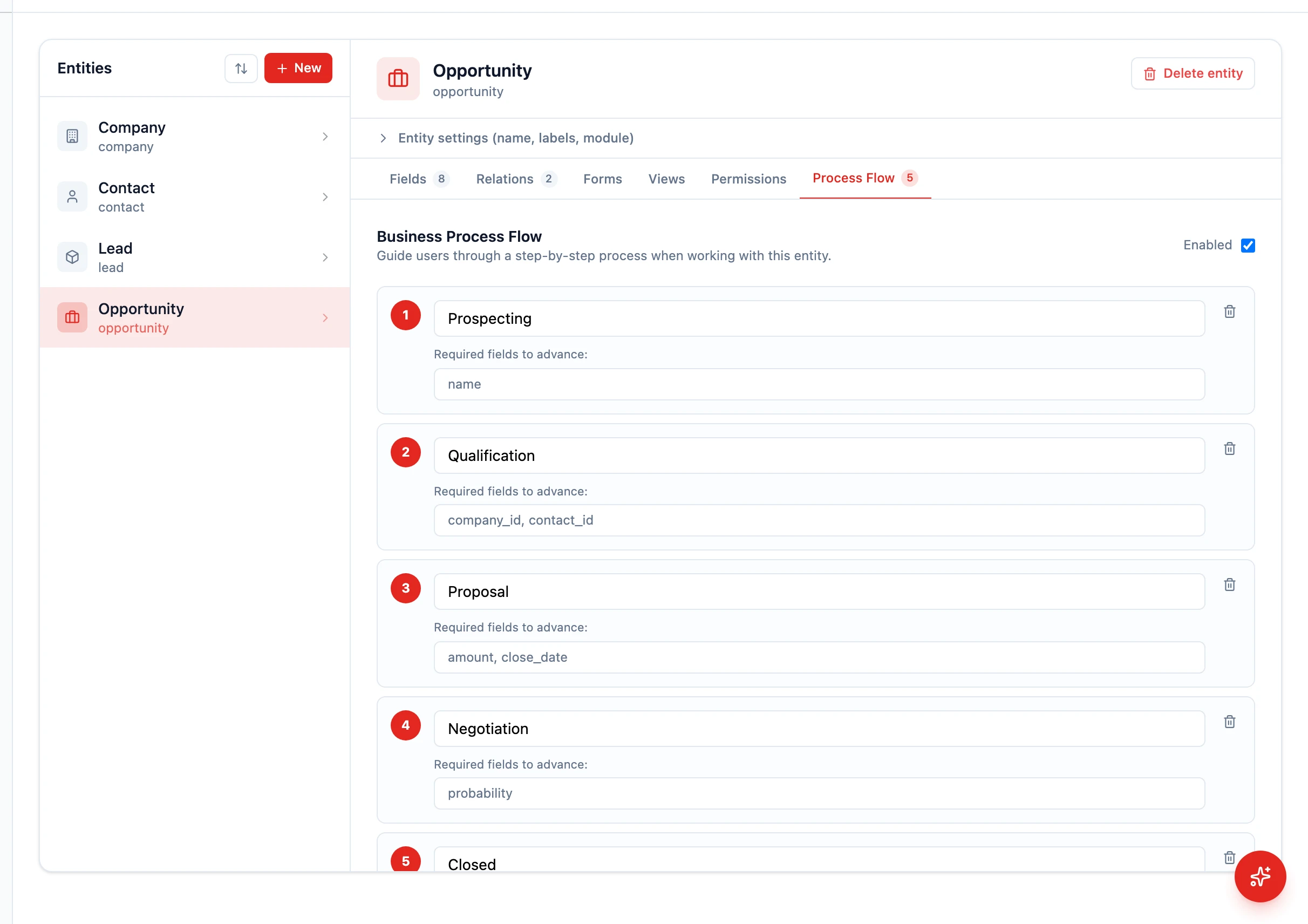
Section titled “Adding a Process Flow on Top”A Process Flow layers visual progress + per-stage required fields on top of the entity. It’s optional — many teams just use the default stages with a Kanban view.
- Go to Settings > Schema and select Opportunity
- Open the Process Flow tab
- Toggle Enabled on
- Click Add stage for each stage in your plan and type the stage name
- For each stage, optionally enter a comma-separated list of field names that must be filled before advancing (e.g.
amount, close_date) - Click Save Process Flow
The stage field of the entity (the dropdown like
stage) drives data; the Process Flow drives the visual breadcrumb at the top of the record and the “required fields to advance” check.
Recommended Required Fields per Stage
Section titled “Recommended Required Fields per Stage”| Stage | Recommended required fields |
|---|---|
| Qualification | budget, decision_maker, timeline (custom) |
| Proposal | amount, proposal_date (custom) |
| Negotiation | close_date |
| Closed Won | close_date, amount |
| Closed Lost | loss_reason (custom) |
Add any custom fields first via Add a Custom Field.
Setting Up the Kanban View
Section titled “Setting Up the Kanban View”- Navigate to Opportunities in the sidebar
- Switch to Kanban view using the view mode buttons
- Group by the
stagefield - Save it as a view named “Sales Pipeline”
Your team can now drag deals between columns as they progress through stages.
Default Deal Fields
Section titled “Default Deal Fields”The Opportunity entity ships with these key fields:
- Amount — The expected revenue from this deal (currency)
- Expected Close — When you expect the deal to close (date)
- Probability — Likelihood of winning (percentage)
- Stage — The current pipeline stage
These power your forecasting and funnel charts on the dashboard.
Next Steps
Section titled “Next Steps”- Manage Deals for day-to-day deal management
- Configure Stage Fields for detailed BPF configuration
- Customizing Your Dashboard to add a pipeline funnel chart