
Email Sending Allowance
Every HARi plan includes a monthly sending allowance for HARi’s built-in email delivery. On the Free plan it is about 100 emails a month plus a safety cap of 10 a day; on a paid plan it is about 2,000 a month. That allowance is shared with your AI usage, and if you connect your own mailbox instead, your sending is unlimited — HARi just paces it at a safe rate. Nothing is ever billed per email, and nothing breaks when you reach a cap: sending pauses and resumes on its own.
What is the sending allowance?
Section titled “What is the sending allowance?”The sending allowance is the number of emails your workspace can send through HARi’s built-in delivery in a billing period, before HARi asks you to top up, upgrade, or wait for the next period. It exists so a brand-new workspace can send from HARi on day one without configuring anything — and so nobody can accidentally (or deliberately) blast tens of thousands of messages through shared infrastructure and burn its reputation for everyone else.
There are two separate things the allowance protects, and it helps to keep them apart:
- Volume — how many emails you can send. This is the allowance itself: about 100/month on Free, about 2,000/month on paid, drawn from the same balance as your AI features.
- Speed — how fast they go out. Independent of volume, HARi also applies an hourly rate (100/hour on Free, 500/hour on paid) so a large send is metered rather than dumped in one burst.
The allowance applies only to HARi’s built-in delivery. The moment you connect your own mailbox — Microsoft 365, an SMTP server, or your own provider — those sends no longer count against the allowance at all. See Connect your own mailbox for unlimited volume below.
Why is there an allowance at all?
Section titled “Why is there an allowance at all?”Because shared sending infrastructure has a shared reputation, and one bad actor can put every other sender in the spam folder. Mailbox providers watch complaint rates closely: Google’s official sender guidelines instruct every sender to “keep spam rates reported in Postmaster Tools below 0.30%” and warn that “maintaining a high spam rate leads to increased spam classification” (Google, Email sender guidelines). A spam rate above 0.30% is enough to start throttling a sender’s mail — so a platform that lets any workspace send unlimited volume through a shared channel is one careless campaign away from hurting everyone.
The allowance is how HARi keeps the shared channel healthy: generous enough that a normal small business never notices it, tight enough that abuse is capped. When you outgrow it, the answer is not a surprise invoice — it is either to upgrade your plan or to connect your own mailbox, where your volume is your own business.
How the Free plan allowance works
Section titled “How the Free plan allowance works”The Free plan includes about 100 emails a month of built-in delivery, plus a hard 10-per-day safety cap. Both numbers are visible in Settings → Email Sending, alongside your hourly rate.
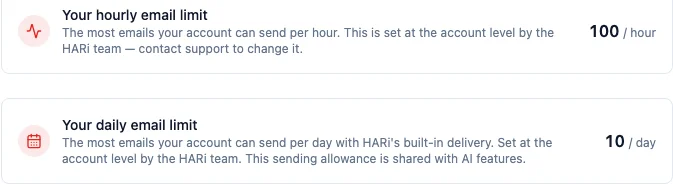
The daily cap is deliberately low. It gives a new workspace enough to try HARi end to end — send a few real emails, run a workflow, test a template — without giving anyone the ability to push real campaign volume through the shared channel before they have their own mailbox connected. Real sending volume is meant to come from a paid plan or your own connector, not from the free tier.
The allowance is shared with AI
Section titled “The allowance is shared with AI”Your monthly allowance is a single balance that both email sending and AI features draw from. Send an email through built-in delivery and it draws down; run an AI enrichment, an AI message, or the AI builder and it draws down too. You can watch both against the same balance in Settings → Billing.
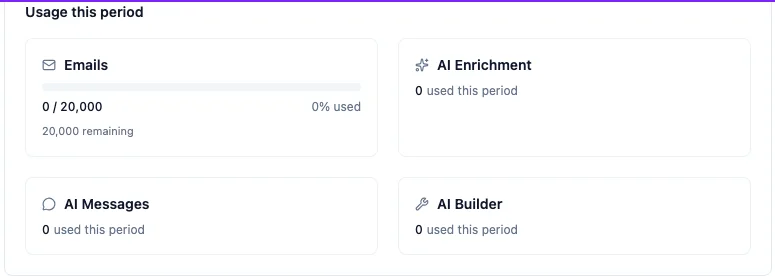
Keeping email and AI on one shared balance is deliberate: it means one simple number to understand instead of a matrix of separate quotas, and it means the balance flexes to how you actually work. A month heavy on AI enrichment and light on email, or the reverse, both fit inside the same allowance. The Credits balance card at the top of Billing shows the current balance, the plan allocation, and the date it resets.

What happens when you reach a cap?
Section titled “What happens when you reach a cap?”Nothing breaks, and you are never billed for going over. When a send would take you past your monthly allowance or your daily cap, HARi pauses it and resumes automatically — the monthly allowance resumes next period or the moment you top up, and the daily cap resumes the next day.
Before you launch a large campaign, HARi tells you in advance if it will not fit. The campaign’s readiness panel shows a non-blocking notice — you can still launch; HARi simply pauses partway and picks up where it left off once there is headroom again.
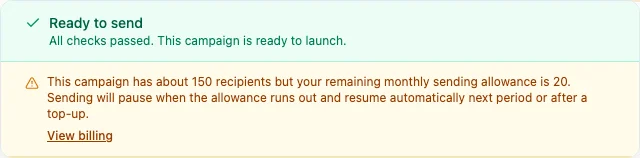
This is the opposite of a hard failure. Your campaign is never rejected, no email is lost, and nothing is silently dropped — the send simply meters itself to the allowance and continues on its own. If you want it all to go out now, top up your credits or upgrade, and the pause clears immediately.
Connect your own mailbox for unlimited volume
Section titled “Connect your own mailbox for unlimited volume”The allowance only ever applies to HARi’s built-in delivery. Connect your own mailbox and the cap disappears entirely — your sending is unlimited, and never counts against the shared allowance or your credits.
When you send through your own connector, HARi still paces the send at your own account’s safe sending rate so you protect your own domain reputation — because the same rules apply to you as to everyone else. Google’s guidelines are explicit that new senders should “start with a low sending volume to engaged users, and slowly increase the volume over time” (Google, Email sender guidelines); HARi’s pacing follows exactly that shape so your first big send does not spike and land you in spam. But the pace is about protecting your reputation, not a volume limit — there is no monthly ceiling and nothing is billed per email on your own connector.
To connect a mailbox, open Settings → Email Sending and choose Microsoft 365, add an SMTP server, or connect your provider. From that point on your sends leave through your own infrastructure at your own pace, with no allowance to manage. See Unified inbox and connected channels for the full setup.
Let your sending speed grow automatically
Section titled “Let your sending speed grow automatically”On a connected sender, HARi paces your campaigns at a safe sending speed that climbs automatically the more you send cleanly. Choose Automatic (recommended) and HARi starts you at a conservative 30 emails an hour, then raises the pace on its own — to 60, then higher — as your emails keep landing and your list quality proves itself. There is nothing to schedule and no number to keep an eye on: a healthy sender simply speeds up over time, and if bounces spike the pace eases back on its own and recovers once sending is clean again.
This is exactly the shape mailbox providers ask for. Google’s official sender guidelines tell every new sender to “start with a low sending volume to engaged users, and slowly increase the volume over time” (Google, Email sender guidelines) — because a sudden spike from an unproven sender is one of the fastest ways into the spam folder. Automatic sending speed follows that curve for you, so your first big campaign ramps up rather than dumping all at once.
You choose how the pace is set when you connect or edit a sender, under Settings → Email Sending:
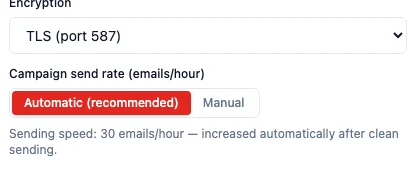
- Automatic (recommended) — HARi manages the pace. The dialog shows your sender’s current earned speed (for example “Sending speed: 30 emails/hour — increased automatically after clean sending”), and that number rises by itself as you keep sending without bounces. This is the right choice for almost everyone.
- Manual — you type a fixed number of emails per hour and HARi holds exactly that pace, no more and no less. Use this only if you have a specific rate your provider requires. Setting it to
0means no pacing limit at all.
Either way, the pace applies only to bulk campaign sends. Your everyday one-to-one emails, replies, and test sends are never throttled — they go out immediately. And because this pacing is about protecting your domain reputation, not a volume cap, there is still no monthly ceiling on your own connector and nothing is ever billed per email.
Sending allowance at a glance
Section titled “Sending allowance at a glance”| Free plan | Paid plan | Your own mailbox | |
|---|---|---|---|
| Monthly allowance (built-in delivery) | ~100 / month | ~2,000 / month | Unlimited |
| Daily safety cap | 10 / day | None | None |
| Hourly rate | 100 / hour | 500 / hour | Your account’s safe pace |
| Shared with AI usage | Yes | Yes | Sending doesn’t draw from it |
| Billed per email | Never | Never | Never |
To see your own numbers, open Settings → Email Sending — the page where you also choose which method sends your mail — for the hourly and daily limits, or Settings → Billing for your monthly balance and reset date. To learn how sending fits alongside campaigns and templates, start with the introduction, or read about the unified inbox to connect your own mailbox.