Changelog
What's new in HARi
Every feature, improvement, and fix we ship — in plain language. No marketing spin, just what changed.
Week of October 12, 2026
- Feature
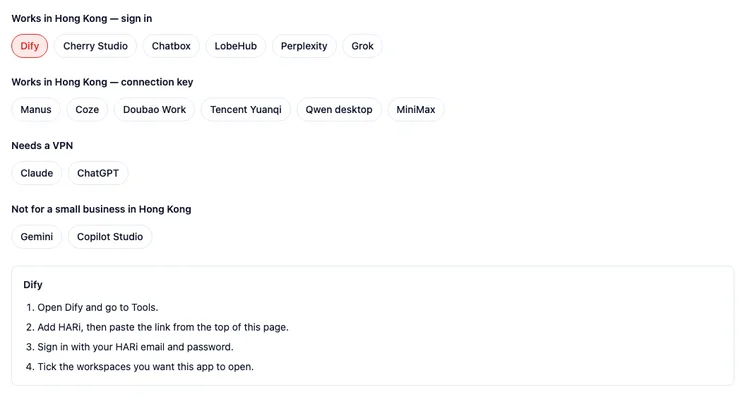
Connect your AI app to HARi
Settings → Connect to AI gives you one link to paste into an AI app. You sign in and tick the workspaces it may open. An app that cannot sign in uses a connection key. Changes wait for your OK unless you turn that off, and the AI permissions an administrator set still apply.
- Feature
Archived workspaces stay open and read-only
An archived workspace still lets you sign in, look around and download CSV. A banner across the top says nothing can be changed, and that turning it back on means contacting HARi. Work that came due while it was parked is cancelled, not sent late.

- Fix
Disconnecting WhatsApp asks you to confirm
Disconnect WhatsApp now asks before it stops the account. Cancel leaves the account connected. Confirm stops new WhatsApp messages. Messages already in HARi stay where they are. Reconnect asks for a new QR code.
- Polish
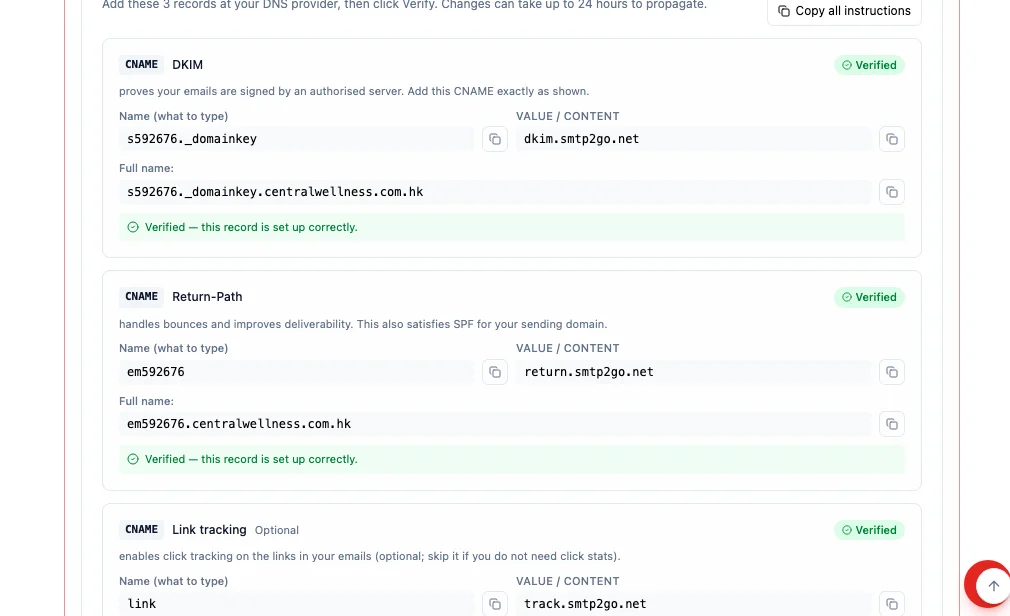
DNS records show the name to type
Each DNS record on Settings → Email now shows the short name to type at your DNS host, and the full name under it. Copy all instructions copies every record in one block. A host guide appears only when HARi knows that host.
- Fix
Disconnecting WhatsApp no longer shows an error
Choosing to disconnect WhatsApp used to leave an error on the account. It now stays quiet. If HARi cannot reach the connection service, the account stays connected so you can try again. Messages already in HARi stay where they are.
- Fix
Disconnecting a mailbox keeps its messages private
Disconnecting a mailbox used to leave its messages visible to everyone in the workspace. Those messages now stay visible only to the person who connected the mailbox, and to an administrator. A WhatsApp chat that was filtered out stays hidden. A message written without a mailbox is unchanged.
- Feature
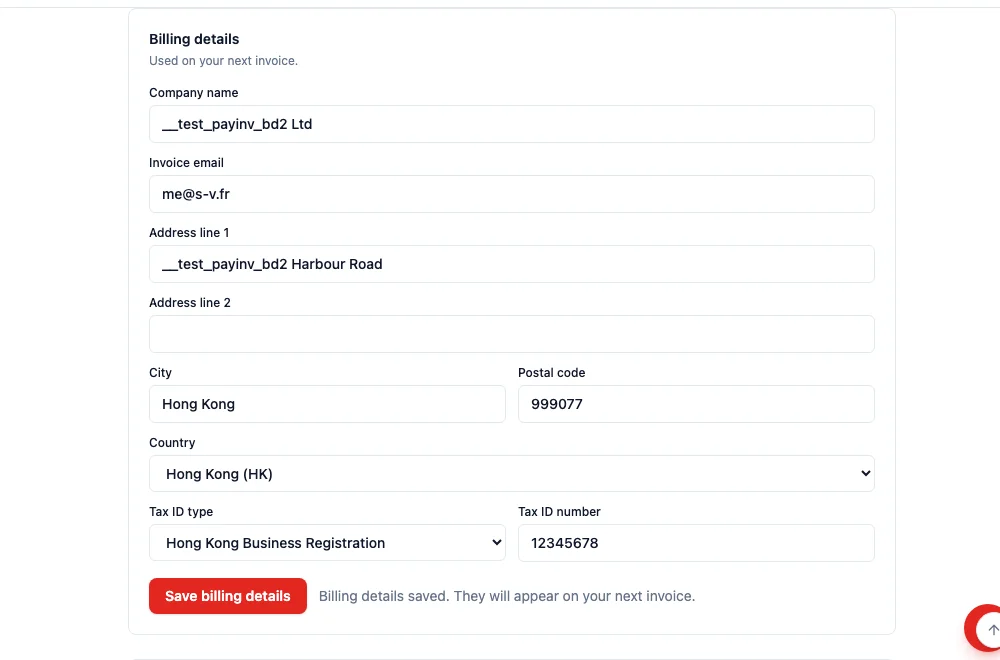
Save the company name and tax ID for the next invoice
Settings → Billing now has a Billing details card above Invoice history. An administrator can save the company name, invoice email, address, and one tax ID. They are used on the next invoice. A workspace that has not paid yet is told that these details are collected at the first payment.

Week of October 5, 2026
- Fix
A field file stays put when you cannot delete it
Removing a photo or a file from a field now deletes the stored file first. If you are not allowed to delete it, the photo stays and the message explains why. Someone who can edit the record can still remove it.
- Polish
Timeline cards show how many files they have
A card on the Timeline that has files shows the count. One file and several files use the right plural, including French and Chinese. Clicking the count opens that record on its Files tab and does not open the card itself.
- Fix
Timeline search finds the text on a linked activity
Searching a Timeline now matches a linked activity by its title and its note. A search no longer treats a hidden link id as a match. A very long note cannot make search fail for the whole workspace.
- Feature
A new workspace includes Activities
A new workspace now installs Activities together with the CRM. Logging what was said has a place to live. An existing workspace is unchanged until it is upgraded.
- Fix
Only editors can add or remove a record’s files
On a record’s Files tab, adding or removing a file now needs the same right as editing that record. Someone who can only view it still downloads the file, and no longer sees a place to drop files or a delete button. The tab’s words follow the language you are using. A link can open that tab directly.
- Fix
Invoice history explains an empty list and keeps downloads inside HARi
The billing page now says your invoices appear after the first payment. A download uses only HARi’s own invoice link. When a payment page is offered, it opens in a new tab. A document that is still being prepared is shown as text, not as a link.
- Fix
View in browser now opens the recipient's own copy
View in browser used to be an empty link in every sent campaign. Each recipient now opens their own copy of that email. The page stays available for 90 days, the same as their unsubscribe link, and search engines do not index it. A test send opens the campaign’s public page, without personal details. Quick send no longer offers marketing-only links.
- Polish

The onboarding unsubscribe page is a branded card
The link in an onboarding email now opens a card with the HARi mark. It asks you to confirm, says when you are already unsubscribed, and follows Chinese when the browser asks for it. If the service is briefly unavailable, the page says so instead of showing an error code.
- Fix
Automation emails show calculated fields
An automation email used to leave a calculated field blank, such as a title built from the brand and the reference. The subject, the message, and a fixed address now show that value. A condition that checks a calculated field uses that value instead of treating the field as empty. Choosing an email field still only lists stored columns.
- Fix
Creating a task with the assistant uses the task fields
The confirmation now names the title and the status. Nothing is saved until you confirm. If the save is rejected, the assistant no longer says the action is done.
- Feature
The assistant can change records without an extra switch
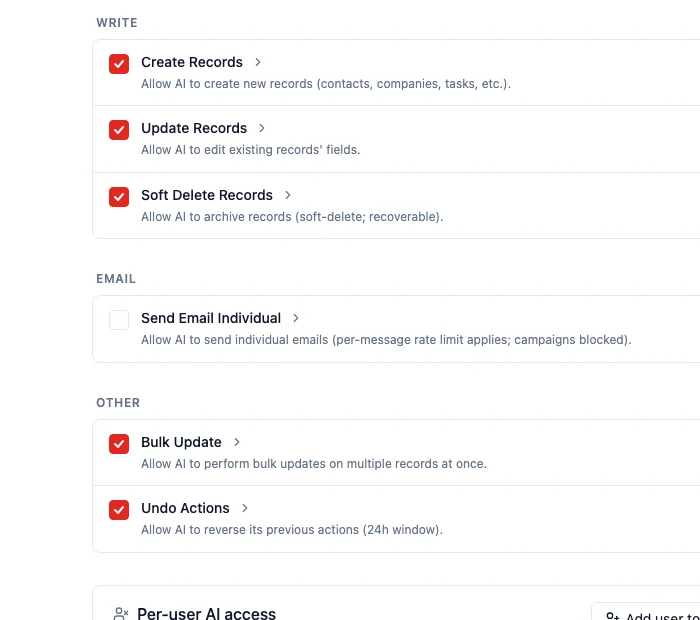
Create, update, archive, and bulk update are on for the assistant in every workspace. It still shows a confirmation card, and nothing changes until you confirm. Sending an email stays off until an admin turns that on. An admin who already turned a switch off keeps that choice.
- Fix
A removed sending domain can be added again
Removing a sending domain used to make that same domain impossible to add again. Adding it now works, and the removed one stays removed. A domain that is already on the list is still refused.
- Fix
The assistant can propose an update to a deal
Asking the assistant to update or archive a deal used to stop with an error, before the confirm card. It now shows that card. The deal is unchanged until you confirm.
- Feature
Recipients manage email preferences without signing in
Put a manage-preferences link in a campaign and the recipient opens their own page, with their address and each list, and no sign-in. The unsubscribe link opens a confirm page first, so merely opening it does not remove them. On Performance, Unsubscribed counts the newest send to that address in the last 90 days, and only once.
- Fix
An unsubscribe link no longer opens the sign-in page
A preferences or unsubscribe link in a campaign used to open Sign in to your workspace. It now opens that recipient’s page. A mail program that only checks the link does not unsubscribe them. They click Unsubscribe, or they use Unsubscribe in their mail app.
- Fix
Adding a sending domain finishes if the first try was interrupted
Adding a sending domain saves the DNS records only after the email service accepts the domain. If that step stopped halfway, trying again used to stay stuck. Trying again now finishes the setup and shows the records. A domain that already belongs to another workspace is refused, and nothing is saved.
- Fix
A deleted data type stays out of reports, activity, campaigns, and the dashboard
Reports no longer chart a data type you deleted, and the activity filter no longer offers it. A new campaign does not list it. The dashboard does not count it. A campaign already saved on that type still shows it, with "deleted" after the name.
- Fix
The assistant shows a card before it changes a record
When the assistant wants to create or change a record, it shows a card with Confirm and Cancel. If an admin has turned off your access to the assistant, Confirm tells you so and does not make the change.
- Fix
A deleted data type stays out of the choices
Picking a data type for an automation, a workflow, a webhook, a role, a relation, a dashboard widget, or the command menu no longer offers a type you deleted. A choice you already saved on a deleted type still shows, with "deleted" after the name.
- Fix
A deleted data type stays in the list, marked Deleted
In Settings → Schema, deleting a data type moves it to a Deleted section. You can still see its name, and you cannot open or edit it. The rest of the list shows only types you can use.
- Fix
You can still sign in while a workspace is being closed
Closing a workspace keeps it read-only for 30 days. People in that workspace can sign in and read their data. An admin can cancel the closure in Settings → Billing before the 30 days end. After that, sign-in stops.
- Fix
Who can see this record stays complete on a large workspace
The list of people who can see a record no longer stops at 60 people, and it no longer says the list is incomplete. Someone who is not allowed to look still sees that the list could not be checked, rather than an empty list.
- Fix
A quick send only fills in the person it is addressed to
Sending from a contact still fills in that contact when the address is theirs. If you change the address to someone else, the send stops and says the email can only be personalised for the person it is addressed to.
- Fix
A campaign test says whether it used a contact or sample details
Under the test address, the dialog says merge fields use the contact with that email when there is one, and sample details otherwise. After the test goes out, the confirmation names each address as their record or as sample values.
- Fix
A campaign test email fills in names and the unsubscribe link
Send yourself a test and each address is filled in on its own. When that address is a contact’s email, the test uses that contact. Otherwise it uses sample details, such as Alex for a first name, and the unsubscribe link opens that address’s own preference page.


Week of September 28, 2026
- Feature
Choose who a campaign is sent from: campaign senders
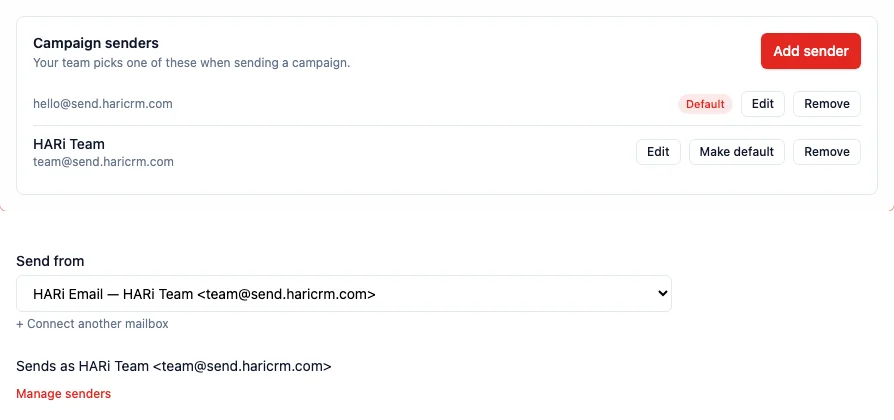
Admins now set up the names and addresses your campaigns can come from in Settings → Email Sending → Campaign senders — for example your company name for business mail and a named person for a newsletter. Everyone who builds campaigns picks one in Send from, including team members without admin rights, and the line underneath shows exactly what recipients will see. Nobody types a From address by hand any more, and every sender sits on a domain you have verified. One sender is the default: new campaigns and quick sends from a contact page use it.
- Feature
A Record updated automation can run again on every later update
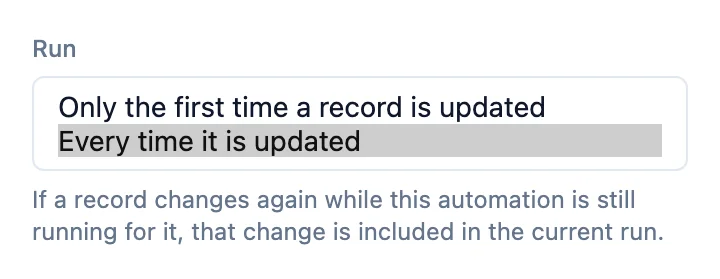
Open the trigger on a Record updated or Field changes automation and set Run to Every time it is updated when a later update should start it again. It runs the first time a matching record is updated, and creating the record does not run it. Only the first time a record is updated is what you see when Run was never set. While that automation is already running or paused for the same record, another update does not start a second copy. After 20 runs for that record in one hour, the next run is skipped until the hour has passed.
- Fix
A campaign keeps the From address you saved when you send with HARi Email
Open a campaign that sends with HARi Email and the From address already saved on it stays. It used to replace that address with the HARi Email mailbox as soon as the campaign opened. You can type any address on your verified domain, and Send from each recipient’s owner stays available. A mailbox you connected yourself still shows that account’s address, and Save stores it.
- Feature

AI Enrich fills your own fields, not only Job Title
Open a contact and click AI Enrich. It now suggests values for every field on the form that has Let AI suggest values switched on in Settings → Schema — Job Title, Notes, Source, Address, or a field you added — plus a Notes summary and a Company card. It used to fill only Job Title. Clear the switch on a field you never want researched.
- Feature

A company's timeline now includes its contacts' conversations
Open a company and its Timeline lists the emails, calls and meetings logged on its people — each card says via Contact. Click This Company when you only want the company's own rows.


Week of September 21, 2026
- Fix
Enriching records no longer stops when the AI counter is full
Selecting contacts and choosing Enrich with AI now sends the batch even if this period’s AI Enrichment counter is used up. Only an empty credit wallet stops it. The yellow bar at the top of the app still warns when email sending is close to its monthly amount — it no longer says AI features are paused because an AI counter is full.
- Feature

Quick create & Timeline — add a task or log an email without leaving the record
Open a contact or a company and add a task, or log an email, a call or a meeting, without leaving it — a side panel opens on the right. The tab that used to be called Activity is now Timeline. When you log an interaction by hand, it also appears as an activity on that Timeline. Interactions written by automations do not.

Week of September 7, 2026
- Feature
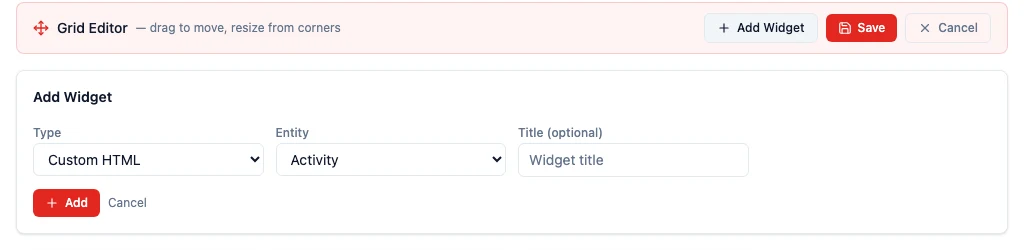
Put your own HTML on a dashboard and let it read your live data
In edit mode, click Add Widget and set Type to Custom HTML to put a page you wrote yourself on a dashboard — a board-ready summary or a layout the chart types do not cover. It reads your live records as it loads, limited to the entities that dashboard shows and to what the person viewing can already see.
- Fix
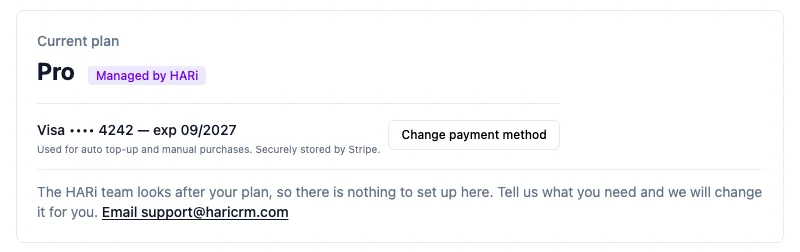
Settings → Billing now shows the real renewal date and the saved payment method
The Current plan card now prints the real renewal date, names the saved payment method (Link shows the email, not a number), and offers Change payment method.
- Fix
Export CSV now matches the filters you can see on the list
Export CSV from a table used to ignore the FilterBar and download the whole table. It now sends the same filters as the list, as repeated filter[]= parameters, so two filters no longer collapse to the last one.
- Fix
Stopping a campaign mid-send now keeps the real sent and failed counts
Aborting a campaign used to leave sent_count at zero and hide it from the marketing dashboard, even when hundreds of emails had already gone out. The campaign now stores the true sent, failed, and recipient totals, and a sent_at so statistics can load.
- Fix
Campaign opens no longer drop when only part of the event history is stored
A campaign that had 148 unique opens could suddenly show 6 after a later pixel row landed, because the report preferred a partial event stream over the maintained counter. Opens and clicks now take the larger of the two; bounce counts are unchanged.
- Feature
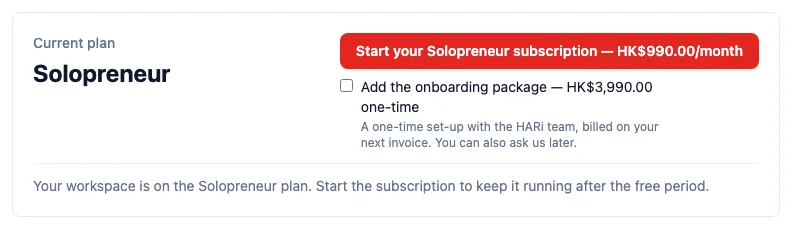
Solopreneur plan — start the subscription HARi assigned you, plus an optional onboarding package
HARi can now place a workspace on the Solopreneur plan (HK$990 a month, one workspace) or on Pro, and the Current plan card on Settings → Billing says which one and offers a single button: Start your Solopreneur subscription — HK$990.00/month. An administrator pays on Stripe's hosted checkout, exactly like the Pro upgrade. Beside that button, a tick adds the onboarding package — a one-time HK$3,990 set-up with the HARi team, billed on your next invoice and never charged twice. Leave it unticked and nothing is added. A checkout you abandon leaves the workspace unpaid until the payment goes through.
Week of August 31, 2026
- Feature
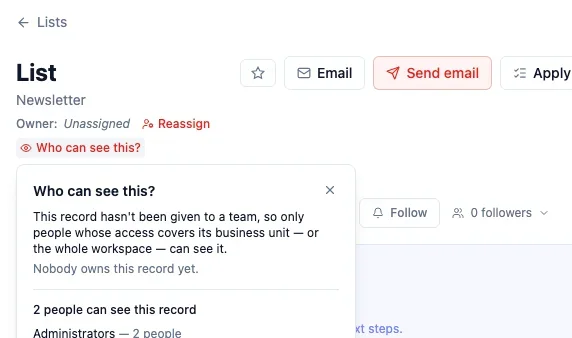
Who can see this? — records belong to a team, not a private owner
Every record now belongs to a team. Open it and click Who can see this? to see who actually can — teammates, people with business-unit access, and administrators. Make private moves it onto your personal team; Change team hands it to another group. Roles (Viewer, Editor, Manager) attach to teams, not to each person. Export CSV still only includes rows you can view, and each export is listed under Export Logs.
- Feature
Upgrade to Pro from Billing — pay in Stripe, no email to support
A Free workspace can now move to Pro from Settings → Billing. An administrator clicks Upgrade to Pro and pays HK$1,990 a month on a Stripe checkout — unlimited users, every feature included. If you already bought credits with a card, HARi can use that card. People who are not administrators are told to ask one; a workspace HARi bills directly never sees a button that cannot go through.

- Feature

Email Safety Net — auto-protection on every campaign
Your first campaign will not burn your sender reputation. Turn on address checking in Settings → Email Sending and every address saved in the workspace is checked (each check uses wallet credits). A new, dormant, or newly-verified sender's first campaign goes out in gradual batches — 50, then 200, then 500 — instead of all at once. If more than 5% bounce after at least 50 messages have gone out, the campaign pauses on its own, remaining recipients are held, and Resume sending stays disabled until you tick the acknowledgement.
- Fix
Integrations that read a record and save it back no longer fail
An integration (Zapier, an API script, or an import tool) that loads a contact, invoice, or deal and writes it back unchanged used to fail with an error naming a field you never created — owner, or a converted money amount such as total_base. Those saves now return 200. The owner name and the amount in your workspace currency are still included when you read a record; sending them back is simply ignored.
- Fix
Mail without a From address no longer goes out as HARi
If you have not set a From address in Settings → Email, HARi no longer sends as hello@haricrm.com. The send is stopped and the message tells you to set the address first. Password-reset and sign-up mail from HARi itself is unchanged.
- Feature
Campaigns now count who clicked a link — on by default

Every new campaign now records who clicked which link. Open a sent campaign, go to Performance, and the Clicked card shows a rate instead of Not tracked. A campaign that nobody has clicked yet reads 0% Needs improvement — tracking is on and waiting, not broken. The Click Report lists who clicked, which link, and when. Turn tracking off in Advanced options before you send if you do not want it; once the campaign has gone out, it cannot be added afterwards. Campaigns you already sent without tracking stay Not tracked.
- Feature
You now choose how visitors fill in a company on a public form

When you add a company — or any other linked record — to a public form, you now choose how visitors fill it in. Visitors type their own answer: they type a name instead of picking from your existing list, and if the name is new it is added for you. Visitors pick from your list: people who open this form can search the names already in your database. You cannot save the form until you pick one. Open Settings → Embed Widgets, open the form, expand Fields, and the two options sit on the field itself.
- Fix
Integration pages no longer show every connector as Paused
Settings → Integrations always labelled connectors Paused, even when they were running, because the screen expected the word “active” and the server sends 0. Status, last sync and next sync now follow the numbers the server already returns.


Week of August 24, 2026
- Fix
Blocklist page 2 and “include unblocked” now actually change the list
Settings → Blocklist always showed the first 50 blocked addresses, even when you clicked next or ticked include unblocked. The screen was sending page numbers the server does not read. It now asks for the right slice, so page 2 is different rows, and previously-unblocked addresses appear muted when you ask for them.
- Fix
Blocklist Source column shows the campaign name again
The Source column on Settings → Blocklist was blank for every bounce-sourced row, because the list API returned only the campaign id. It now returns the campaign name, and a deleted campaign still lists with a blank source instead of disappearing.
- Fix
Campaign “sent to N recipients” follows the workspace language
After a campaign finished sending, the progress toast stayed in English even when the rest of the composer was French. It now uses the same language as the rest of the screen.
- Feature
Admins can now see records the rest of the team cannot open
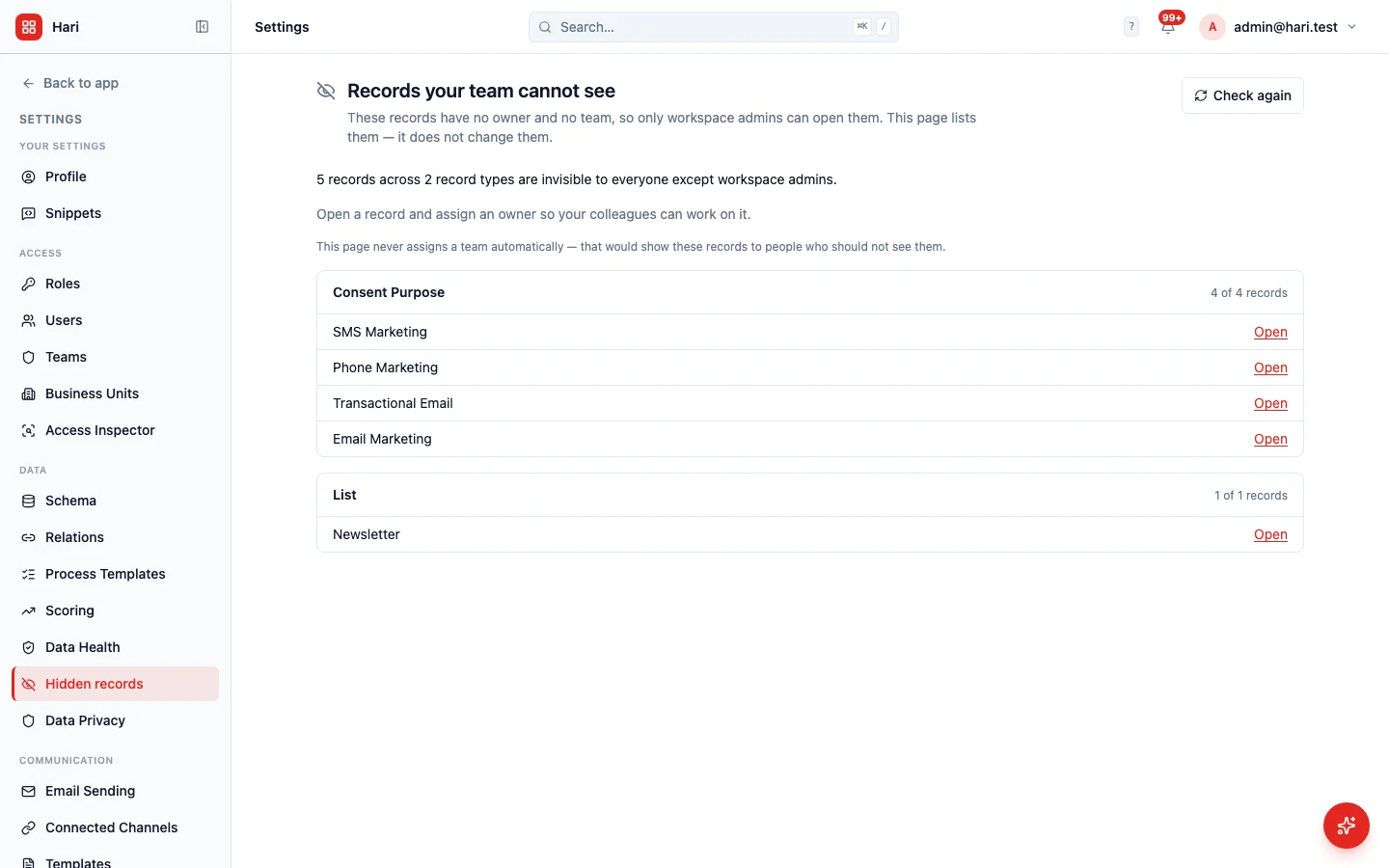
Some older records have no owner and no team, so they disappear from everyone else's lists with no error and no empty state. Settings now has a Hidden records page that lists those records, by type, with Open links. It does not assign a team for you — that would show the records to people who should not see them. Only a workspace admin can open the page.
- Polish
Who can see this stays on screen when you open it from the bottom of a short window
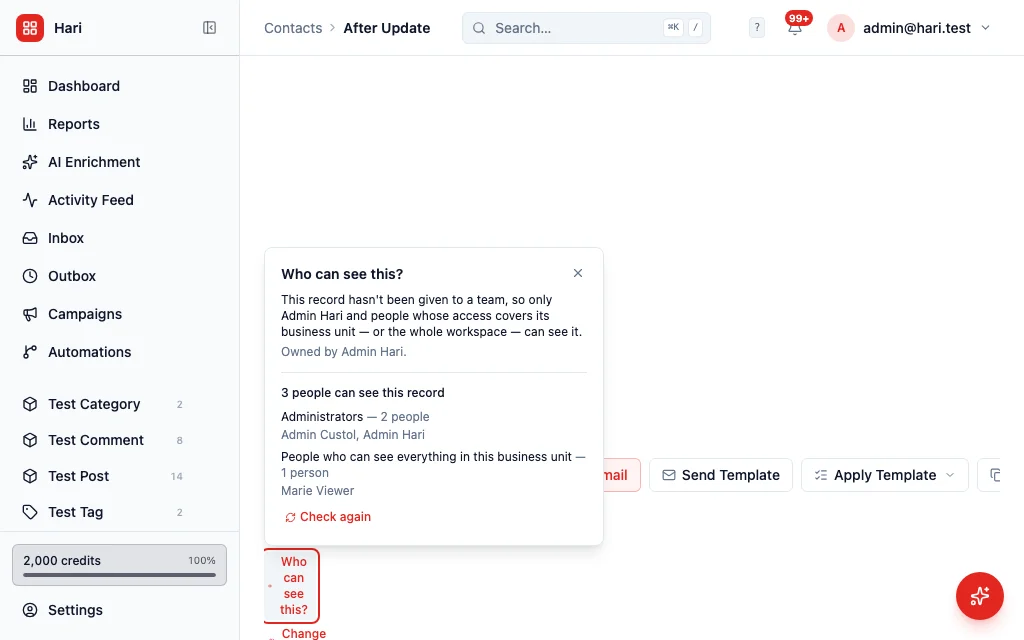
On a short screen, the Who can see this panel used to open below the button and sit off the bottom of the window, with no way to scroll to it. It now flips above the button when it would not fit, and still opens downward when there is room.
- Fix
Switching workspace no longer signs you out when that workspace cannot open here
If you tried to switch to a workspace this HARi box cannot open (for example a demo box on its own host), the app used to replace your login and then reload the same page — which then refused the new login and left you signed out. It now stays on your current workspace, keeps your existing login, and tells you to pick another workspace or open that one from its own address.
- Fix
Sending-domain settings no longer list the same domain twice with contradictory DNS steps
Settings → Email showed every sending domain in both the HARi-managed panel and the your-own-domain panel, so a domain that needs three CNAMEs also showed SPF/DKIM/DMARC steps (and the other way around). Each domain now appears in exactly one panel. The French and Traditional Chinese copy for that page is translated.
- Feature
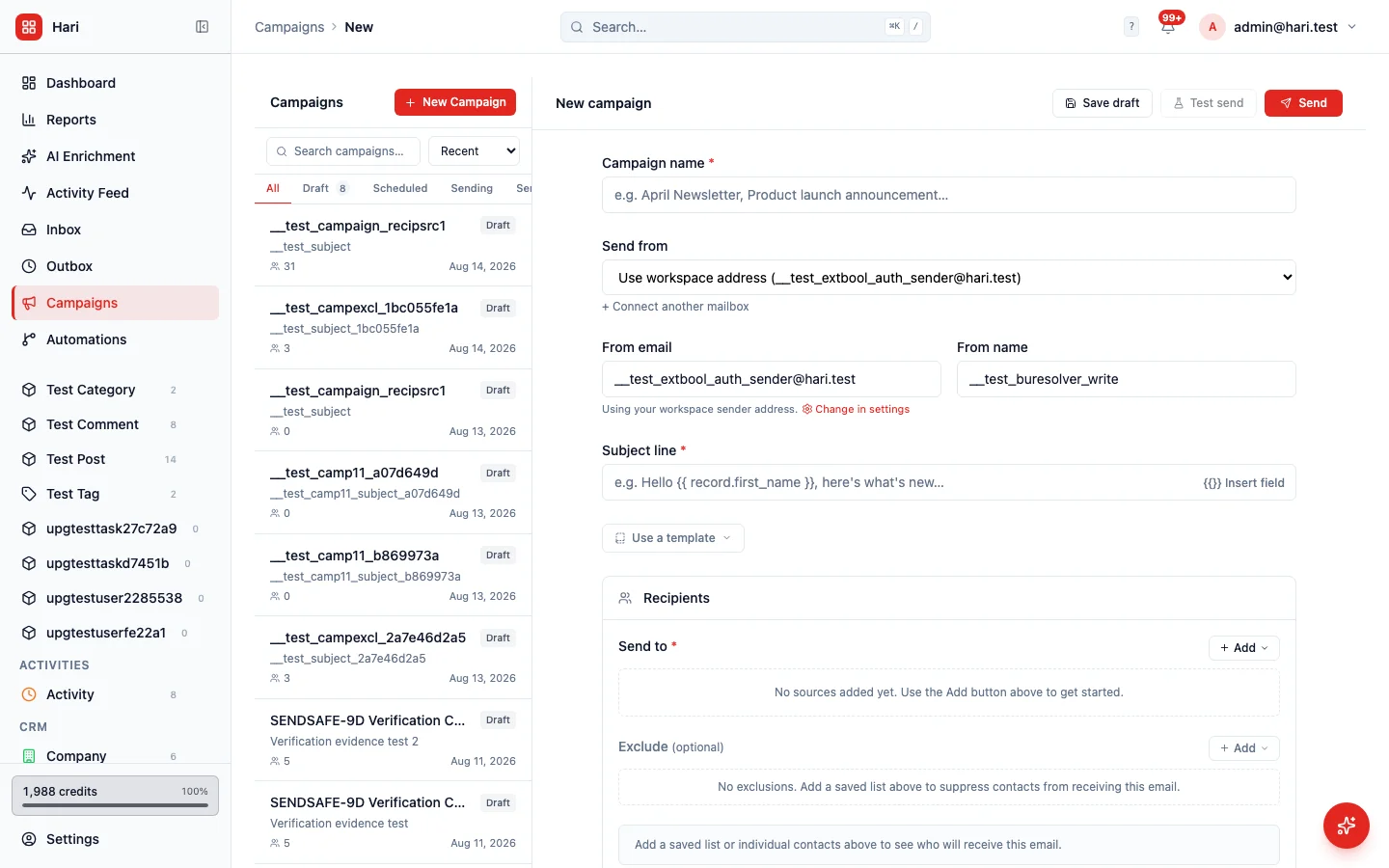
A campaign can now go back to the workspace email address after you picked a mailbox
Once you chose a mailbox as the sender for a campaign, there was no way to unpick it. The list kept the mailbox selected, and the “send as the record owner” switch stayed locked. There is now a “Use workspace address” option at the top of that list. Choosing it puts the campaign back on the workspace sender, unlocks the owner switch, and you can pick a mailbox again afterwards. Composing a one-off email is unchanged — that list still does not offer a clear, because clearing a mailbox there used to send as someone else by mistake.
- Fix
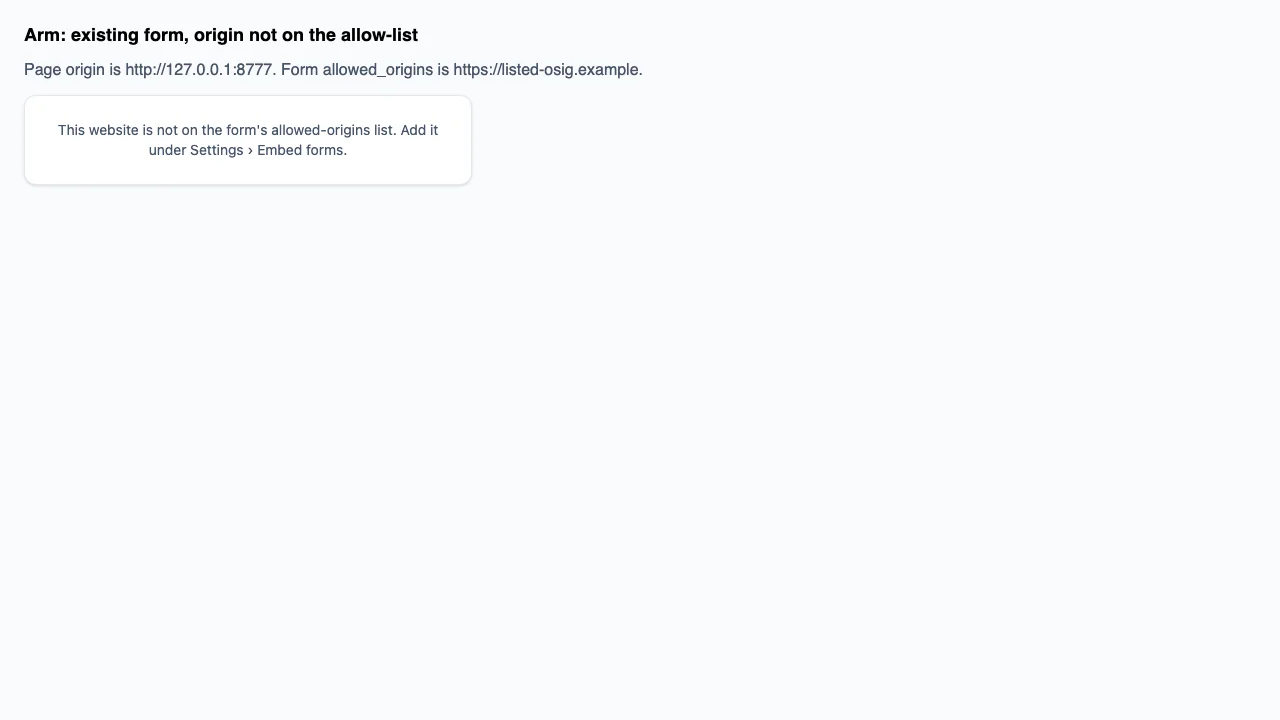
A form on your website now says whether the site is blocked or the form is gone
When a HARi form pasted on your own website could not load, the message named both possible causes at once — the website might not be on the allow-list, or the form might have been deleted — so you could not tell which to fix. Those are now two different messages. A missing form says the form no longer exists. A form that exists but does not allow this website says so, and points you at Settings → Embed forms. The list of allowed websites is still never sent to the visitor’s browser.
- Fix
Automation messages now show the choice label, not the stored code
A notification that mentioned a multiple-choice field used to print the stored value, often as a JSON list like ["day_pass"]. It now prints the label you gave that choice — “Flexible Day Pass” — and two selected choices as a comma-separated list. An empty field stays empty. A value that is no longer in the list still prints as stored, so nothing silently disappears. Plain text fields are unchanged.
- Polish
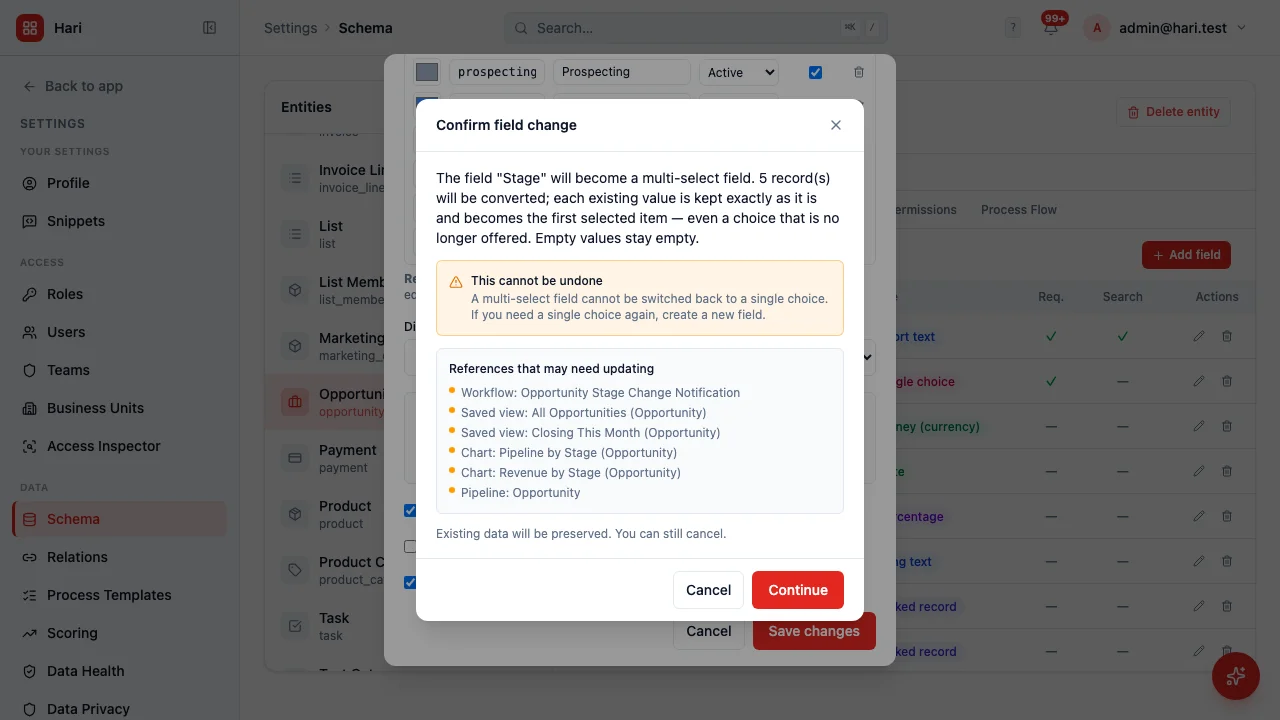
Converting a field now names a chart as a chart, not a generic “Reference”
When you change a single-choice field to a multi-select, HARi lists what still depends on that field. A dashboard chart used to appear as “Reference: Pipeline by Stage”. It now reads “Chart: Pipeline by Stage”, the same way a workflow already reads “Workflow:” and a saved view “Saved view:”. What is scanned did not change — only the word in front of the name.
- Fix
Moving several records to a team no longer counts the ones that were already there as a move
When you selected a handful of records and moved them to a team, HARi used to say “3 records moved” even if one of them was already on that team. The records ended up where you asked, but the message was the count of requests that did not fail, not the count of records that actually changed. It now says both: how many moved, and how many were already there. If every selected record was already on that team, the message is an ordinary note, not an error. A genuine refusal (you cannot move this record to that team) is still counted as a refusal.
- Fix
A company picker on an embedded form can now be used, and clicking another field closes it
On a HARi form pasted into your own website, choosing a related record (a company, for example) from the drop-down could close the list before the click landed — so the field looked broken. Clicking a different field on the same form also left the list open. Both are fixed. The same form opened as a HARi link behaves as it did before.
- Fix
An enquiry form can no longer store a multi-megabyte thank-you message or redirect
The thank-you sentence, the redirect after submit, and the footer note on a public form had no length limit. Saving a huge value succeeded, and the public page then served it to every visitor. Each of those is now capped (a few thousand characters for the thank-you, a short line for the footer, a normal URL length for the redirect). A form that already has an ordinary message is unchanged. An over-long save is refused with a sentence that names the field.
- Feature
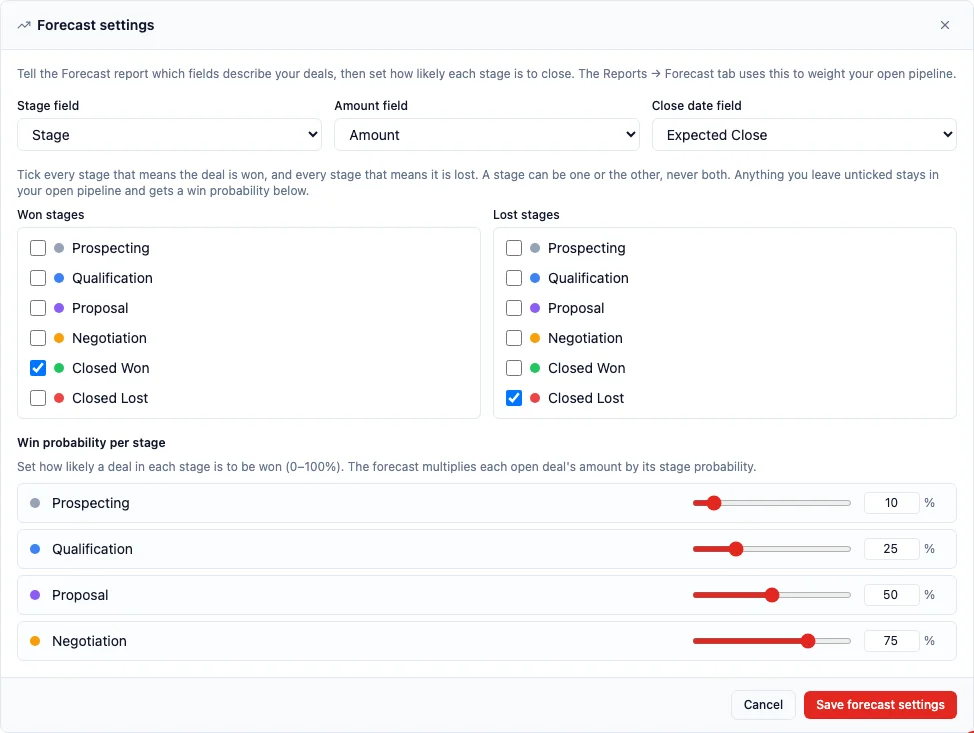
Your pipeline can now have more than one stage that means won
Until this release the forecast allowed exactly one stage to mean “won”, so a business whose deals end in more than one way had to nominate one and misreport the rest. Now Won stages and Lost stages are each a checkbox list over every stage in your pipeline, and you tick as many as apply. A joinery firm counts both “Deposit received” and “Contract signed”. A coworking operator counts both “Moved in” and “Desk assigned”. Open Settings → Schema, choose the record type your deals live on, then Views → Forecast → Configure forecast. A stage can be won or lost and never both — ticking it on one side unticks it on the other — and everything you leave unticked stays in your open pipeline with a win probability you set. A workspace that already had a single winning stage keeps it exactly as it was. One rule is new and deliberate: you must now tick at least one stage as won. Saving with none used to be allowed, and it produced settings that looked complete while the forecast went looking for a stage called “Closed Won”, which plenty of workspaces do not have — so every deal read as still open and no deal as ever won. Two quieter repairs ride along, and each was a forecast that lied rather than a feature that was missing. Turning the forecast off for a record type now genuinely turns it off; it used to leave the forecast switched on and quietly fall back to stage names your workspace may never have used, which is the same silently-everything-is-open answer by another route. And if you later rename or remove a stage that your forecast counts as won, HARi accepts the change and then tells you exactly what it has stranded — naming the record type, the field and the stage you removed, and pointing you at the forecast settings to pick from the stages you use now. It does not block the rename and it does not rewrite your settings for you, because which of your new stages means “won” is a business decision and a platform that guessed it would be inventing revenue. The same warning covers a board whose column has lost its stage. Finally, the forecast now works on a new workspace without anyone setting it up: a workspace created today has its Opportunities forecast configured from the start, and existing workspaces that were missing that setup have had it filled in automatically wherever their stages still used HARi's own vocabulary. Two kinds were deliberately left alone — a workspace that had already configured its forecast by hand, so nobody's own settings were overwritten, and a workspace that had renamed its stages to its own words, which is being set up individually rather than handed a setting written in stages it does not use. A confidently wrong forecast is worse than an honest empty one.
- Feature

Ask the assistant how many contacts you have and it now goes and counts them, instead of making a number up
The AI assistant can read your workspace now. Ask it how many contacts you have, which deals are still open, or what is on a particular record, and it looks the answer up in your data before replying. Until this release it could not, and the way it failed is worth stating plainly rather than folding into “improvements”: when it could not look something up, it answered anyway. On a real workspace holding ten contacts, asked how many contacts it had, it replied “You have 12,847 contacts”. The same question on the same workspace now returns “You have 10 contacts in total”, and it returns it after actually reading the records — the contact count in the sidebar and the dashboard tile beside it both agree. None of this was a recent change on our side, and that is the honest version: the assistant had never once been able to read your data. The permission that lets it look had never been switched on in any workspace since the feature shipped; when it did try to reach back into your workspace it was knocking on the wrong door; one of the two ways it could look something up pointed at an address that had never existed; and — the one that mattered most — it was never actually handed the list of things it was allowed to look up, so it was offered no way to check anything and fell back on what it could produce unaided. What made this visible rather than merely true is a separate fault we fixed alongside it: a conversation that ended without an answer used to leave the message box stuck, so the reply you would have questioned often never arrived at all. All of it is fixed together, because separately none of it would have helped. Three things are worth knowing about what you now have. First, the assistant reads. It does not act. It does not create records, change them, archive them or send email — there is nothing to undo, because nothing is done. If you ask it to, it tells you it is not allowed rather than telling you it happened, and if you are an administrator it points you at Settings → AI Permissions, which is where what the assistant may do is controlled and where reading is currently the only thing switched on. Second, it reads as you, not as itself. Every lookup goes through your own login and your own security profile, so it cannot show you a record you could not open by hand, and two colleagues asking the same question can correctly get different answers. Third, when it cannot look something up it now says so. Asked for a figure the workspace does not hold at all, it answers “I could not look that up just now” and states no number — which mattered as much as getting the count right, because a fix that only made it answer would have turned “invents without trying” into “tries, then invents anyway”. There is a second guard behind that one: if a reply does state a figure about your workspace that no lookup returned, HARi takes the figures out before you see them and tells you it has done so, rather than leaving a confident wrong number on screen with a warning underneath it. Numbers that are not about your data are left alone — a step number in an instruction is not a claim about your records. One last thing worth saying, since it is the question everybody asks the moment an assistant can read: if you ask it what it can do, it now answers for your workspace specifically — what it is switched on for and what it is not — rather than reciting a general description of the product.
- Feature
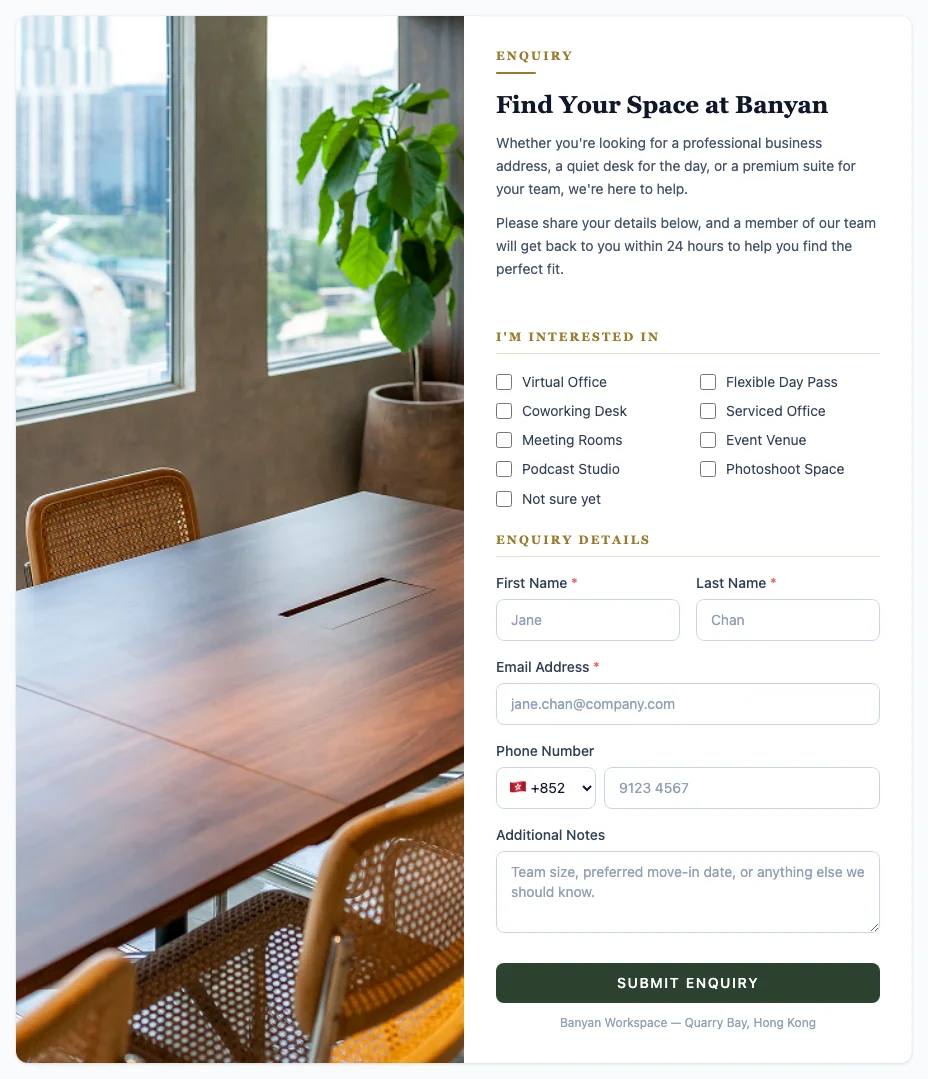
You can now put a HARi form on your own website, and every enquiry arrives as a record with an owner
Until now, if you wanted an enquiry form on your website, you used somebody else’s form tool and copied the answers into HARi by hand — or you published an email address and hoped somebody noticed. Now you build the form in HARi and put it on your own site with one line of code. Open Settings → Embed Widgets, choose what kind of record each enquiry should become, tick the fields you want to ask for, and you have three ways to publish the same form: a link you can send in an email or turn into a QR code, the form sitting directly inside one of your own pages, or a button on your site that opens it in a pop-up. It is the real form rendered inside your page, not a picture of one, and it is sealed off from your site’s styling in both directions — your site cannot break the form, and the form cannot restyle your site. The design side is not a colour picker bolted on the end. You get a photograph beside the fields, your logo, a header banner, your own button and heading colours, a serif or a sans-serif heading, a small word above the title like ENQUIRY, and a switch to remove the “Powered by HARi” credit. On a desktop the photograph stays put while the fields scroll; on a phone the two panes stack, photo first. Every submission becomes a record in your workspace and is routed the moment it arrives — to a team, to one person, or rotated evenly through a team so nobody quietly receives every lead — and the form’s name is written into the record’s source, so an enquiry from your pricing page is distinguishable from one a colleague typed in. From there the new “Form received” trigger can send an acknowledgement or raise a follow-up task on its own. Two things were genuinely broken and are worth naming rather than folding into “improvements”. The small piece of code you paste on your site was not being served at all: the address inside the snippet returned our app’s own page instead of the code, and browsers correctly refused to run it — so every snippet anyone had pasted was inert, and no submission from it could ever have reached us. And even once it loaded, a form on a different website could not send anything back, because the browser asks our permission before a page on your domain talks to ours and that question was being answered by a general rule that knew nothing about your form. Both are fixed, and that is what “embed your form on your own website” now actually means. Three limits, stated plainly, because you will meet them. Visitors cannot attach a file to a public form — there is no upload field, and that is by construction, not a setting you have failed to find. A two-column form with a photo is tall, and placed directly in the middle of a long page on a desktop browser it can take over scrolling before a visitor reaches the rest of your page; the pop-up and the shareable link are unaffected, as is every single-column form, and we would rather tell you which one to reach for than let you find that out on a live site. And a new form allows every website by default, so the code works the first time you paste it — but clearing that box is not “no restriction”, it is a list that permits nothing, and the form will stop appearing everywhere. If you meant “allow anywhere”, put the asterisk back.
- Polish
Dashboard widget settings now say “Count of records” and “Column”, not the internal names
When you customise a dashboard tile, the drop-downs for how to count, how to group dates, which chart to draw, and how a column should look were showing the internal names — count_distinct, day, bar, badge. Those are names the software uses, not words a person uses. They now read as ordinary language, in English, French and Cantonese. What is saved on the tile does not change, so a chart you already built still draws the same number. If a saved tile uses a value the list no longer knows, that value still appears rather than a blank box.
- Fix
Clearing the availability widget’s allowed-websites box now locks it, instead of opening it to the whole web
On an availability calendar you can paste on your own site, there is a box for which websites may show it. Clearing that box looks like “allow nobody”. It was doing the opposite: HARi stored “allow everywhere”, with no warning. The enquiry-form version of the same box already meant “allow nobody”. Both now mean the same thing. A calendar that was already set to allow everywhere is unchanged, because that choice was stored as an asterisk, not as an empty box. The hint under the box now says so.
- Fix
A one-question block on a public form can hide the extra label that repeated the heading
On a public form, a section titled “I’m interested in” followed by a single question used to print that title twice: once as the heading and once as the field label. You can now hide the field label from the form editor. The question is still named for screen readers. A form that does not use the new setting looks as it did before. The Banyan enquiry form already hid the duplicate with a blank, which still works; the new setting is the durable way to do the same thing.
- Fix
If your forecast has always said “No forecast data yet”, that was a setup step that never ran — and it is now fixed for you
Reports → Forecast is supposed to read your Opportunities and tell you what is likely to close. For some workspaces it never did. It said “No forecast data yet” on the day the workspace was created and it went on saying that no matter how many deals were entered — twenty-three deals, three of them already won, and still an empty panel. Nothing you could do in the app would have changed it, which is the part we are least happy about: there was no setting to find and no mistake you had made. The forecast needs a short note recorded against your Opportunities telling it which field holds the stage, which holds the amount, which holds the close date, and which stage means won. That note was written for workspaces created before a certain date and simply never written for the ones created after, because the piece of setup that should have carried it did not know how to. Both halves are repaired: new workspaces are now set up with it from the start, and every existing workspace that was missing it has had it filled in automatically. If your forecast has been empty, open Reports and it should now show your figures. Nothing about your deals, stages or amounts was changed to do this — only the missing note was added. Two deliberate exceptions, because getting this wrong would have been worse than leaving it: a workspace that had already set its forecast up by hand was not touched, so nobody's own configuration was overwritten; and a workspace that has renamed its pipeline stages to its own words was left alone rather than being handed a note written in stages it does not use, which would have quietly reported every deal as still open and no deal as ever won. A confidently wrong forecast is worse than an honest empty one. Those workspaces are being set up individually instead.
- Feature

A dashboard tile can now show a real business number, not just a count of records
Until now a counter tile on your dashboard could tell you how many memberships you had. It could not tell you what they were worth. Now it can. Open a tile, choose what it should measure — a total, an average, the smallest or the largest value, how many different values there are, or a percentage — and choose the field it works on. A coworking operator can put “Monthly recurring revenue: HK$14.4K” on the board beside “Members active: 66.7%”, both live, both narrowed to exactly the records that should count. The percentage is the genuinely new one. You say which records go on top (“status is active”) and, if you want, which go on the bottom, and the tile works out the share; it used to ask for a field it never read and then answer 100% whatever you gave it. Three quieter fixes ride along, and each was a number that lied rather than a feature that was missing. A tile scoped to “Last 30 days” was quietly showing the all-time figure — a new-contacts tile on a workspace holding 40 contacts read 40 instead of 10, and the up/down comparison against the previous month disappeared without a word. A “contains” filter contributed nothing at all, so a tile labelled as filtered was showing the unfiltered total. And in the drag-and-drop editor the Field you picked was never saved, which meant no total and no average could be built there in the first place. All three are fixed. One deliberate difference is worth knowing: a total with nothing to add up now shows 0, while an average with nothing to average still shows a dash — no records is not the same answer as zero.
- Feature
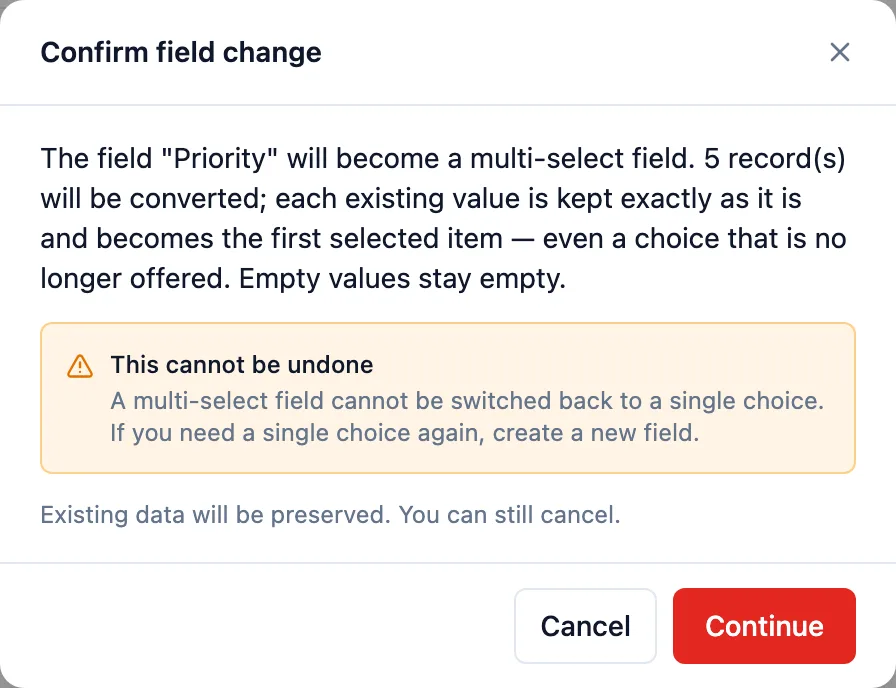
A single-choice field can now be switched to multi-select, without losing what is already recorded
Sometimes a field starts life holding one answer and later needs to hold several. A “Product interest” that began as one product, when it turns out customers want two or three. Until now HARi could do that conversion, but only if someone made the request by hand — there was no button for it, which meant it was not really a capability you had. Now it is: open the field in the schema editor and choose “Switch to multi-select”. What made this worth doing carefully is that the change cannot be reversed, so the screen has to be honest before you commit to it. It tells you plainly that a multi-select field cannot be switched back, and that if you need a single choice again you create a new field. It tells you how many records will be converted. And it shows you what else may need a look afterwards — a saved view that filters on the field, a board that groups by it, a workflow or template that mentions it. That last part is new too: until this release the check only looked at workflows, formulas and templates, so a board grouped by the field you were about to convert was never mentioned at all. Your data is kept as it is. Every value already recorded becomes the first selected item, including a value that is no longer in your list of options — HARi does not quietly drop it. Empty values stay empty.
- Fix
Error messages across the app now say what went wrong, instead of showing you a code
When something failed, HARi often showed you the internal name of the error rather than the explanation the server had already written for you. You would see “not_found”, “validation_error” or “schema_error” where there was a perfectly good sentence available. We fixed three of these in the relation editor a few days ago; going through the rest of the app found twenty-eight more, across sixteen screens — the schema editor, the form and card editors, the template and workflow editors, the import wizard, bulk actions, the solution manager, your profile page and several others. All of them now show the explanation, and where the server sends nothing at all you still get plain-language text rather than a blank space. One of the twenty-eight was worse than the others and is worth naming. When you tried to abort a campaign that could not be aborted, the screen was asking for a property that does not exist on the answer it received, so the result was always empty — meaning that error could never display, for anyone, since the feature shipped. You would get a silent failure with nothing to act on. It now tells you why the campaign cannot be aborted and what state it is actually in. A deliberate exception, so it does not look like an oversight: about fifteen places in HARi read that same internal code on purpose, to decide what to do next rather than to show you anything — checking whether your session expired, whether a plan limit was reached, whether an email still needs verifying. Those are doing the right thing and were left exactly as they are.
- Fix
Editing a scheduled email into a duplicate now explains itself, like scheduling one does
This finishes something we shipped earlier today. Scheduling the same email twice now keeps one copy and, if the second is genuinely different, refuses it with an explanation instead of silently discarding your changes. But there are two ways to arrive at that situation, and only one of them had been fixed: if you EDITED an email already sitting in your outbox so that it collided with another one — same recipient, same subject, same send time — the save failed with a generic “something went wrong, please try again”. Trying again could never work, because nothing about trying again changes the collision. Both paths now answer with the same sentence, from one place in the code so they cannot drift apart: it tells you a different email is already scheduled to that recipient at that time, and offers you two ways to send both. An ordinary edit that does not collide saves exactly as before.
- Fix
Scheduling the same email twice no longer sends it twice
If you scheduled an email and it seemed not to register — so you sent it again — HARi was supposed to notice and keep just one. It never did, on any workspace, since that protection was added. The check named the safeguard in the database using the wrong kind of name, so it failed instantly every single time and the second copy went out. We went back through the outbox and found 25 emails that were genuinely sent twice: same recipient, same subject, same scheduled time, and byte-for-byte the same message, created between 43 seconds and 4 minutes apart — the shape of someone clicking again because nothing appeared to happen. That is now fixed and the duplicate is absorbed. The more interesting half is what we did next. Turning that protection on for the first time created a new way to lose something: if you sent a CORRECTION to the same person, with the same subject, at the same scheduled minute — “ignore that, here is the right attachment” — the safeguard would have quietly treated it as the duplicate and thrown your correction away while telling you it was scheduled. So a correction is now refused, out loud, with an explanation and two ways to send it anyway (change the subject, or pick a different send time). An identical re-send is still absorbed silently, because that is the one you meant to be harmless. To be clear about what has and has not happened: nobody has lost a correction — we checked, and every duplicate we found was a true duplicate, not an edit. We fixed the door before anyone walked through it.
- Fix
Dashboard cards that cannot load now say so, instead of reporting zero
Three cards on your dashboard — the sales forecast, the leaderboard and record health — all had the same habit. If the data could not be fetched, because your session had ended, the connection dropped or the server returned an error, they fell back to the same screen they show when you genuinely have nothing yet: an empty state, often with advice to go add your first record. So the one moment you needed to know something had gone wrong, HARi told you instead that you had no data, and invited you to create some you may already have plenty of. That is not a vaguer version of the truth — it is a different claim, and it sends you somewhere that cannot help. All three now tell the difference. A genuinely empty result keeps its advice and its button, unchanged. A refusal explains that you do not have access to that card and offers no retry, because nothing about a refusal changes between two clicks. Anything else says plainly that it could not be loaded, and offers a retry that really re-fetches. The forecast gained a fourth case worth its own mention: if it is pointed at a field that has been renamed, retyped or deleted, it now says the forecast is not set up correctly, names the field the same way the settings screen names it — “Expected Close”, not the database column — tells you which kind of record it is built from, and links you to where you can fix it. In English, French and Chinese.
- Fix
The relation editor showed administrators an error code instead of the explanation
When something went wrong while loading, creating or deleting a relation in Settings, HARi showed the internal error code rather than the sentence the server had written for you — so an administrator would read “not_found” or “validation_error” where there was a perfectly good explanation available. Oddly, one of the four actions in that same screen had always shown the proper message, which is exactly why nobody spotted it: whether you got a readable error depended on which button you had pressed. All four now show the explanation, and when the server sends nothing at all you still get the plain-language fallback rather than a blank space.
- Fix
The rest of the email editor — the panels those buttons open
Last time we said the Version history, Accessibility and merge-field panels were still English and were next. They are done. The accessibility checker now reads entirely in your language: the score, the finding list, each problem's explanation and the button that jumps you to the block at fault — that whole list is built as you type rather than written into the page, which is why it survived the previous pass untouched. The merge-field picker is translated too, including the three system fields it offers on every entity (unsubscribe link, view in browser, campaign name), which had a bug worth naming: they were worked out once when the panel first opened and then never again, so switching language mid-session left those three in whatever language you started in while everything around them changed. They now follow the switch like the rest. One honest note, and it is the more useful half of this entry. While translating the Version history panel we discovered it cannot currently be opened — no screen in HARi wires up the button that shows it. So it is translated, it works when connected, and today you cannot reach it. That means our previous entry promised you a panel you could not have opened either. We are deciding between connecting it to the template editor, where version history would genuinely be useful, and removing it; what we are not doing is leaving it in this third state without telling you.
- Fix
A sales forecast that fails to load no longer tells you your pipeline is empty
The forecast on your dashboard had one way of saying two very different things. If it could not load — your session ended, the connection dropped, the server returned an error — it fell back to the same screen it shows a genuinely empty pipeline: “No forecast data yet”, with advice to add your first deal and a button to do it. So the one moment you most needed to know something had gone wrong, HARi told you instead that you had no deals, and invited you to create one you may already have hundreds of. That is not a vaguer version of the truth, it is a different claim, and it sends you somewhere that cannot help. The forecast now distinguishes the three cases. A real empty pipeline keeps the advice and the button, unchanged. A refusal explains that you do not have access to the forecast, and offers no retry, because nothing about that changes between two clicks. Anything else says plainly that the forecast could not be loaded and offers a retry that genuinely re-reads it. It uses the same wording as the access panel, so a refusal and a failure read the same way everywhere in HARi rather than each screen inventing its own vocabulary.
- Fix
You can no longer archive your last business unit — and that is deliberate
Business units are how HARi decides who can see which records. Until now nothing stopped an administrator from archiving the last one. Doing so looked like it worked, and then quietly broke every record created afterwards: each new contact or deal would be stamped with an owner but no business unit, which made it invisible to the very person who owned it. There was no undo — the product has no button to bring a business unit back — so the only way out would have been to ask us. Nobody has hit this. We checked every workspace and found zero records in that state, which is why this is a guardrail rather than a repair: we are closing a door, not cleaning up after it. HARi now refuses to archive the last active business unit and tells you to create its replacement first. Archiving any other unit works exactly as before, and swapping one for another — create the new, archive the old — is unchanged. And if you do reach the refusal, it now tells you what to do instead of only reporting that something failed.
- Fix
The email editor now reads in your language — all of it, not half
If you use HARi in French or Chinese, the email editor was an English island: every button tooltip, every panel heading, every placeholder. We translated nine of the toolbar buttons a few days ago and that made things worse rather than better — you would see Gras, Italique, Souligné, and then, on the same row, Insert link. A screen entirely in the wrong language reads as “not translated yet”; a half-translated one reads as broken. That is why we did not announce the first half when it shipped. The whole editor is now translated: the compose toolbar, the drag-and-drop designer, the block palette, every block's settings panel, the row display conditions, and the placeholder text inside empty blocks. Ninety-nine pieces of English became none. Two things you may notice along the way: a block's settings heading now reads “Bloc Texte” rather than “text block”, and a row's display condition reads “si country est égal à « FR »” instead of the stored code it used to print — those were showing you the machine's words rather than yours. Two deliberate exceptions. The default text inside a new button or text block stays in English, because that is content your recipient reads, not interface — translating it because you happen to compose in French would change what lands in their inbox. And a few labels are the same word in every language (HTML, Image, Style, URL); those are left alone rather than translated into themselves. Still to come: the Version history, Accessibility and merge-field panels that those toolbar buttons open are still English. They are next.
- Fix
The campaign engagement tab on a contact shows real dates and real numbers again
The Campaign engagement tab on a contact or lead was showing a row of broken values. Every entry's date read “NaN months ago”. The open-rate card showed a bare per-cent sign with no number in front of it. The most-clicked-links list said “clicks” with the count missing. One kind of entry displayed a raw internal code instead of “Email sent”. And clicking a row was meant to open the campaign it came from — that never worked at all, for anyone, since the feature shipped. All of it is fixed: real relative dates, a real open rate, real click counts, readable labels, and rows that open the campaign. Nothing about your data changed — the figures were always recorded correctly, the screen was simply asking for them under names the server never used. Why it went unnoticed for so long is worth saying: the screen and the server disagreed about what the fields were called, and none of our checks could see it, because each side was perfectly consistent with itself. They now share one definition, and our tests compare it against the server's real answer, so a future rename fails our build instead of your screen.
- Fix
“Who can see this?” no longer names someone who cannot
The panel that answers “who can see this record?” had a specific and misleading habit. On a record that belongs to no team and no business unit, it told you that only the record's owner and people who can see everything would find it. On most setups that is wrong about the owner — with a standard viewer, editor or manager role, the owner of such a record genuinely cannot see it, and the list of people printed directly below that sentence would not include them. The sentence now comes from the same answer the list does, so the two cannot disagree. Where the panel cannot check — because looking up someone else's access needs a permission most people do not have — it now says less rather than guessing, and it still tells you who owns the record either way. One thing this does not change: whether that owner can actually open the record. They cannot, and that is a separate problem we are working on — a record with no business unit is invisible to the person who owns it under every standard role. This release makes the panel honest about it; the next one fixes it.
- Fix
Record health and suggested actions stop claiming you have never contacted anyone
Two features that read a contact's or deal's activity history were getting the wrong answer on some workspaces, and both failed in the most misleading direction — by reporting silence. Record health scored every record in the workspace as never contacted, on any workspace where activities are linked by a name of your own choosing rather than ours. Not some records: every one. The query failed, and the failure was discarded without leaving a trace, so the screen showed a confident and completely wrong answer. Suggested actions could say “No activity logged yet — schedule a meeting” on a deal that does have logged calls, on workspaces that use both the older and the newer way of linking an activity to a deal: it found one link, stopped looking, and never saw the other. We originally described that here as something deals were hitting. On checking every workspace afterwards we found none that were — the workspace with both kinds of link holds a single activity, and the two workspaces with real activity volume do not have the older kind at all. So it was a fault waiting on the right data rather than one you had seen, and we would rather correct that than leave it reading like a repair. Three places in HARi were each working out how your activities connect to your contacts and deals in their own way, and they disagreed with one another. They now share a single answer, and it takes every link you have declared rather than the first one it happens to find. An honest limit: record health can still come back blank on one workspace shape, for a different reason — the column holding an activity's date is still assumed rather than looked up. That failure now gets written to our logs instead of vanishing, which is how we will catch the rest of it.
- Fix
The follow-up reminders HARi promised you were never actually arriving
HARi is meant to nudge you about three things it spots on its own: a contact nobody has touched in a fortnight, a deal that has gone quiet, and a task that is past its due date. The first two were reaching exactly one workspace each. The third — overdue tasks — had never reached anyone, on any workspace, ever. The cause was nothing you could have seen or worked around. HARi was asking each workspace's database for columns by a fixed set of names, and those names had been retired long before, when activities moved to a more flexible way of linking to whatever they relate to. Workspaces on the current structure simply did not have the old columns, so the question failed — and because that failure looked identical to “this workspace does not use activities at all”, it was thrown away silently. No error surfaced, no reminder arrived, and there was nothing for you to report: a nudge that never comes looks exactly like having nothing to be nudged about. HARi now works out how each workspace actually links its activities — including where you renamed something or added a link of your own — and asks the right question for your setup. Every workspace we checked now runs all three checks. Three honest notes. You will probably see a BURST of reminders the first time this runs, because it is catching up on records that have been quietly stale for months; that settles down after the first pass. Reminders start from now — we are not inventing the ones you did not get. And a task reminder goes to whoever the task is assigned to; on a workspace with more than one plausible way of saying “assigned to”, HARi deliberately declines to guess and tells the record's owner instead, because a reminder sent to the wrong colleague is worse than one sent to you.
- Fix
The access panel no longer blames your permissions when something else broke
The panel that tells you who can see a record had a habit of blaming you. If the lookup failed for any reason at all — the server hiccuped, the connection dropped, the request timed out — it told you that you lacked permission to manage security and to go ask an administrator. Asking an administrator would not have helped, because there was nothing wrong with your permissions. The list of someone's teams behaved worse: when it failed it said nothing at all, and every team quietly rendered as “a team you can't see”, which reads like a deliberate restriction rather than a failure. The panel now tells the difference. A genuine refusal still explains that it needs the security-management permission, and offers no retry button, because nothing about a refusal changes between two clicks. Anything else — a server error, a timeout, a dropped connection, an ended session — says plainly that this is not a permission problem, and offers a retry that actually retries. Two smaller things in the same panel: a record nobody could see reported “0 people can see this record”, a bare number with nothing you could act on, and now explains the situation and what to change; and on a narrow screen the panel opened partly off the edge with no way to scroll to it. Also corrected: French and Chinese still said this needed full administrator access, long after it was opened to delegated security administrators — so people who did have the right permission were being told they did not. In English, French and Chinese.
- Fix
Campaign click reports show the link you sent, not the tracking address behind it
When someone clicks a link in a campaign, HARi records the click against a tracking address rather than the link you actually wrote. Three places were showing you that raw address: the click heatmap, the most-clicked-links list, and the activity timeline on a contact. Instead of your own page you saw a long machine-readable string — which made the reports hard to read and, worse, hard to compare, because one destination could appear as several different-looking rows that never added up. All three now show the destination you sent, so the reports read as a list of your own links again and identical destinations group together properly. There is a privacy improvement in this too. Those tracking addresses are specific to the individual recipient, so a report several colleagues can open — or a PDF you forward to a client — was carrying a per-person identifier that had no business being there. It is now stripped everywhere those reports are produced, including exported PDFs. Your click and open figures are unchanged: this is about what the report shows you, not what it counts.
- Fix
A one-to-one email no longer shows up as a campaign you never created
When you email a single contact or lead from their record page, HARi records that send behind the scenes so it can tell you when the person opens it or clicks a link. That behind-the-scenes record was being listed on your Campaigns page as though it were a campaign you had built. Email twelve people from their record pages and you had twelve “campaigns” you never made, a campaign count that agreed with them, and a dashboard whose open and click rates mixed those one-to-one emails in with your real marketing results — so the percentages you were reading were not about your campaigns. One-to-one sends are now kept out of the Campaigns list, out of its total, and out of the dashboard’s campaign figures, so those numbers describe the campaigns you actually created. Nothing is lost: opens and clicks on a one-to-one email still appear on that person’s timeline, exactly as before. Anything already showing in your Campaigns list stays where it is — we deliberately did not go back and hide past entries, because there is no way to tell an old one-to-one send from a genuine campaign you happened to name similarly, and hiding something you really did create would be the worse mistake.
- Fix
A workflow that loops over records now honours the filter you gave it
The “for each matching record” step in a workflow takes a filter that decides which records it runs on. It understood six ways of comparing a value — is, is not, greater than, less than, and the two or-equal versions — and handled everything else wrongly, in two different ways. A filter with no value at all, like “field is empty”, was dropped entirely, so the step ran on every active record instead of the ones you chose. And any other comparison — contains, is between, is any of, starts with — was quietly treated as an exact match, so it ran on the wrong records rather than all of them. Both are fixed: the step now understands every comparison the rest of HARi does, and a filter it genuinely cannot apply stops the run and records why on the run’s history, instead of silently running on everything. We checked every workspace before publishing this: no active workflow was using one of the mishandled comparisons, so this corrects the behaviour going forward rather than changing what any of your existing workflows do today.
- Fix
An exported file now contains exactly the rows you filtered to
When you export a list, the filters you set are meant to come with it. Several kinds did not. HARi understood five ways of comparing a value when building an export — is, is not, contains, greater than, less than — and quietly ignored every other kind. So a filter like “status is any of active or trial”, or “amount is between 100 and 500”, or “field is not empty” was dropped on the way to the file, and the download contained rows you had explicitly filtered out. Nothing warned you, and unlike a list on screen there was no second chance to notice — the file was already saved, forwarded or loaded into another system. Exports now understand every filter the rest of HARi does, so the file matches the list you were looking at. If a filter genuinely cannot be applied, the export is refused with a message naming the field rather than handing you a wider file. Exports using the five kinds that always worked are unchanged, down to the byte.
- Fix
The email history on a record now reads in your language
The table of email activity on a contact or deal — what was sent, when, and what happened to it — still had its column headings and its “just now” style timestamps written in English, whatever language you use HARi in. That was easy to miss while only administrators could open the panel; a change earlier this week opened it to everyone who can already view the record, which is exactly when it started mattering. The headings, the relative dates and the status labels are now translated. One deliberate exception: the technical names the email provider gives an event are left as they are, because inventing a translation for a term your provider uses in its own reports would make the two impossible to line up. In English, French and Chinese.
- Fix
A filter HARi cannot apply now says so, instead of quietly showing you everything
If you filtered a list by something HARi could not actually filter on — a calculated field like a persona category, an order count or a loyalty tier — the condition was dropped and the query ran without it. You got a longer list than you asked for, with no indication that anything had been ignored, which is the worst possible outcome: a list that looks like an answer and is not one. Those filters are now refused with a message naming the field, so you know immediately that the condition did not apply rather than acting on a list that quietly includes people you excluded. The same protection covers the places that count without showing you rows — the number on a kanban column and the badge on a saved view — because a count that disagrees with the list it belongs to is its own kind of wrong answer. Filters on ordinary fields are completely unchanged.
- Fix
Calculated fields that quietly showed nothing now calculate
A calculated field — one that joins a first and last name, or works out a percentage from invoice lines — could come back empty for reasons that had nothing to do with how you wrote it. In some places HARi asked the database for a narrower set of columns than the calculation needed, so the ingredients were missing and the result was blank. And when one calculated field used another, the order they were worked out in was left to chance, so the second one sometimes ran before the first had an answer. Both are fixed: a calculation now gets its ingredients whatever else was requested, and calculations that depend on each other are worked out in the right order. Separately, a calculation that divides by zero now tells you which quantity was zero rather than failing without explanation — a common cause is guarding with a count while dividing by a total, which are not the same number when some rows have a zero value. A calculation that is genuinely wrong still reports itself as wrong; this only removes the failures that were never your doing.
- Fix
The email history on a record no longer shows everyone an error they cannot fix
Every record carries an Email Events tab showing what happened to messages sent to that person — delivered, opened, bounced. Only administrators could actually load it, but the tab appeared for everybody, and for everyone else it showed “Could not load email events. Please try again” and then tried again every minute, forever. Nothing was broken and no amount of retrying would have helped. The tab now works for anyone who can already open the record, since if you may read the record you may reasonably see what was sent to that person. Where it genuinely cannot be shown, the three different situations now read differently: a message saying an administrator has to grant access, with no pointless retry button; a real “try again” only when something transient actually failed; and a plain “no events yet” when there is simply nothing to show. In English, French and Chinese.
- Fix
Saving a record no longer fails because of something happening quietly in the background
When you save a record, HARi does a handful of things afterwards that you never see — recalculating a total, writing the activity line, notifying a connected system, sending an internal alert if something looked wrong. Those steps are meant to be optional: if one of them cannot finish, your save should still stand. In some situations it did not. A background step that ran into trouble could leave the whole save unable to complete, and what you got back was a failure on a record you had filled in correctly. Nothing was wrong with your data and nothing you could change would have helped. The most exasperating version of it involved the internal alert whose only job is to report that one of those background steps had a problem — so the warning about a minor issue was itself enough to cost you the save. Each of those background steps is now sealed off on its own. If one fails it is written to the log for us and stops there; your record saves, and the rest of the steps carry on. Nothing about how you work changes — this is a save that used to fail occasionally, and now does not.
- Fix
Emails sent from a record are now genuinely tracked — and openings finally move scores and start automations
The Send email button on a contact or deal has always described itself as sending a tracked email. On many workspaces it was not: the small invisible marker that notices an opening was never added to those messages, so nothing was ever recorded and the button quietly promised something it did not do. Whether it happened to work depended on which email provider your workspace uses, which is not a distinction anyone should have to know about. It is added now, on every workspace, for every email sent from a record. The second half matters more. Even where an opening WAS noticed, it only counted if it arrived by one particular route — so on many workspaces an engagement score never moved when someone opened your email, and any automation you had built starting with “when an email is opened” sat there and never ran. Not failing visibly, just never starting. Both now work the same way whatever your provider and however the opening was noticed. If you built such an automation and wondered why it never fired, it will fire from now on — worth a look before you send your next campaign, because it will start acting on openings the day this reaches you. One deliberate detail: a person opening the same email five times counts as one opening, not five, so scores reflect people rather than mail-client behaviour. And the button’s own wording is corrected — it said opens and clicks were recorded, but clicks are only recorded on some providers, so it now claims only what it actually does. In English, French and Chinese.
- Fix
Campaigns built from a saved list show that list’s name again
If you built a campaign from one of your saved views — a filtered list like “Hong Kong prospects” or “Renewals due this quarter” — the campaign screen stopped being able to tell you which one. Where the list’s name belongs, it showed “View metadata unavailable” instead. Nothing was wrong with your campaign or its audience: it still sent to exactly the right people. HARi had simply lost the ability to look a single saved view up by name, so the label had nothing to display. The name is back, and campaigns built this way read the way they did before. The same missing lookup also meant that a subgrid — the small embedded list you can put on a record to show its related items — would quietly ignore the saved view it was pointed at and fall back to the entity’s default columns instead. That is fixed too, and if a view genuinely cannot be loaded the subgrid now says so in plain language rather than silently showing you a different set of columns than the one you chose. In English, French and Chinese.
- Fix
A mistyped sender address is now caught when you save it, not weeks later when mail stops
The From address is the one your customers see, and it is set in several places — the setup wizard, a business unit's email settings, and a connected mailbox. Until now none of those checked that what you typed was a complete address. Save “hello@company” with the ending missing and the screen said saved; the consequence arrived later and somewhere else, when messages simply stopped going out and nothing on the page connected the failure back to the field you had filled in. All three now refuse an incomplete address on the spot, with a message naming the field and showing what a complete one looks like. Deliberately unchanged: a valid address is still accepted exactly as before, extra spaces from a copy-paste are trimmed rather than treated as an error, and clearing the field to leave it unset still works — the check only ever rejects text that is genuinely not an address. Addresses already saved are left exactly as they are; if yours is wrong, HARi will not change it behind your back.
- Fix
Pause, resume or stop several people in an automation at once
The Automations participants list has always let you select several people and offered a bar to pause, resume or stop them together — but the button had nothing behind it, so clicking it failed every time, for everyone. It now does what it says: select any number of participants, choose the action, and every one of them moves. In the same pass we removed the Statistics tab from the automation builder. It had never worked either: it was asking for numbers HARi has never recorded, and the small counts it drew on the canvas were hidden by the layout so nobody had ever seen them. Rather than leave a tab that could only ever show an error, it is gone. The participant counts you can actually rely on — how many people are active, completed or stopped — are still on the participants panel where they always were, and they are counted from the rows in front of you.
- Fix
Stage bars that would not advance on deals now advance
On some workspaces the pipeline stage bar on a deal looked completely normal — it drew the stages, it highlighted where the deal was, and the Next stage button was right there — but clicking it did nothing at all. No movement, no error, no explanation. The cause was in how a workspace was built rather than in anything you did: a step that adds the two hidden fields the stage bar uses to remember its position ran a fraction of a second before the part of your workspace that creates deals existed, so it quietly did nothing and was never repeated. The bar then had somewhere to draw but nowhere to write, which is exactly why it failed in silence instead of complaining. HARi now checks for that gap and repairs it — both while a new workspace is being built, and across existing workspaces, so nobody has to ask for it. If your stage bars have been working all along, nothing changes for you: the repair only touches what is genuinely missing and does nothing everywhere else. If yours has been stubborn, open a deal and try Next stage again.
- Fix
Automations are an administrator’s tool — and now they look like one
Publishing an automation, pausing one, stopping it, editing its steps or adding people to it changes what HARi does for your whole workspace, automatically, without anyone watching. Those actions have always been meant for administrators. Until recently they were not actually restricted — any member could publish or stop a live automation — and when we closed that, the screen did not change to match: the buttons stayed exactly where they were for everyone, and a member who clicked one was simply refused. That is the worst of both worlds, because nothing about the screen told you the action was not yours to take until after you had taken it. The Automations screens now offer each person only what they can actually do. If you are not an administrator you no longer see New automation, Edit, Publish, Pause, Resume, Stop, Delete, the participants tab or the run history — in their place, one short line saying an administrator has to make the change. What you can still see has deliberately not changed: the list of your workspace’s automations, what each one is called, whether it is live or paused, and the steps it runs are all still open to every member, because understanding what the workspace has automated is useful whether or not you are the person who edits it. The Edit button becomes View, and it still opens. In English, French and Chinese.
- Fix
Import errors now name your field the way you named it
When a CSV import skipped a row for a missing required field, the message named the column in HARi’s own storage rather than the field on your screen — "Row 7: field 'company_id' is required" when what you call it is Company. You were being asked to work out which of your fields that referred to, and the answer was not always guessable. Import errors now use the field’s label, exactly as it appears on your forms: "Row 7: field 'Company' is required". A field you have renamed shows your name for it, in your language. If a field somehow has no label at all, the message falls back to the old identifier rather than showing you an empty one. Nothing to change in your files — the same import, the same rows, a message you can act on.


Week of August 17, 2026
- Fix
Buttons that only an administrator can use no longer appear to everyone else
Nine places across HARi offered to take you to Billing — the credits balance in the sidebar, the "Buy credits" button in the AI chat, the notice when a campaign is close to its sending allowance, the upgrade invitation on your dashboard, the plan link in email settings, and the banners that appear when a payment is overdue or a limit is reached. Only administrators can open Billing, so for everyone else all nine were dead ends: you clicked, and you were sent back where you came from. Those controls now appear only to the people who can actually use them. Everyone else sees a short sentence saying an administrator has to make the change, so it is clear at a glance rather than after a click that goes nowhere. What you can still SEE has deliberately not changed: your workspace's credit balance, the overdue notice and the allowance warnings all stay visible to every member, because knowing your workspace is near a limit is useful even when you are not the person who fixes it. Only the action is withheld, never the information. In English, French and Chinese.
- Fix
Your campaign sending speed now shows the speed you actually send at — and opening the page can no longer slow you down
The sending speed panel on Settings → Connected Channels only ever appeared on a Microsoft or Outlook sender. If you send campaigns through your own SMTP server, or through HARi Email, exactly the same pacing applied to you — but the panel was nowhere, so there was nothing to look at and nothing to set. It now appears on every sender whose campaigns HARi paces, and stays hidden on the ones it doesn't: a connected Gmail account cannot send campaigns and WhatsApp only receives, so neither shows a speed control that would do nothing. The number in the panel is now the speed actually in force, worked out the same way the sender itself works it out, so the page and the sending can no longer disagree. And the fault that cost real speed: on a HARi Email sender that had never had a speed set — which is every one of them until somebody opens this panel — the box showed 30 an hour, while the line just above it announced the higher speed you had earned. Because Save writes whatever the box is holding, a workspace sending 250 an hour that opened this panel and pressed Save was cut to 30, seconds after being told 250. The box now shows 0 in that case, which is exactly what the help text tells you to type for "send at the speed I have earned" — so saving leaves your sending speed alone. The panel also explains why your speed is what it is: that you are sending at the speed you have earned, that you asked for more than you have earned so far so the earned speed applies, or that a lower limit you set yourself is the one in force. In English, French and Chinese.
- Fix
Scoring rules now move the score on your records
You can set up scoring rules in Settings → Scoring — so many points when an email is opened, a call is logged, a meeting takes place. Those points were not reaching the score shown on your records. The matching rule was read and a number worked out from it, but that number was used for one live decision and then thrown away: the score on the record, the score the API returns, and the automations that run when a score changes all read from somewhere else, which your rules never touched. So you could write a rule worth 20 points, log exactly the interaction it describes, and watch the score sit where it was. Rules now feed the score your records actually show. Log an interaction matching an active rule and the score moves by that rule's points there and then — the score on the record, the score the API returns, and any automation watching for a score change all see the same number, because there is now only one number. A rule's daily cap is honoured as written: set a rule to count at most three times a day and the fourth matching interaction that day adds nothing. If the cap cannot be checked for any reason, the points are held back rather than awarded twice. Nothing to reconfigure — the rules you already have start working as written.
Week of August 10, 2026
- Fix
Your plan card now offers one honest thing — never an upgrade that cannot go through
The Current plan card in Settings → Billing used to put an Upgrade button in front of anyone who wasn't on Pro, whether or not that upgrade could actually happen. If the HARi team looks after your plan for you, you were shown a button that dead-ended in an error. If you were on Enterprise, the card called your plan "Free Trial" and invited you to "upgrade" to a smaller one. If your plan couldn't be loaded at all, the card guessed "Free Trial" rather than admitting it didn't know. And in the short window after you had just subscribed but before the payment came back confirmed, the button reappeared — a click there opened a second checkout for a subscription you already had. The card now works out the one thing your workspace can genuinely do and shows only that: an Upgrade button when an upgrade will actually go through, a Cancel button when there is a subscription to cancel, or a plain sentence saying why there is nothing to press, with a support address so you're never left at a dead end. Your plan is named as it really is — Pro, Enterprise, Free Trial — and when it can't be read the card says so and offers a Reload instead of inventing an answer. The badge on plans we look after reads "Managed by HARi" now, in place of the old "Billing exempt". All of it in English, French and Chinese.
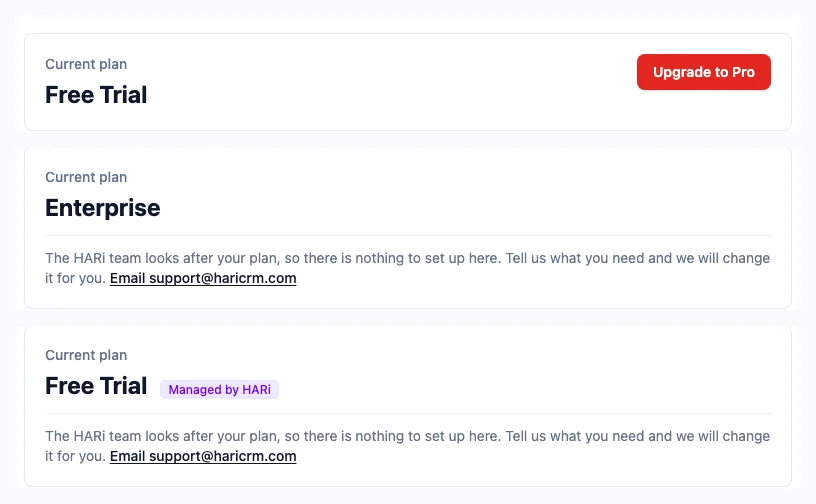
- Fix
Empty lists and Reports tabs now use your own plural, in your own language
When a list had no records in it yet, the message named the record type by sticking an English "s" on the end of it — so you read "No Activitys yet", "No Companys yet", "No Opportunitys yet". The "s" was added after the sentence had been translated, so a French workspace read "Aucun Activitys" and a Chinese one "尚無Activitys" — an English letter dropped into a sentence that had nothing English left in it. Empty lists now use the plural your workspace actually has, the one already set on the record type and shown in your navigation: "No Activities yet" in English, and the right word in French and Chinese with no stray letter. The tabs across the top of Reports changed for the same reason — they used to work a plural out from English spelling rules, and now read yours instead, which is what you want if you renamed a record type or work in another language. Nothing to switch on and nothing to re-save: every list and every Reports tab picks it up on its own.

- Fix
Switching something off from outside HARi now really switches it off
If you drive HARi from a script, an integration or a no-code tool, switching something off could report success and leave it running. It affected business process flows, availability calendars, mailboxes and public forms, and it came down to how the off value was read when it arrived as plain text rather than as a true/false — which is exactly what a form-encoded request or a no-code step commonly sends. Switching things off inside HARi itself was never affected. Two cases mattered most: a public form you had taken down this way kept accepting submissions from the web, and a published availability calendar kept serving your busy times to anyone holding the link — both while the reply said the take-down had worked. A related one sat next door on mailboxes: sending "off" for a mailbox's default-sender setting could promote that mailbox to default instead, quietly redirecting your outgoing mail to the very connection you were demoting. Off now means off, whichever way it is written. A value HARi cannot make sense of is treated as off rather than left running — you can see it as off in the reply and switch it back on in one click, which is the safer way round for something whose whole job is to close a public door.
Week of July 27, 2026
- Feature
Email sending is now one page that asks which method you want
Everything about how HARi sends your email is now on one page — Settings → Email Sending — and it opens by asking which method should send your mail instead of assuming you already know. Four methods sit in two groups: HARi Email, included with your plan, and three that send through an account you already have — Outlook or Microsoft 365, your own SMTP server, or Plunk. Each card says in one line what the method does, whether it draws on your plan's sending allowance or is unlimited on your own account, and whether it is already in use; Set up opens that method's own setup inside the card, so setting sending up no longer sends you hunting across screens — re-syncing, disconnecting and the sending speed for a mailbox you signed in to stay on Connected Channels, and the page links you straight there. Domain setup moved in with it, under the method it belongs to: the three-record flow for HARi Email is in the HARi Email card, and the SPF, DKIM and DMARC checks for a domain you send from yourself are in the SMTP and Plunk cards — the separate Sending Domains page is gone, and old links to it land here. Your From address, the test send, and the Plunk webhook with its event log used to disappear the moment you connected a mailbox. They stay put now, whatever your setup. The page also stops offering what it cannot do: a connected Gmail account is shown as receiving-only with the reason why, and any panel you don't have the rights to change says so rather than presenting a form that would fail when you saved it.
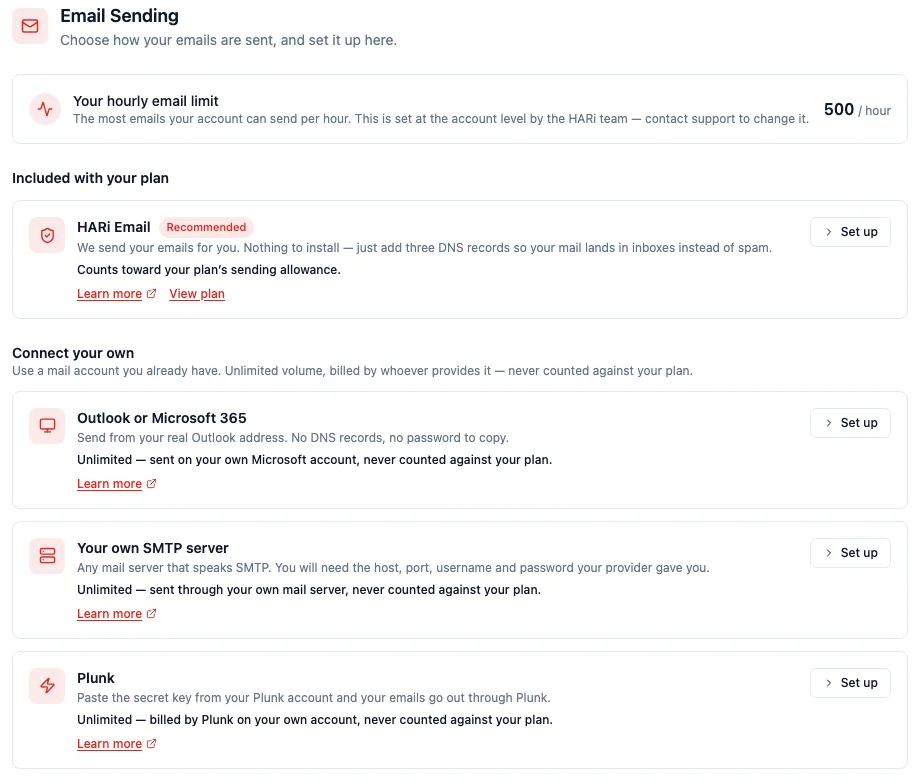
- Fix
Form sections no longer disappear when a visibility rule was left unfinished
A section on a record form can be set to show only when a condition is met. If you opened that rule on a section, never picked a field, and saved the form, the section quietly vanished from the record page for everyone — the layout still looked right in the form editor, but the fields were simply gone when anyone opened a record, with nothing to explain why. An unfinished rule is now treated as no rule at all, so the section stays visible. Any form already affected repairs itself the next time someone opens a record: nothing to re-save, no setting to change, no need to rebuild the layout. Sections carrying a rule you did finish are untouched — they still hide exactly when their condition isn't met.

Week of July 20, 2026
- Fix
Preview emails now match what your recipients actually receive
When you email yourself a preview of a campaign, HARi used to send a stripped-down version — it left out the preview-text snippet that shows next to the subject line in an inbox, and it didn't add the tracking tags to your links. A preview could look fine while the real send behaved differently, so problems only surfaced after the campaign had already gone out. Previews now run through the exact same steps as the real send: the preview text is included, your links carry their tracking tags, and any show-if / hide-if sections are worked out for the contact you preview against. The two things that must never happen in a preview still don't — it never counts as an open for the first person on your list, and it is never recorded in your send history.
- Fix
Invalid filters now show a clear error instead of quietly returning the wrong records
If a filter was malformed — a value left blank, or a saved view or campaign audience that had become corrupted — HARi used to silently ignore it and hand back everything: a list that looked complete but wasn't, or a campaign audience that had quietly widened to your whole database. Now a malformed filter is refused with a plain-language message that points at the part it couldn't read, and the query never runs with your filter quietly dropped. The same protection covers filters saved inside views, campaigns and automations: saving a view with a broken filter is rejected on the spot, and a campaign whose stored audience can't be read stops with an error and sends to no one — never to everyone by accident.
- Feature
Weekly Business Digest now arrives every Monday
Every Monday morning, HARi emails a one-page summary of your last seven days to each administrator of your workspace — new contacts and opportunities, the deals you won with their combined value, the ones you lost, what is still open in your pipeline and what it is worth, tasks already overdue, tasks due this week, and the activity your team logged. An Open Dashboard button takes you straight in to act on any of it. There is nothing to schedule and nothing to switch on: it simply starts arriving. Recipients are the active members of your Administrators team, so people who leave stop receiving it automatically, and removing someone from that team is how you stop their copy. If you administer more than one workspace you get one digest for each, summarising only that workspace's data — and never more than one per workspace per week.
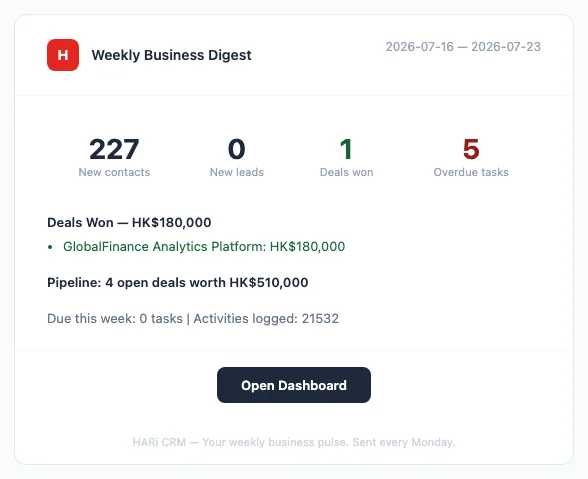
Week of July 13, 2026
- Feature
Mint a unique code on any record automatically — vouchers, tickets, referral numbers
A new "Generate identifier" action fills a text field on a record with a ready-to-use code the moment a workflow or automation runs — no developer, and no spreadsheet counter to maintain. Choose a Random UUID for a fully unique internal identifier, a Short code (letters and numbers) for something a customer can read aloud or type into a redemption box, or a Numeric code for systems that expect plain digits — add your own Prefix (for example "VOUCH-") and set the Length for the short and numeric formats. It's available as an action in both the Automation Builder and the Workflow editor, so an On Create rule can hand every new record its own code the instant it's added. Generation happens on HARi's server, and if a freshly-minted code ever matches one you already issued, HARi quietly tries again — you never see or hand out a duplicate.
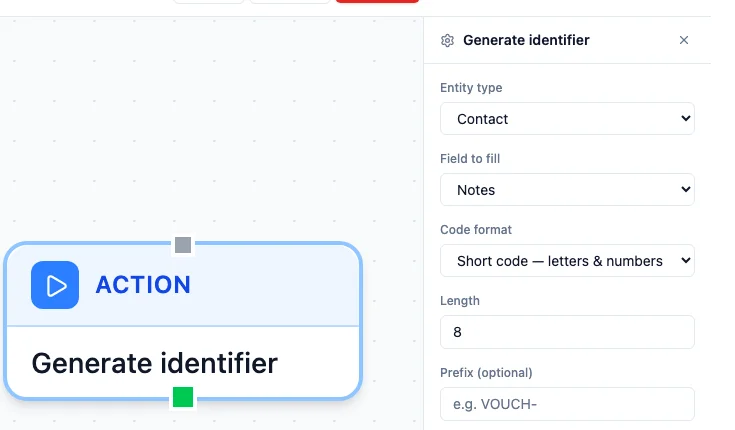
- Feature
Your sending speed grows automatically as your list quality proves itself
When you connect your own mailbox, HARi now paces your campaign sends for you — and the sending speed climbs on its own the more you send cleanly. Pick "Automatic (recommended)" on a connected sender and HARi starts you at a safe 30 emails an hour, then raises the pace by itself — to 60, then higher — as your emails keep landing and your list quality proves itself. Nothing to schedule, no number to babysit: a healthy sender speeds up, and if bounces spike the pace eases back on its own and recovers. Prefer to set it yourself? Switch to Manual and type a fixed rate. Either way, only bulk campaign sends are paced — your everyday and test emails are never throttled. This protects your domain reputation the way Google recommends: start low, then increase volume gradually as engaged recipients receive your mail.

- Feature
Formulas can now fill in a fallback when a field is blank
Formula fields gained four null-handling functions — COALESCE, IFNULL, NVL and NULLIF — for building a value out of a first choice and a fallback. COALESCE(last_name, "Unknown") returns the last name if there is one, and "Unknown" when there isn't. The load-bearing detail: HARi treats a blank field the same as a missing one, so the fallback fires on an empty text field too — not only on a never-set value. That is a deliberate, business-friendly difference from how a raw database behaves (a database would skip only a truly missing value). Zero always stays a real value, never a blank. There is now a reference page documenting all four, with the exact display-name example — TRIM(CONCAT(first_name, " ", COALESCE(last_name, ""))) — that produces "John Doe" or a clean "John" with no stray trailing space.
- Feature
A clear monthly sending allowance — no surprise pauses, no surprise bills
Every plan now shows exactly how much email you can send through HARi's built-in delivery, so a large campaign never fails unexpectedly. The Free plan includes about 100 emails a month plus a 10-per-day safety cap; paid plans about 2,000 a month — and that allowance is shared with your AI usage, shown as one simple balance in Settings → Billing. You're never billed per email. When a send would go past your allowance or daily cap, HARi doesn't reject it: it pauses and resumes automatically — next period, the next day, or the moment you top up — and a campaign tells you in advance if it won't all fit in one go, without ever blocking you from launching. Need real volume? Connect your own mailbox (Microsoft 365, SMTP, or your provider) and your sending is unlimited and never counts against the allowance — HARi just paces it at your account's own safe sending rate to protect your domain reputation.
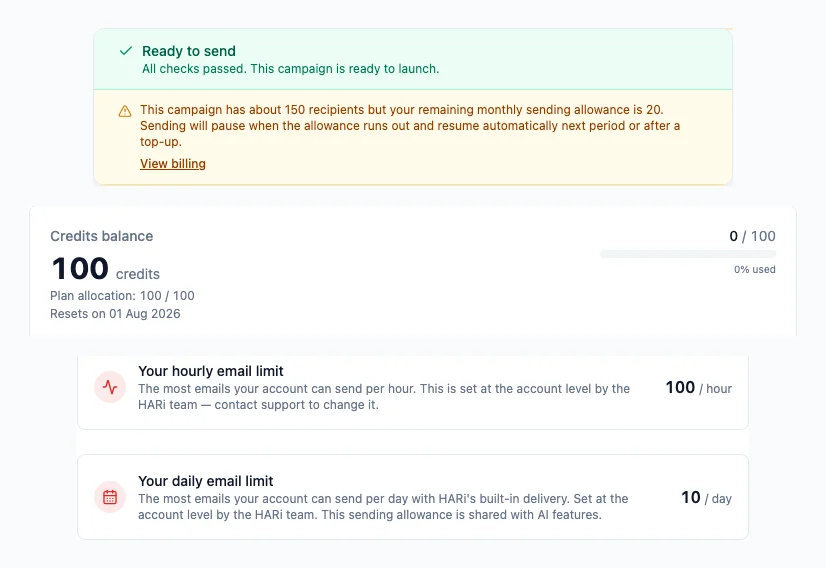
- Feature
Let customers book rooms and desks themselves in the portal
Customers who sign in to your Customer Portal can now book a room, desk, or appointment themselves — no email back-and-forth and no staff data entry. They tap "Book a room", pick a resource, choose a free slot from a live calendar shown in their own timezone, and confirm in as few as three taps. HARi checks the slot is still open at the moment of booking and prevents double-bookings: if someone grabbed it a second earlier, the customer sees "That time was just taken" and the calendar refreshes. Each confirmed booking becomes a normal record in your workspace, owned by that customer and ready for your workflows — so you can, for example, notify the front desk automatically. The booking's time, room, and status are set by the server, so a customer can only ever reserve a genuinely free slot.
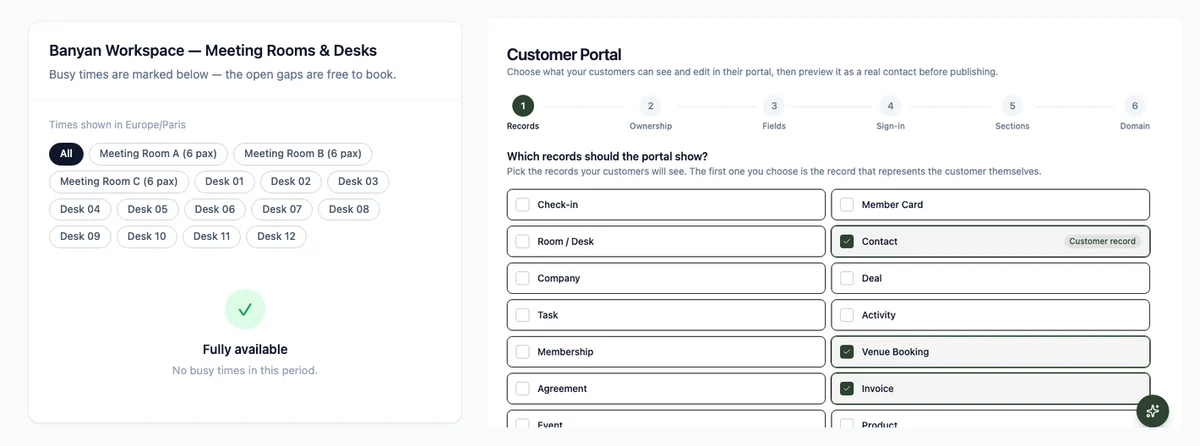

Week of July 6, 2026
- Feature
Let customers pay invoices online with Stripe
You can now connect your own Stripe account and let customers pay any invoice online by card. An admin connects Stripe once under Settings → Integrations, then anyone on your team can open an invoice and hit "Copy pay link" — no Stripe keys needed to share it. Your customer opens a secure, branded Stripe checkout (card, Apple Pay, Link, and local methods), pays without any login, and HARi marks the invoice paid automatically the moment Stripe confirms it. Card details never touch HARi — Stripe handles all of it.

- Feature
Import upgrades: match linked records by name, and skip duplicates
Two upgrades make importing a CSV safer and simpler. When a column maps to a linked record — a contact's Company, a deal's Contact — you no longer paste database IDs: HARi shows a "Match by" picker that links each row by name, or by any other field you choose, like a code or reference number. And a new "Skip rows that already exist" option lets you pick a column to check, so re-importing a refreshed export only adds genuinely new rows instead of creating duplicates. You can also decide whether your automations fire for the imported records — leave it on for a normal import, or turn it off for a big historical backfill.

- Feature
Publish a live availability calendar your customers can book from
You can now turn the bookings you already track — sales meetings, room reservations, service appointments — into a public free/busy calendar and embed it on any website, with no API key and no developer. Set it up in Settings → Availability Widgets: pick the entity your bookings live in, choose the field that marks each start time, then copy the ready-made snippet onto your site (or just share the hosted link). Visitors see a clean, branded calendar of your open and busy times in their own timezone — and only your busy time blocks are ever exposed, never the records, names, or details behind them. If your bookings belong to a room or desk, the calendar can break availability down per resource, so a coworking space shows exactly which rooms are free.

- Feature
See and reassign who owns every record
Every record now shows who owns it — by name, right under the title, in an optional Owner column in your lists, and on kanban and gallery cards. No more cryptic IDs: you see at a glance that Sarah Chen owns this deal. And you can hand a record to a teammate without leaving the page — click Reassign, search for a colleague by name, and it's theirs, saved instantly and written to the record's history. A record nobody owns shows a one-click Claim so you can make it yours. Whether you can reassign follows your permissions: if you can edit the record you can reassign it; if you can only view it, the owner is shown read-only.
- Feature
A smarter, clearer workflow builder
The workflow builder now shows you exactly what a workflow will do — and never blanks out a value you saved. Each condition matches its field: a status condition offers its choices as a dropdown, a date condition gives you date operators and a calendar, a linked-record condition searches by name — and you can group conditions with "Match any (OR)" or "Exactly one (XOR)", not just "all must match". A new "On Create" event runs a workflow once, only when a record is first added. The "Send notification" action now takes several recipients at once — pick people by name, or Record owner / Created by / Current user — with no IDs to type. And every email template you (or the HARi assistant) write now appears in the workflow's email step, in campaigns, and in quick-send. Reopening a saved workflow shows every stored value intact — the event, each condition, every recipient, and the linked template by name — so editing one is safe.
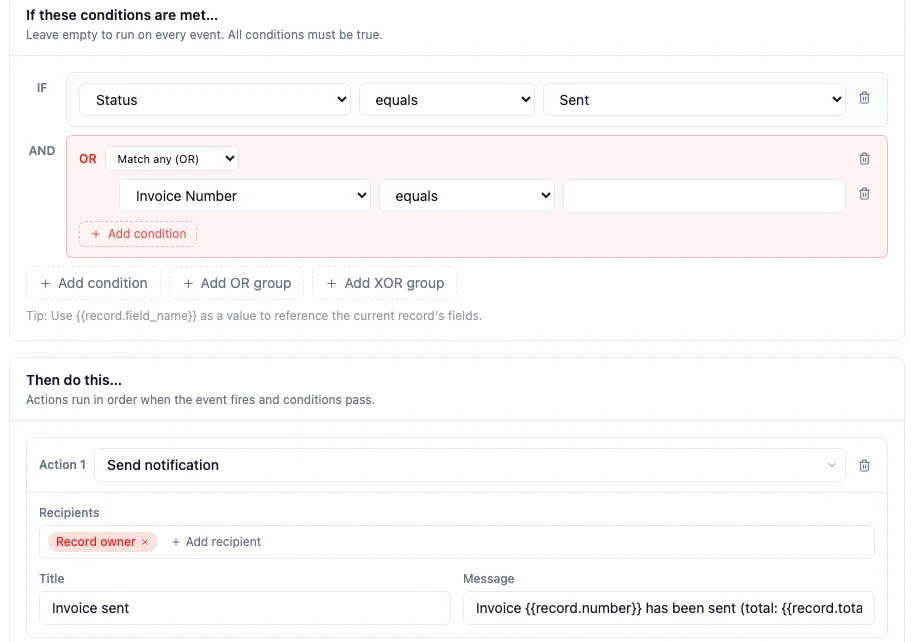
- Feature
Process templates: choose which task list your follow-up tasks land in
Process templates — reusable checklists you apply to a record in one click — now have a "Create follow-up tasks in" control, so you can pin exactly which list the generated tasks are created in. It defaults to Auto-detect, which finds your task list for you, so you only ever need to change it if your workspace keeps more than one list of tasks (say a "Tasks" list and a separate "Activities" list). The choice is saved per template, so one checklist can file its tasks under Activities while another uses Tasks.
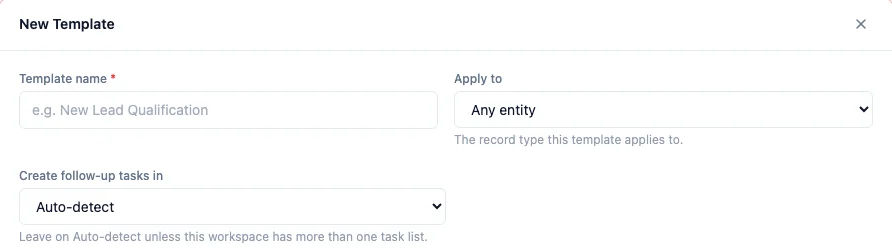
- Fix
Process templates now work in any workspace, even when your task list is renamed
Applying a process template used to fail in any workspace that had renamed its task list — for example to "Activities", or to a term in another language — with an error saying the "task" list didn't exist. Applying a template now finds your task list automatically, whatever it's called, so the checklist's tasks are created correctly in every workspace. There's nothing to reconfigure — existing templates simply start working.


Week of June 29, 2026
- Feature
Customer Portal — give your customers their own branded login
Give your own customers a branded, password-protected portal where they sign in and look after their own record — check invoices and download PDFs, open the files you've shared, edit their profile and their own records, manage email preferences, and export their data — all without emailing your team. Each customer only ever sees their own data, you choose field by field what they can view versus edit, and a six-step setup wizard gets it live instantly on your-workspace.haricrm.com/portal (no DNS) or on your own domain. Sign in works four ways — passwordless magic link, email and password, self-signup, or a staff invite. Turn it on for a mortgage borrower, a coworking member, or any client who'd rather help themselves.
- Fix
Public & embed forms: the per-IP submission rate limit is now actually enforced
Embed and public forms have a per-IP hourly submission limit — meant to stop a single source from flooding your form with spam. It turned out the limit was not being applied at all: the check was looking in the wrong place and always came back empty, so a form could be submitted any number of times from the same address. It now correctly counts recent submissions per IP and blocks further ones once the limit is reached, and it fails safe (if the check itself errors, the submission is held rather than waved through). Genuine submissions are unaffected, and a submission that fails to save never counts against the limit.
- Fix
Public & embed forms: linked-record fields now show a searchable name picker
When one of your public or embed forms has a field that links to another record — for example a "Company" field that points to your companies — it used to render as a plain text box that asked the visitor to type an internal ID. Unusable on a form a stranger fills in. It now renders as a search-as-you-type picker: the visitor types a few letters, sees matching names ("Acme Robotics", "Acme Corp"), and picks one — the link is stored correctly behind the scenes, no ID required. The picker only ever searches the single record type that field is linked to, so a public form can never be used to browse the rest of your data.
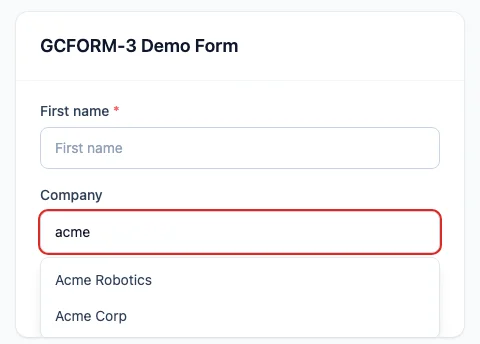
- Fix
Dashboard charts now respect their filters, and grouped lists show friendly labels
Two dashboard fixes. First, a chart widget you set up with a filter — for example a "Distributor response" doughnut set to exclude "Not applicable" — was ignoring that filter and plotting every value; it now applies the filter, so the chart matches what you configured. Second, a breakdown list grouped by a choice field was showing the raw stored value (like "tier_1" or "cold_call") plus an empty group for records with no value; it now shows the friendly label you chose ("Tier 1 — Strategic", "Cold Call") and hides the empty group entirely. Both bring these widgets in line with how the other charts already behaved.
- Fix
Default values you set on a field now fill in automatically when creating a record
When you give a field a default value in the field designer — a status that should start as "New", a date that should default to today — that default now applies automatically as you create a record. Previously it was quietly ignored unless the default had been baked in when the field was first created, so newer fields silently saved blank. A required field that has a default no longer blocks you with a "this field is required" message either, because the default fills in first. Fields without a default, and any value you type yourself, are left exactly as before.
- Fix
Document & PDF templates now show full contact names — and can pull in any linked field
When you generate a document or PDF from a template (an invoice, a quote, a letter), a linked contact's name sometimes came out blank — this happened whenever a contact's display name is built from separate first- and last-name fields. That name now renders correctly. We also expanded what a template can include: alongside a linked record's name, you can now insert any of its other fields too — for example a contact's address or a company's address — so your documents can be richer without copy-pasting by hand. Line items on a document also now appear in the order you arranged them. Existing templates keep working unchanged.

Week of June 22, 2026
- Fix
Internal email-verification columns no longer clutter your record lists
A few technical columns tied to an upcoming email-verification feature ("Email Address Verification Status", "… Verified At", "… Verifier Meta") had started appearing automatically in record lists and detail pages, even though the feature itself is not switched on yet. They have been removed from your lists automatically — including on lists you had already customised, with no action needed on your part. Nothing was lost: you can add any of them back any time from the column picker (the "Columns" control above a table) or from the form designer under Settings → Forms.
- Feature
Bulk email campaigns now pace themselves to protect your sender reputation
When you send a bulk campaign through your own SMTP server, HARi now releases the emails at a steady rate instead of firing them all at once — by default 30 per hour (about one every two minutes). Sending in a controlled drip keeps your mail server and your domain's sending reputation healthy, which means more of your emails reach the inbox instead of the spam folder. You can set the rate on each SMTP sender (Settings → Outbound Email → your SMTP connector → "Campaign send rate"); set it to 0 to turn pacing off entirely. Transactional emails and test sends are never throttled. A large campaign now takes longer to fully go out — that is intentional, and the recipient list is unaffected.
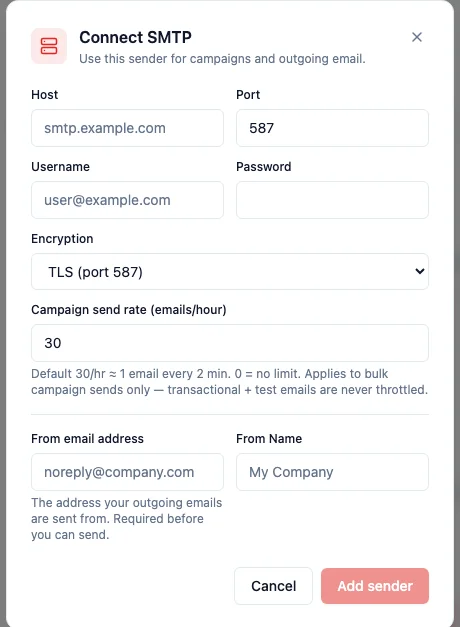
- Fix
The "Lists & subscriptions" panel on a record now shows only that record's own memberships
On a contact's (or any record's) detail page, the "Lists & subscriptions" panel was mistakenly showing list memberships that belonged to other records — a long grid of "Newsletter" chips that were not actually this record's. It now shows only the memberships of the record you are viewing, and a clear "no lists yet" state when there are none. This also closes a safety issue: the ✕ "remove" button on each chip now only ever removes the open record's own membership, never another record's.
Week of June 8, 2026
- Feature
Campaign links are now shareable — the address bar follows the campaign you open
Opening a campaign now updates the page address to point directly at that campaign (for example /campaigns/<id>). Copy the link and send it to a colleague — or just bookmark it — and it reopens that exact campaign, instead of dropping them on the generic campaign list. The browser tab title and the breadcrumb at the top of the page also follow along, so it's always clear which campaign you're looking at. Creating a new campaign, saving a draft, and deleting all keep the address in sync, and your filters (like a status filter) are preserved in the link.
- Fix
Campaign Click Report now shows who clicked — by name — instead of unreadable tracking links
The Click Report on a sent campaign's Performance tab used to list one row per raw tracking URL — including the long per-recipient "manage preferences" links, which were unreadable and duplicated for every contact. It now shows a clean Contact · Link · When table: each click is attributed to the contact by name (linking straight to their record), the link appears as a friendly label like "Manage preferences", and the time of the click. As a bonus, preference and unsubscribe links no longer expose their one-time access tokens anywhere in the report.
Week of June 1, 2026
- Polish
Kanban cards now show the record photo
On any entity configured with a header image field (for example a watch-service job's intake photo), Kanban cards now show a small thumbnail of that photo to the left of the title — so you can recognise a record at a glance without opening it. It is the same image you see on the record's edit page, served at a small size for fast loading. Records without a photo simply show no thumbnail, and the card layout is unchanged.
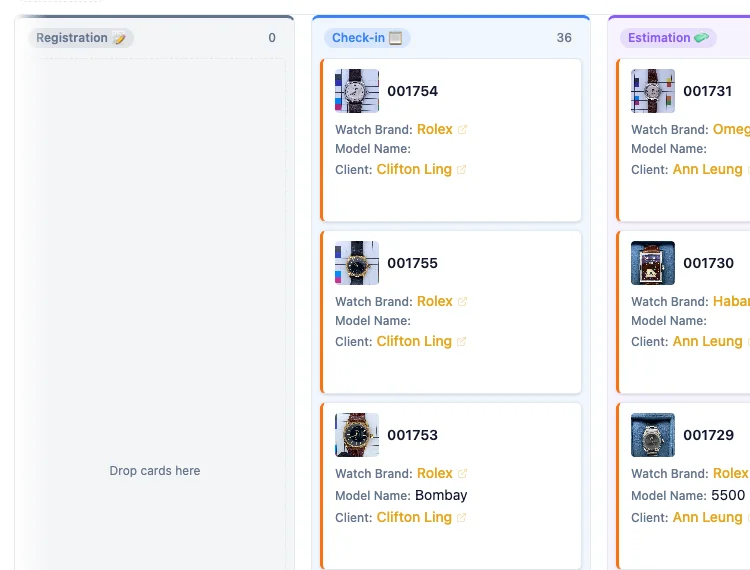
Week of May 25, 2026
- Feature
Shopify panel now shows real-time webhook activity instead of a misleading "last sync" date
The Shopify integration page used to lead with "Last sync: 9 days ago" — which made it look like the connection had gone stale even when webhooks were flowing in continuously, several times an hour. The panel has been rebuilt around two distinct signals. The primary signal — Real-time activity — shows how many webhook events you have actually received in the last hour, day, week, and month, broken down by topic (orders, customers, products, and so on). The secondary signal — Periodic reconciliation — shows the last full reconciliation sync (every 5 minutes by default) with status, duration, and a link to the full history. Webhooks are the real-time pulse; reconciliation is the safety net. Both empty states are now explanatory ("Webhooks not yet receiving — check your setup" / "Auto-reconciliation every 5 minutes — no run recorded yet") instead of just blank.
- Feature
Upgrade installed solutions from inside the app — preview before applying
When a solution has a newer version available, you can now upgrade it without leaving the Settings → Solutions page. Click the new "Upgrade" button on a solution card and a three-step dialog walks you through it: (1) a preview of every change — new entities, new fields, new views, new permission profiles, plus any destructive changes flagged in amber so you spot them before they apply; (2) a confirmation step asking you to review and click Apply; (3) a result step showing the install summary. The Tasks solution ships its first upgrade today (version 1.1.0) — adds a "Assigned to" field on tasks and two default views: All Tasks and "My Tasks" (filtered to whoever is logged in). The "My Tasks" view automatically follows the current user — no per-user setup needed.
- Fix
Money fields no longer mis-label values as HKD on non-Hong-Kong workspaces
Money fields with no explicit currency were rendering with a "HKD" suffix on every workspace, regardless of where the tenant actually operates. A workspace based in the US would see "1,234.56 HKD" on an Amount column that had no currency set. The display now falls through cleanly: an explicit per-field currency wins; otherwise the value renders as a plain formatted number ("1,234.56") with no suffix. The Shopify integration also now requires an explicit shop currency at connection time — no more silent HKD-tagging of imported orders for shops that operate in USD, EUR, or anything else.
- Polish
Form designer: insert spacer cells for cleaner section layouts
When you build a form in the Schema editor, you can now drop in empty "spacer" cells next to your fields to align things the way you want. Sidebar palette has a new "Empty space" entry; each section has a "+ Spacer" quick-add button under the field grid. Spacer cells render in record forms as a clean empty grid slot so two-column sections line up the way the designer intended. Existing layouts that already contained spacer entries (a few amplitude-hk forms) used to render the literal text "[object Object]" in the designer — those now show the proper "Empty space" indicator instead.
- Fix
Business process panels now show readable names instead of internal IDs
In the right-hand process tracker — the panel that shows the required fields for each stage of a sales pipeline or onboarding flow — fields linking to another record (a Client, an Owner, a Property type) used to leak a raw internal ID instead of the record's name. Multi-select values appeared as `["locatif"]`, currency values had no formatting, and the in-place editor was a bare text input even for fields that should have been a dropdown. All of these now use the same renderer as the rest of the app: relations show human names, multi-select shows chip badges, currency is formatted, and editing inline opens the correct field type. This was the fourth time we hit the same root cause across different surfaces — every panel-style view now goes through the canonical renderer.
- Fix
Merging contacts now keeps every linked record — even the unmapped ones
When you merged two contacts, related records (activities, tasks, custom child entities) were supposed to move from the deactivated copy to the survivor. In a handful of older workspaces some of those links were missed: a record could be merged and yet its survivor page still showed fewer children than expected. The merge engine now reads the database itself for every real link between records, not just the ones declared in the Schema editor, so every child row is repointed at merge time and the survivor record shows the complete history.
- Fix
Settings → Email now correctly shows a connected Microsoft 365 mailbox
When the workspace was set to send through Microsoft 365 and a teammate had connected their Outlook mailbox in Connected Channels, the Settings → Email page would still say "Email not configured" with an amber warning — even though the inbox was already pulling mail through that same connection. The check now looks at the whole workspace (any teammate with a connected Microsoft 365 mailbox counts) instead of asking only whether the person currently looking at the page has connected their own mailbox, so the status banner finally matches reality. The "Send test email" button also no longer claims the provider is unconfigured in that case.
- Feature
Choose a record thumbnail image
Records can now open with a picture, not just text. In the Schema Editor, next to where you set the Display name, there is a new Record thumbnail selector — point it at any image or file field on the entity (a contact photo, a company logo, a product shot) and that image shows at the top of every record of that type. The field stays fully editable in the form, so uploading or swapping the image from the record updates the thumbnail too. Records that have no image for that field simply show no thumbnail — nothing looks broken.
- Fix
Kanban cards now show names, not IDs
On the Kanban board, fields that link to another record (like Client, Owner, or a status drop-down) used to leak a raw internal ID on the card — you would see "Client: 6aac76d6…" instead of the actual name. Those fields now resolve to the human display name, exactly like they already did in the list view, so a card reads "Client: Acme Ltd" at a glance.
- Fix
Clearer errors when a record can't be saved
When a record could not be created because of a database rule — a required value was missing, or a value had to be unique and already existed — HARi used to surface a generic "Failed to create record" with no hint about what went wrong. You now get a plain-language message that names the problem and highlights the field at fault, for example "Email is required" or "That value already exists", so you can fix it and save without guessing.
- Feature
Your table columns now follow your login across devices
Set up a table the way you like it — which columns show, the order you drag them into, each column's width, and how many rows appear per page — and HARi now remembers that layout against your login instead of just the browser you happened to be using. Arrange the Contacts table on your laptop and the same columns, order, widths, and page size are waiting when you sign in on another computer. Each entity (Contacts, Companies, Deals, and so on) keeps its own layout, so tuning one never disturbs another. Want a clean slate? The table's column menu now has a "Reset to default columns" item that restores the standard layout for that entity in one click.
- Feature
Schedule a campaign to send at a future time
The campaign send dialog now asks "Send now" or "Schedule for later". Pick "Schedule for later", choose a date and time, and HARi holds the campaign and sends it automatically when that moment arrives — handy for hitting a recipient's local morning, lining a newsletter up with a launch, or queuing the send before you step away. The picker only accepts a time in the future, so you can't accidentally schedule into a moment that's already passed. A scheduled campaign stays editable while it waits, and you can still cancel it before it leaves.
- Feature
Mark fields as Recommended — a nudge, not a hard block
Required fields (red ★) stop a record from saving until they're filled — the right call for data you genuinely can't do business without. But forcing every nice-to-have field is heavy-handed and slows people down. Fields can now be marked Recommended (blue ★) instead: leaving one empty doesn't block the save — HARi shows a friendly "save anyway?" prompt so you can fill it in or proceed. Use it for job titles, phone numbers, lead sources — anything that improves your data without being a deal-breaker. Configure it with the new "Recommended (advisory)" checkbox when you add or edit a field in the Schema Editor.
- Feature
Merge duplicate records from any list
Cleaning up duplicates no longer means hunting them down one record page at a time. Select two or more rows in any entity list, open the Actions menu, and click "Merge N records" to launch a guided three-step dialog: choose which record to keep (with a Swap button if HARi picked the wrong one), resolve any conflicting field values — keep-all toggles set every field at once, or pick winners individually — then confirm against a plain-language summary of exactly which related records will move. Related activities, deals, emails, tasks, and list memberships move to the kept record, the other is deactivated rather than deleted, and no automations fire. The Data Health and record-page banner paths now open this same dialog.
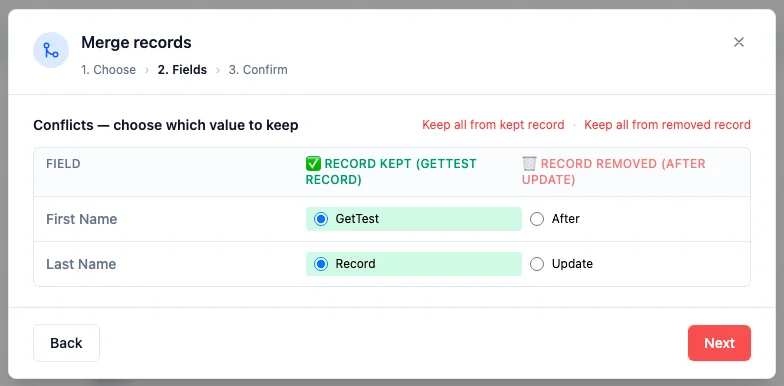
Week of May 4, 2026
- Feature
Build campaign recipient lists directly on the campaign
A new "Filter directly" source type lets you build the recipient query inline when creating a campaign — no need to first create and save a view. Pick any entity that has an email field (Contact, Company, Event Registration today; whatever your custom solutions add later), set filter conditions including one-hop relation traversal (e.g. "Company > Industry equals tech"), and pick which email field(s) to send to when an entity has more than one. Multiple sources stack and deduplicate by email automatically — if the same address appears under a contact and a company, it ships exactly once. The first source listed wins for tracking attribution. The recipient box also got a width revamp so the filter UI breathes instead of cramming into a narrow column.
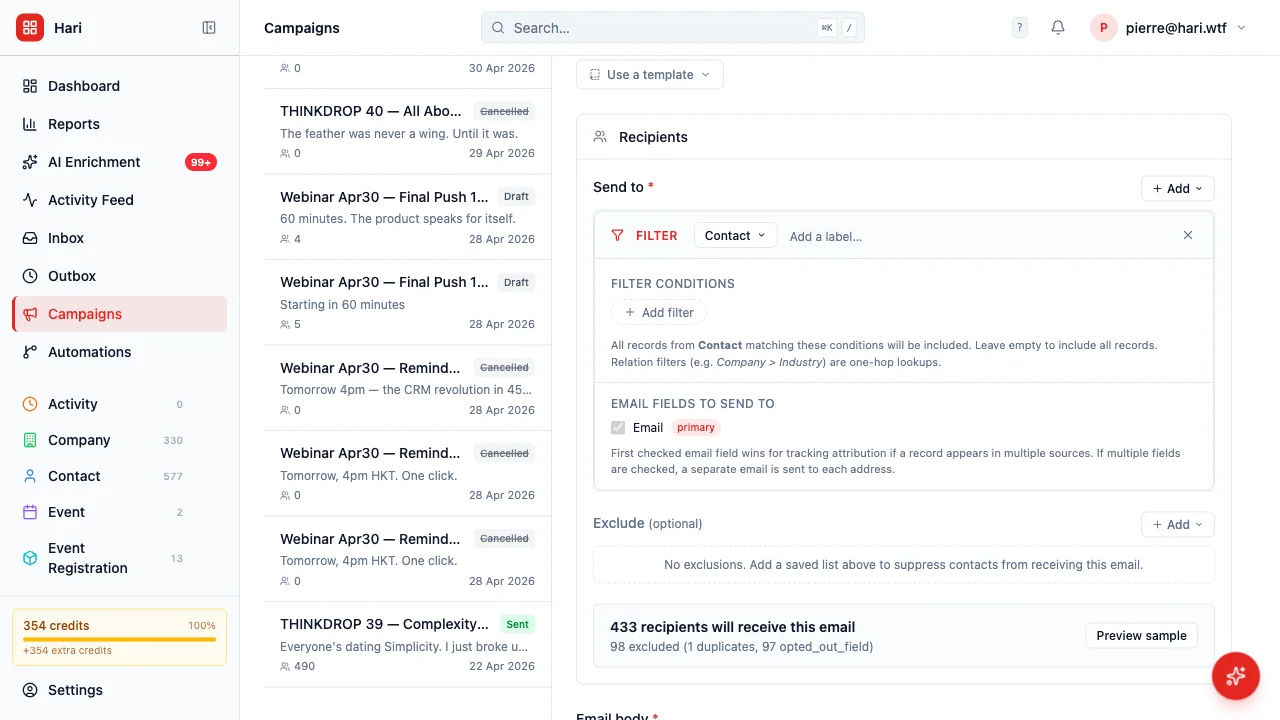
Week of April 27, 2026
- Feature
Abort a campaign that's already sending
Until today, once a campaign moved into the sending status there was no way to stop it from the app — Delete only worked on drafts, Cancel only worked on scheduled. A real customer hit the gap when they noticed a duplicate "Sending..." campaign and had no kill switch. Now every campaign in sending shows a red "Abort campaign" button, both in the row actions and in the report header. Confirming opens a modal with a clear count: how many recipients have not yet received the email (these are cancelled), versus how many already received it (these are preserved as historical record). The campaign moves to the new "Cancelled" status and the cron stops processing it on the next tick.
- Feature
Test-fire any webhook directly from the settings page
Configuring a webhook used to mean saving it in HARi, then triggering a real workflow event to confirm the endpoint actually received the call — slow whenever you tweaked the URL or the payload. Each saved webhook now has a "Test fire" button that sends a sample payload immediately. A result panel appears below the row showing HTTP status, response time, the response body (truncated at 500 characters with a "Show more" link for long payloads), and any connection error in red. The panel persists until you dismiss it — no toast you have to catch before it fades.
- Feature
Leads merged into Contacts with a Lifecycle Stage field
Tracking the same person twice — once as a Lead, then again as a Contact when they sign — was awkward and easy to break. Now there's one record per person on the Contact entity, with a Lifecycle Stage field that moves them through Lead → Qualified → Customer (or Lost). The "Active Leads" view that used to live under /lead now points at Contacts filtered to Lead + Qualified, so the workflow stays familiar. Existing workspaces keep their old Lead records visible until your admin runs the one-shot migration (which copies them into Contact with lifecycle_stage="lead" and soft-archives the old rows). New workspaces ship without the Lead entity at all.
- Feature
Download dashboard charts as PNG
Every chart on your dashboard now has a "Download as PNG" button next to the CSV one. Click it and the chart drops to your downloads as a retina-quality image with the right background colour for whatever theme you're in — drop straight into a slide deck or report without screenshotting and cropping. The CSV button is still there when you need the raw numbers.
- Polish
Reactivated teammates: see what was transferred away last time
When you open a teammate's profile in Settings → Users, HARi now shows a "Records previously transferred away" card if any records were reassigned to other teammates during a prior deactivation — listing the entity, count, new owner, and date. Useful when a returning teammate asks where their old contacts went; you can see at a glance who picked them up and reach out for a manual handover. Pure information — no surprise auto-reassignments.
- Polish
Forms now show errors next to the right field instead of one big message
When a record save fails validation, HARi now highlights exactly which fields have a problem and what to fix — the email is malformed, the amount is below the minimum, the date is in the wrong format. Previously some forms only showed a single "Validation failed: 3 error(s)" toast that left you hunting for the offending field. The same standardized error shape now flows everywhere: contacts, companies, opportunities, tasks, invoices, custom entities — anywhere you create or edit a record.
- Polish
User reactivation no longer surprises record owners
Reactivating a deactivated teammate is one click and now does the conservative thing on purpose: it re-enables login and nothing else. Records previously reassigned to other teammates stay with their current owner — no silent yank-back when someone returns. The Reactivate button on the user detail page spells it out in a tooltip so admins aren't guessing what the click will do, and admins can still reassign records back manually on a case-by-case basis if the returning teammate genuinely needs them.
- Polish
Workspace renames no longer break embed widgets
Until now, renaming your workspace would also rotate the URL slug — which silently broke every embed widget, OAuth callback, and external link you'd already shared with customers. The URL is now locked at signup; the editable label lives separately in Settings → Branding → Workspace identity. Type a new label, hit Save, and the workspace switcher and login page update — your URL stays the same so nothing downstream breaks.
- Polish
Deactivation modal: notify the new owner with one summary message
Tick the new "Notify the new owner" box when you reassign someone's records during deactivation, and the chosen teammate gets a single summary in their notification bell — "Vincent reassigned 47 records from Amy to you." — instead of one ping per moved record. Off by default to keep the notification feed quiet on routine cleanups; flip it on when you want a heads-up to land.
- Feature
Deactivating a teammate: pick who inherits their records
When you deactivate someone in Settings → Users, HARi now opens a dialog showing exactly what they own — contacts, opportunities, tasks, and any team where they're the only active member — and asks where it should go. Pick a teammate to receive everything, or skip with a short note explaining why (for example: "Returning in 3 months — keep records as-is"). The transfer happens in one click and is recorded in the audit log so you can always see what moved. No more silent record orphaning when someone leaves.
- Polish
Embed widget pings you when its routing breaks
When an active embed widget routes new submissions to a user who's been deactivated or deleted (or to a team that no longer exists), the widget creator now gets a notification the moment the platform detects it — instead of having to spot the issue buried in Settings → Data Health. The detection runs on the existing nightly hygiene scan, and the notification only fires the first time each broken widget is found, so re-runs don't spam.
- Polish
Wait timers can stick to business hours
The "Only count business hours" toggle is back on automation Wait nodes — and now actually does what it says. Pick "Wait 5 days" with the toggle on, and the timer skips Saturday and Sunday so a Friday start resolves on the following Friday, not the next Wednesday. Pick "Wait 2 hours" with the toggle on at 5 PM, and the wait carries over to 10 AM the next business day instead of finishing at 7 PM after-hours. Times use the contact owner's timezone, falling back to UTC.
- Feature
New automation actions: subscription lists + AI enrichment
Three actions are now configurable in the automation builder: "Add to list" and "Remove from list" subscribe or unsubscribe a contact from one of your marketing lists, and "AI enrichment" queues a contact for background AI enrichment on the fields you pick (with an optional "apply suggestions automatically" toggle when you trust the result quality). The Add/Remove list actions write through the same opt-in / opt-out audit trail your campaign sends respect, so the consent gate stays honoured. Pair them with the new "Sent a campaign" trigger for end-to-end campaign-driven workflows — for example: someone receives the welcome newsletter → enrich their job title and company → add to the engaged-prospects list.
- Feature
Automation trigger: "Sent a campaign"
New trigger in the automation builder: "Sent a campaign" fires the moment a contact receives a campaign send. Pick a specific campaign or any campaign. Use it to chain follow-up workflows after a newsletter, drip the next message in a sequence, or notify the owner once a recipient has been reached. Replaces the old "Matches a saved filter" trigger for the "contact enters a campaign" pattern, with no polling delay — the automation enrols the contact at the same moment the send is marked successful.
- Polish
Automation triggers — "Matches a saved filter" retired
The "Matches a saved filter" trigger option has been removed from the automation builder. View membership turned out to be a poor signal for automating workflows — it's a derived filter result rather than a real data event, so the engine could never reliably catch indirect cases (records that became visible because something else changed). Use real data triggers instead: "Field changes", "New contact added", "Form received", or "Engagement score reached". Existing automations using the old trigger now show a "Deprecated trigger" pill on the automation list so you can spot and rewrite them.
- Feature
Compose Email suggests related contacts
Composing an email from a record without an email field of its own (like a Company or Account) used to open with an empty "To" — you had to remember which contact was associated and type their address. The dialog now suggests up to 10 related contacts as one-click chips below the recipient field. The suggestion list is built from your schema (any record type that "belongs to" the parent and carries an email field) and respects your read permissions, so you only see contacts you're already allowed to see.
- Fix
Webhook activity log now tells you when it fails to load
When the webhook log on Settings → Webhooks couldn't reach the server (5xx error or network blip), the page silently dropped to "No log entries match the current filters." — making a real failure look like an empty result. There's now a clear red banner explaining the load failed, the underlying error, and a Retry button. Empty results still show the empty-state.
- Fix
Activity feed marks soft-deleted records as "[deleted]"
When a record was archived (soft-deleted), the activity feed kept showing its live name as if nothing had changed — "John Smith updated" instead of indicating the record was gone. Soft-deleted records are now prefixed with "[deleted]" in the activity-feed entries so it's clear at a glance which timeline events relate to records still in your workspace versus ones that have been archived.
- Polish
Billing audit log now reads in plain English
The Wallet ledger and audit tables on Settings → Billing used to show raw enum strings in mono-font — "top_up", "credit_pack_external_billing", "subscription_read_only_triggered" — that nobody but a developer could decode. Every event and action is now shown in plain language ("Top-up", "Credit pack purchase", "Workspace switched to read-only", "AI chat", "Email send", etc.). Hovering over any label still shows the raw value as a tooltip for support and debugging.
- Polish
Settings breadcrumbs now show the leaf page on Currency, Data Privacy, and Data Health
The breadcrumb at the top of the Settings → Currency, Settings → Data Privacy, and Settings → Data Health pages used to stop at "Settings" — not telling you which sub-page you were on. Now the full chain shows ("Settings · Currency"), matching every other settings sub-page.
- Polish
Background Tasks page: plain-language header and live "Updated N seconds ago" indicator
The Settings → Background Tasks page (formerly "Job Queue") got a friendlier header — "Webhooks, bulk imports, AI jobs, and other long-running work — auto-refreshed every 30 seconds." — and a live "Updated 12s ago" / "Just updated" indicator next to the Refresh button. The page already auto-polled every 30 seconds, but you had no way to tell whether the numbers on screen were 1 second old or 29 seconds old. Now you do.
- Polish
Dashboard shows skeletons on first load instead of "No charts yet"
Opening the Dashboard used to flash "No charts yet" and "No records yet" for two to four seconds while data was loading — making the workspace look broken or empty on every navigation. The skeletons now render from the first paint and only resolve to real content (or the genuine empty-state messages) once the data has arrived.
- Feature
Download any chart as CSV from /reports and dashboards
Every chart on the Reports page (and on dashboards) now has a small download icon next to its fullscreen icon. One click saves the chart's underlying numbers as a CSV file with two columns — Label and Value — that opens straight into Excel, Numbers, or Google Sheets. Works for every chart type (pie, doughnut, bar, column, line, funnel) and uses today's date in the filename so you can keep snapshots.
- Fix
Contact pickers, card view, and timeline now show full names
Anywhere HARi rendered a record from an entity that uses a compound display name (like Contacts, where the display is "first name + last name"), the label was rendering empty or showing the raw ID. The relation picker dropdown, card view tiles, timeline list, business-process indicator, and right-click context menu all now resolve compound display fields correctly and fall back to a friendly "(unnamed)" label rather than leaking an internal UUID.
- Polish
Templates page opens to your most-recent template
The Settings → Templates page used to drop you into an empty "New Template" form even when you already had saved templates. Now it auto-opens the template you edited most recently, so returning users land on the row they were probably about to edit. The sidebar list also got proper list semantics for screen readers and a clearer selected-row indicator.
- Feature
Four starter templates on the Templates page
Open Settings → Templates in a fresh workspace and the editor now offers four ready-to-edit starting points: Newsletter, Welcome email, Receipt, and Announcement. Pick one to pre-fill the form with sample copy and merge fields, or click "Start blank" to keep the old behaviour. The cards disappear automatically once you have at least one saved template.
- Feature
Reassign historical embed-form submissions when you change routing
Edit any embed widget, change its owner or team, and tick the new "Also apply this routing to records already submitted via this form" checkbox before saving. The save will reassign every historical submission from that widget to match the new routing — no more leaving old leads stranded with the previous owner. Future submissions are always routed by the current settings, with or without the checkbox.
- Fix
Webhook Activity Log shows real entries instead of "no entries"
The Webhook Activity Log on the Integrations page was silently rendering "No log entries match the current filters" even when deliveries had happened. The underlying API call was failing because two columns the code expected were never created in the database. Both columns are now in place and the log shows your real webhook delivery history again.
- Feature
Trigger automations from public form submissions
You can now build an automation with a "Form submitted" trigger and have it fire every time a visitor submits one of your embed widget forms. Pick a specific form, or "any form" on a chosen entity. Useful for instant assignment, welcome emails, or notifying a team channel the moment a lead arrives.
Week of April 13, 2026
- Feature
Export your entire workspace as a ZIP
Download a full copy of your HARi workspace — all contacts, companies, deals, tasks, and related files — from Settings. Useful for GDPR/PDPO subject-access requests, backups, and moving between plans.

- Feature
Close your workspace yourself
You can now request workspace closure directly from Settings. No email ticket needed. Your data is exported, then deleted on schedule — you stay in control.

- Feature
Automatic cleanup of deleted records
When you permanently delete a record, attached files stored in HARi are now cleaned up at the same time. No more orphaned attachments taking up space.
- Polish
Dark-mode polish across the app
Record pages, settings screens, and the relation editor now look and feel native in dark mode. Colours, borders, and badges were all tuned for comfortable reading.
- Polish
Smoother loading on record pages and dashboards
Opening a contact or the main dashboard now shows a light skeleton of the page while data arrives, instead of a blank screen. Feels noticeably faster.
- Polish
Friendlier tables and forms
Row hover is more obvious, the first field in forms is auto-focused so you can start typing immediately, and list views feel cleaner on mobile (down to 375px).
- Feature
Phone fields get a country-code picker
Adding a phone number now offers a country-code dropdown so formatting is consistent and international numbers are stored correctly.
- Feature
AI Assistant page with real examples
A new Features → AI Assistant page shows exactly what the assistant can do for you: answer questions about your data, draft emails, manage records, and build workflows.
- Polish
Sidebar active-page indicator
A small accent border now highlights the page you're on in the sidebar, so you always know where you are. Notification tooltips were also tightened up.
- Polish
Friendlier tables and billing errors
Table rows alternate colours for easier scanning, form fields auto-focus where it makes sense, and billing error messages are now in plain language.


Want to try the latest updates?
Start free — no credit card
Every change on this page is live for every HARi workspace. No feature-gating, no upgrade nag.