
Sales Forecast
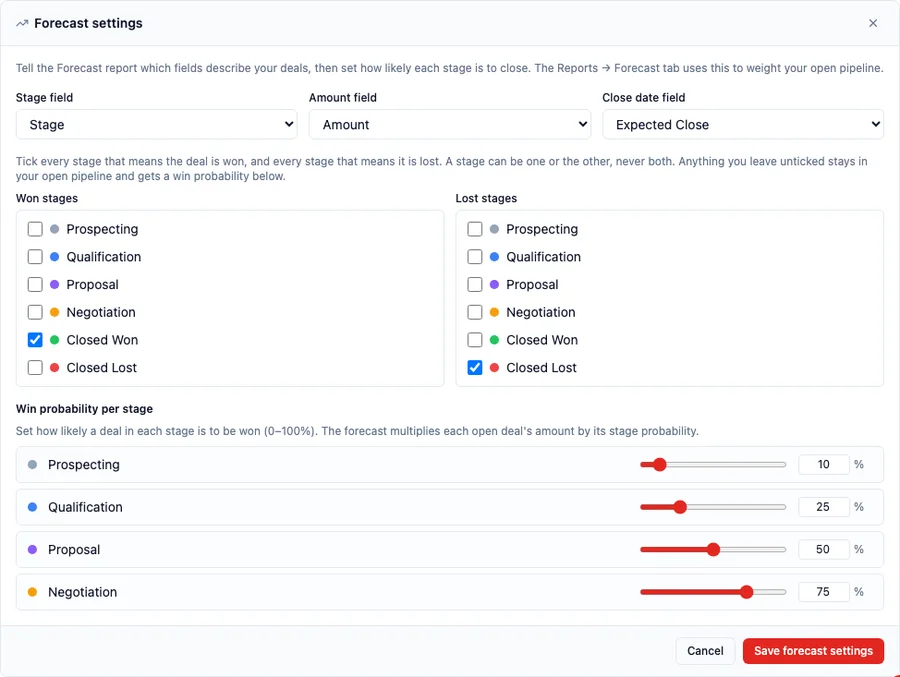
Reports → Forecast reads your open deals and tells you what the pipeline is worth once every deal is weighted by how likely its stage is to close. It needs four answers from you: which field holds the deal stage, which holds the amount, which holds the expected close date, and which stages mean the deal is won. More than one stage can mean won, and more than one can mean lost.
Getting that last answer right is what separates a forecast from a guess. XANT Labs analysed 270,912 closed-won opportunities worth more than $18.1 billion across 18 companies and reported that “only 28.1% of the opportunities we analyzed closed within 5% of the 90-day forecasted amount” (The Gap Between Forecasting and Reality, XANT Labs). A forecast pointed at a stage your workspace does not use is not merely inaccurate — it reports every deal as still open and no deal as ever won.
Which stages mean won?
Section titled “Which stages mean won?”Won and lost are each a checkbox list over every stage in your pipeline, so tick as many as apply. A joinery firm whose deals end at either Deposit received or Contract signed ticks both as won. A coworking operator whose deals end at Moved in or Desk assigned ticks both. Nothing forces a pipeline into a single closing stage.
Three rules govern the two lists:
- At least one stage must be ticked as won. The forecast has to know what a win looks like; without it there is nothing to count.
- A stage is won or lost, never both. Ticking a stage on one side unticks it on the other.
- Everything you leave unticked stays in your open pipeline and gets a win probability, further down the same panel.
Set up the forecast
Section titled “Set up the forecast”The forecast is configured per record type, in the same place you manage that record type’s fields and views.

- Open Settings → Schema and choose the record type your deals live on (Opportunity, in a standard workspace).
- Open the Views tab and scroll to the Forecast section, then click Configure forecast.
- Pick the Stage field, the Amount field and the Close date field. Only fields of the right kind are offered: a stage must be a choice field, an amount must be a money field, a close date must be a date field.
- Tick every stage that means won, and every stage that means lost.
- Set a win probability for each stage that is left, then click Save forecast settings.
Win probability per stage
Section titled “Win probability per stage”Each open deal contributes its amount multiplied by its stage’s probability, so a HK$100,000 deal sitting in a stage you scored at 50% adds HK$50,000 to the weighted pipeline. Won and lost stages get no slider, because they are counted rather than weighted — a won deal is worth what it is worth, not a share of it.
Probabilities are set from 0 to 100%. Start with what your own history suggests rather than a round number per stage: the point of the figure is that a deal in Negotiation is genuinely more likely to close than one in Prospecting.
What happens if you rename a stage later
Section titled “What happens if you rename a stage later”If you edit your stage list and remove a stage the forecast counts as won, HARi saves the change and tells you what it has just stranded — naming the record type, the field and the stage you removed, and pointing you at the forecast settings to pick from the stages you use now. The rename is never blocked and your forecast settings are never rewritten on your behalf: which of your new stages means “won” is a business decision, not one the platform should guess.
Until you go back and repick, a forecast left pointing at a stage that no longer exists will show no completed sales. The same warning appears for a board whose column has lost its stage.
Does a new workspace need any of this?
Section titled “Does a new workspace need any of this?”No. A new workspace is created with its Opportunities forecast already set up, so Reports → Forecast works from the first deal you enter. Existing workspaces that were missing that setup have had it filled in automatically, wherever their stages still used HARi’s own vocabulary. Two kinds of workspace were deliberately left alone: one that had already configured its forecast by hand, so nobody’s own settings were overwritten, and one that had renamed its stages to its own words, which is set up individually instead of being handed a setting written in stages it does not use. A confidently wrong forecast is worse than an honest empty one.
Turning the forecast off for a record type now genuinely turns it off, rather than leaving it switched on with borrowed stage names.
If the forecast panel is empty
Section titled “If the forecast panel is empty”Reports → Forecast shows “No forecast data yet” when no record type has forecast settings, and it explains itself when the settings it has cannot be used — a field that has since been deleted, or an amount field that does not hold numbers. Work back through the setup steps above: the panel names the record type and the field it could not use.
See also
Section titled “See also”- Dashboards — where the forecast sits alongside your charts and tiles
- Dashboard Metric Tiles — put a single forecast-adjacent number on the board
- Build a sales pipeline — set up the stages this page reads
- What is a sales pipeline? — the concept behind the stages