
Who can see this record?
Click Who can see this? on any record. HARi tells you which team holds it, how many people can open it, and — if you can edit the record — who they are. That answer is computed from team membership and roles, not guessed from the Owner field.
IBM’s Cost of a Data Breach Report 2024 put the global average cost of a breach at USD 4.88 million, a 10% jump and the largest since the pandemic (IBM Newsroom, 30 July 2024). Microsoft’s Zero Trust guidance puts the control in three words: “Use least privilege access.” (Microsoft, Zero Trust). The cheapest CRM version of that sentence is the popover: only the people whose role reaches a record can find it.
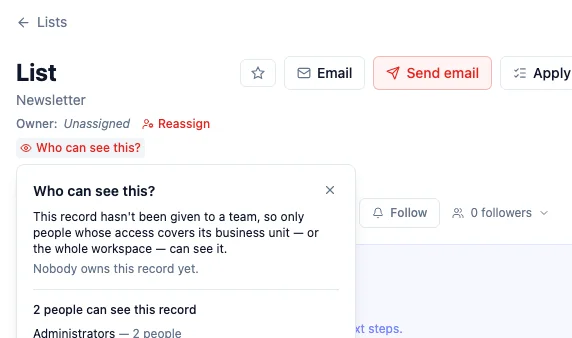
How do I see who can see a record?
Section titled “How do I see who can see a record?”- Open the record (a list, a company, a contact — any record).
- Under the title, click Who can see this?
- Read the first sentence — that is what the record itself says (which team holds it, or that it has not been given to a team yet).
- Read the count underneath. Viewers see classes and counts. People who can edit the record also see names.
If HARi cannot check, the panel says so rather than inventing a list. Check again re-runs the same question.
Out-of-scope records do not appear in lists, search, exports, or reports. Asking for one by URL looks like it does not exist. That is deliberate: a 404 hides the fact that the row is there.
What decides the answer?
Section titled “What decides the answer?”Three facts, in this order:
- The team that holds the record. New records take your default working team unless you pick another. Change team moves it (you need the Reassign right).
- The roles on the teams you belong to. A Viewer role on CRM Viewers lets Marie see CRM records in that business unit. It does not let her see invoices unless a billing role says so.
- Administrators. They can see and change every record, whatever their teams say. The popover lists them as Administrators.
Owner (the person named under the title) is who follows up. Changing Owner with Reassign or Claim does not add or remove viewers. See record ownership.
If the record has no team yet, the popover says so. People whose access covers the business unit — or the whole workspace — can still see it. Give it a team with Change team if you want the answer to be a named group.
How do I check one person, not one record?
Section titled “How do I check one person, not one record?”Settings → Access → Access Inspector. Pick a person to see what they can reach, or switch to By record to ask the same question the popover asks, with a line about what to change if the answer is wrong.
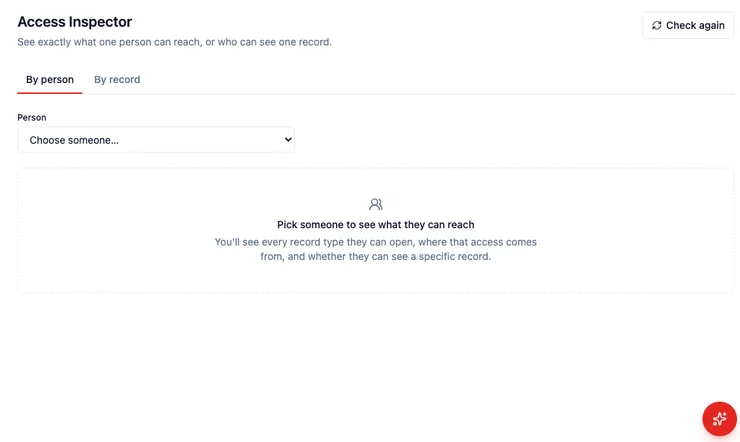
You need permission to manage security to open the Inspector. The popover on a record you can already edit is the everyday path.
What should I do when the list is too wide?
Section titled “What should I do when the list is too wide?”- Move the record with Change team to a smaller team.
- Use Make private to keep it on your personal team — private records explains who can still see it.
- Narrow the role on Settings → Access → Roles (see teams and roles).
- Split work across business units if one unit is seeing another unit’s pipeline.