
How do recipients unsubscribe from a HARi campaign?
Recipients unsubscribe from a HARi campaign by opening the unsubscribe link in the email and clicking Unsubscribe. The page shows their address and does not ask them to sign in. Nothing changes until they click. Receipts, password resets, and other account messages can still arrive.
How do recipients unsubscribe from a HARi campaign?
Section titled “How do recipients unsubscribe from a HARi campaign?”They open the unsubscribe link and land on a confirm page titled Unsubscribe from marketing emails. The page names the address that will be removed, explains that account messages can still arrive, and offers one button: Unsubscribe. A link under it, Manage my preferences, opens the preference page for that same address. There is no password and no account to create.
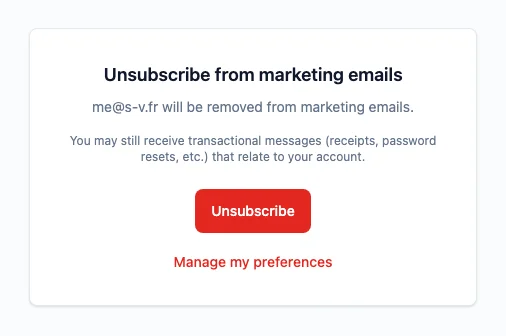
Opening the link, or a mail program checking it, does not unsubscribe anyone. The click does. If the mail app itself offers Unsubscribe, that works too, without a visit to the page.
That shape is what the law and the mailbox providers ask for. The U.S. Federal Trade Commission says you must “honor a recipient’s opt-out request within 10 business days” and that you cannot “make the recipient take any step other than sending a reply email or visiting a single page on an Internet website as a condition for honoring an opt-out request” (CAN-SPAM Act: A Compliance Guide for Business). The same guide says the opt-out has to keep working for at least 30 days after you send. A HARi link keeps working for 90 days. After that, the page says the link is invalid or has expired.
Google requires senders of more than 5,000 messages a day to Gmail accounts to follow its bulk-sender rules. Those rules state: “Marketing messages and subscribed messages must support one-click unsubscribe, and include a clearly visible unsubscribe link in the message body” (Google, Email sender guidelines). The visible link is the confirm page. The one-click path is what a mail app uses when the person never opens HARi.
How do recipients choose which emails they still want?
Section titled “How do recipients choose which emails they still want?”Manage my preferences, or the manage-preferences link in the email, opens Email preferences. It shows the address, then each list your workspace sends, marked Subscribed or Not subscribed. Unsubscribe on a list stops that list only. Subscribe adds them to a list they are not on. Unsubscribe from all marketing emails stops every marketing campaign. The page says they will still get receipts and account messages.
Choosing Subscribe on one list after they have unsubscribed from all marketing emails does not turn marketing back on. The page then says they are currently unsubscribed from all marketing emails.
The public page does not ask how often they want mail. It only records which lists they are on.
How do I add the links to a campaign?
Section titled “How do I add the links to a campaign?”In the campaign editor, open Merge field and look under System fields.
- Unsubscribe link inserts
{{unsubscribe_url}}. Each recipient gets their own confirm page. - Manage preferences link inserts
{{preferences_url}}. Each recipient gets their own preference page. - View in browser inserts
{{view_in_browser_url}}. It opens that recipient’s own copy of the email. The page is personal, so forwarding the link shares that copy. It stays available for 90 days, the same lifetime as the unsubscribe link. A test send opens the campaign’s public page instead, and that page has no personal details.
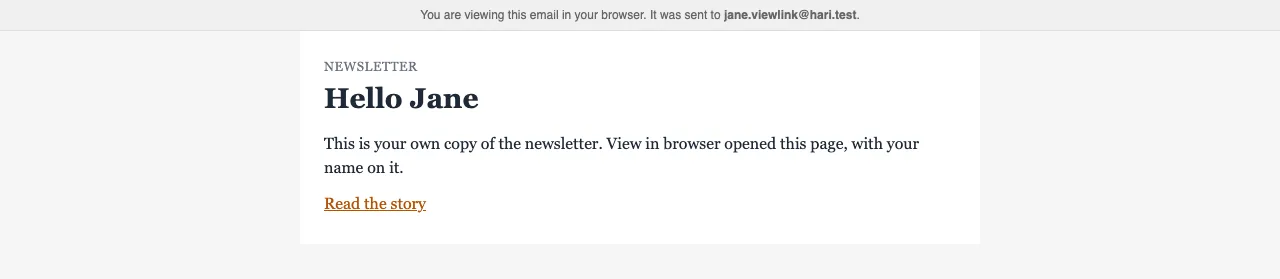
You do not build the address yourself, and you do not put a password on it. A test send of the unsubscribe or preferences link fills that link for the address you typed. When that address belongs to a contact, the test uses that contact. See Email sending for who the campaign is sent from.
Where do I see who unsubscribed?
Section titled “Where do I see who unsubscribed?”Open the campaign and go to Performance. Under the Delivered, Opened, Clicked, and Bounced cards, Unsubscribed is the count. The same people appear on Recipients when you filter to Unsubscribed.
The count is the newest campaign send to that address in the last 90 days, and only if that send has not already been counted. A second click does not add another. If they have not been sent a campaign in those 90 days, they are still unsubscribed, and no campaign’s number moves. Clicks on other links are a separate report: Campaign click tracking.
Someone who has unsubscribed is left out of later marketing campaigns. On the campaign’s Exclusions tab the reason reads Unsubscribed: only they can subscribe again, using a link in an email you sent them earlier.
What about HARi’s own onboarding emails?
Section titled “What about HARi’s own onboarding emails?”Getting-started emails from HARi, as opposed to a campaign you send, use their own link. It opens a page titled Unsubscribe from onboarding emails. Nothing stops until they click Unsubscribe. They still receive important account notifications. That page is not the campaign preference page.
Related
Section titled “Related”- Email sending covers who a campaign is sent from
- Campaign click tracking covers who clicked which link
- Email sending allowance covers what counts against the plan
- Why are my emails not sending? covers a failed send