
Campaign click tracking — who clicked which link
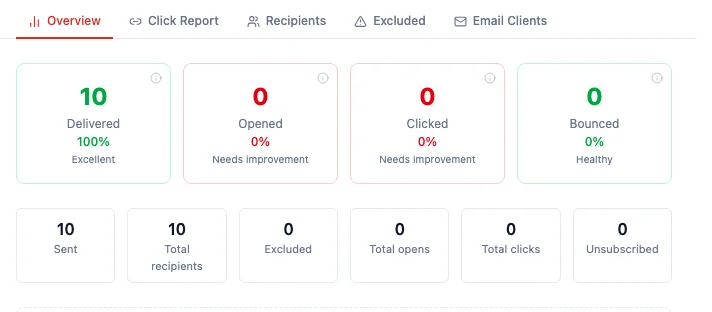
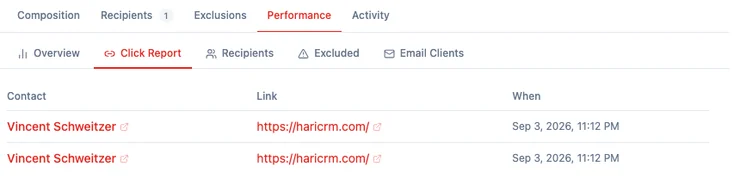
Every new campaign counts who clicked which link, unless you turn tracking off before you send. Open the campaign, go to Performance, and the Clicked card shows a rate — 0% means tracking is on and waiting, not that it is broken. The Click Report lists the person, the link, and the time. Two limits sit behind that number: a plain-text inbox is not counted, and a change to the workspace address breaks tracking links already sitting in inboxes.
Clicks are the engagement signal you can still trust. Litmus’s July 2026 Email Client Market Share, calculated from over 1 billion opens, puts Apple at 62.26% of tracked opens (Litmus, The State of Email Client Market Share). Apple’s Mail Privacy Protection “prevents senders from seeing if you’ve opened the email they sent you” (Apple, Use Mail Privacy Protection), and Litmus notes that this now affects roughly 55–60% of all email opens — which is why they recommend click-through rate over open rate.
Where do I see who clicked?
Section titled “Where do I see who clicked?”Open Campaigns, open a sent campaign, and go to Performance.
- Overview — four cards: Delivered, Opened, Clicked, Bounced. When tracking is on, Clicked is a number and a rate. A campaign nobody has clicked yet reads 0% and Needs improvement. That is the waiting state, not an error.
- Click Report — a table of Contact, Link, and When. The contact name opens their record. The link is the page you actually sent them to, not a tracking address. If nobody has clicked yet, the tab says “No link clicks tracked yet.”
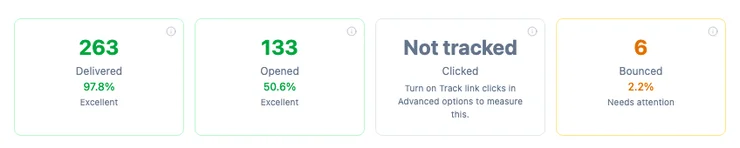
Campaigns you already sent with tracking off stay as they were. Their Clicked card reads Not tracked, with a hint to turn tracking on in Advanced options before the next send.
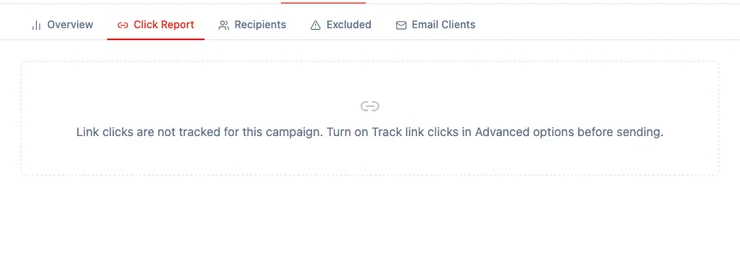
The Click Report on those campaigns says link clicks were not tracked for that send.
How do I turn click tracking off?
Section titled “How do I turn click tracking off?”Tracking is on for every new campaign. Turn it off only if you do not want clicks counted on that send.
- Open the campaign while it is still a draft (or scheduled).
- Expand Advanced options.
- Next to Google Analytics tracking, find Track link clicks.
- Switch it off. The label reads “Count how many people click the links in this email. Turn this on before you send — it cannot be added afterwards.”

Once the campaign has gone out, the switch is locked. You cannot add tracking to mail that is already in inboxes, because the links in those messages were never rewritten.
Web links in the formatted email are counted. The unsubscribe link and the manage-preferences link are not. A link that is not a web address — a mailto: or a phone number — is not counted either.
Why are some clicks not counted?
Section titled “Why are some clicks not counted?”A plain-text-only inbox is not counted. HARi records a click when someone follows a web link in the formatted version of the email. A recipient whose inbox shows only plain text — no pictures, no coloured buttons — follows the original address, so that click never passes through HARi. This is a real gap. Do not treat a 0% click rate as proof that nobody clicked if you know part of the list reads mail as text.
Opens are a separate signal (a tiny image in the message). They are useful, and they are also the number Apple’s Mail Privacy Protection distorts. Clicks still require a person to choose a link.
What happens if the workspace address changes?
Section titled “What happens if the workspace address changes?”Changing the name you see in the app — Settings → Branding → Workspace identity — does not touch tracking. That label is not the address the links use.
Changing the workspace’s public address — the your-company.haricrm.com part — does. Tracking links in mail already delivered still point at the old address. Those clicks are not counted, and the person may not reach your page. The address is locked on purpose: it is also the address of every embed you have shared and every bookmark a teammate has saved. If you ever need it changed, do it before you send, not after. See How to personalize your workspace.
Related
Section titled “Related”- What is email tracking? — opens, clicks, and why they sit on the contact’s timeline
- Email sending — how the campaign actually leaves HARi
- Email setup — connecting a sender and scheduling a campaign
- Email sending allowance — what a bulk send counts against your plan