
Every connector in one place
An administrator opens Settings → Integrations. Connectors lists every app HARi can sync with. A card names what that app needs and, when something is missing, asks before installing it. Cancel changes nothing. Install and continue installs what is missing, then opens the app. Cliniko and HikeUp are set up by the HARi team.
Where are the connectors?
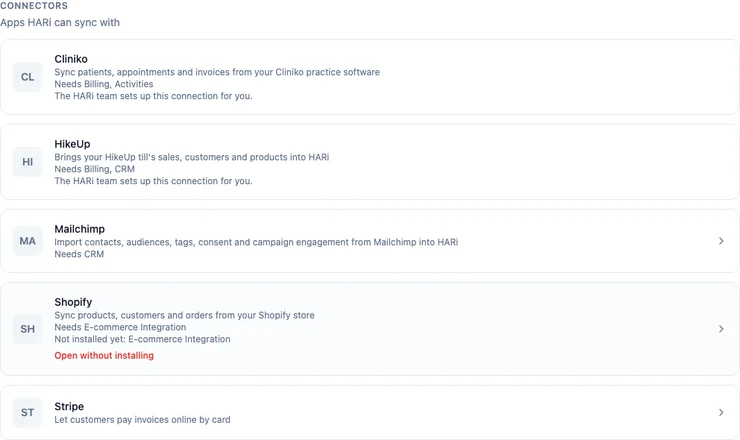
Section titled “Where are the connectors?”Settings → Integrations, under Connectors. The line under the heading is Apps HARi can sync with. The cards are Cliniko, HikeUp, Mailchimp, Shopify and Stripe. Mailchimp, Shopify and Stripe have their own pages, so those cards show a chevron. Cliniko and HikeUp do not.
Connected apps, under the list, is for a connection that has no card page of its own. A connector with a page is listed once, on its card. With nothing connected, the page says No apps connected yet and Pick an app under Connectors above, or set up a webhook. See Creating an outgoing webhook.
What does Needs mean?
Section titled “What does Needs mean?”Needs names the solutions the connector uses, even when they are already installed. Cliniko needs Billing and Activities. HikeUp needs Billing and CRM. Mailchimp needs CRM. Shopify needs E-commerce Integration. Stripe needs nothing else, so it has no Needs line.
What does Not installed yet mean?
Section titled “What does Not installed yet mean?”Not installed yet names what is still missing, including anything that missing piece itself needs. When CRM and Billing are already installed, Shopify says Not installed yet: E-commerce Integration. If Billing were missing too, the line would name Billing as well. A card with nothing left to install does not show the line. Needs is what the connector is built for. Not installed yet is what this workspace still does not have.
What do Install and continue and Open without installing do?
Section titled “What do Install and continue and Open without installing do?”Choosing a card that has its own page, when something is still missing, asks first. The title names the app and what is missing, as in Connecting Shopify first installs E-commerce Integration. Each missing solution is named with what it adds. For Shopify that is E-commerce Integration: Adds purchase totals and a shopping stage to each contact. The Shopify connector needs it.
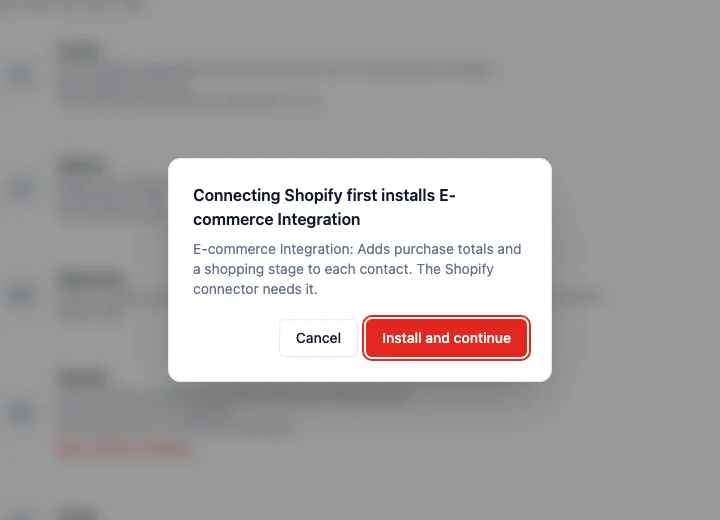
Cancel closes the question. Nothing is installed, and you stay on Integrations.
Install and continue installs what is still missing, then opens the connector. For Shopify that is E-commerce Integration. Billing is installed with it, because Billing holds products, invoices and invoice lines. If the install has a note, HARi says Installed. A few things need your attention: and Continue to Shopify (the button names the app) opens the page. Cancel on that note stays on Integrations. The install has already been done. If an install fails, HARi names the solution and says to try again, or to install it from Settings → Solutions.
Open without installing appears only when the card has its own page and something is still missing. It opens that page and installs nothing. If a Shopify shop is already connected and E-commerce Integration is missing, the Shopify page still offers it: an amber banner, Install the E-commerce Integration to sync products and orders, and the button Install E-commerce Integration. HARi then says Installed. Run a full resync to pull products and orders. See Before you connect Shopify.
A card with nothing missing opens its page and does not ask. That is Stripe, and Mailchimp when CRM is already installed. See Stripe payments and How do I connect Mailchimp?.
Shopify asks the same kind of question on its own install screen. Its help says: “Before you install an app, Shopify displays an Install app screen that displays the data and areas of your store the app needs access to. Review this information carefully before you proceed.” A custom-app install link from a developer expires after seven days (Shopify Help Center, Installing and setting up apps).
Which connectors does the HARi team set up?
Section titled “Which connectors does the HARi team set up?”Cliniko and HikeUp. The card says The HARi team sets up this connection for you. Choosing the card does not open a page and does not install anything. Needs still says what the connection uses. To have one connected, contact support. Solutions themselves are installed from Settings → Solutions. See Installing a solution.